






TL;DR: Vibe coding is natural-language app creation — describe what you want and AI builds it. 92% of developers now use AI coding tools daily, and the $4.7B market is growing 38% YoY. Taskade Genesis takes it further with Workspace DNA: prompt → deployed app with agents, automations, and persistent memory. Try it free →
Remember when building apps felt like cooking every meal by yourself? You shopped, chopped, and cleaned, and it still took hours. Now it feels like working with a personal chef. You describe what you want, who it is for, and any constraints, and the system prepares the finished dish while you focus on the outcome.
In this article, we define vibe coding in plain terms and show you how to apply it to real projects. We use Taskade Genesis as the reference platform and we walk through a practical workflow that non-coders and cross-functional teams can follow today.
Watch: One prompt = one living app. Taskade Genesis turns natural language into deployed software with AI agents, automations, and workspace memory. Source: Taskade YouTube

Definition of Vibe Coding
Vibe coding is a natural language approach to building functional apps where you simply describe what you want in plain English. Instead of manually configuring components, you state your goals, provide examples, and specify any rules or constraints, and then the system automatically generates the interface, user interactions, and data connections to match your requirements.
This approach is designed for product managers, operations teams, analysts, creators, and anyone who needs working tools without traditional engineering resources. Common applications include internal workflow tools, lightweight CRMs, project planners, intake portals, collaborative dashboards, and rapid website prototyping.
Vibe coding prioritizes outcomes over technical implementation. You focus on what you want to accomplish rather than how to wire individual components together.
While it's not intended to replace sophisticated frontend frameworks for highly specialized applications, it excels at rapidly turning ideas into functional tools without requiring drag-and-drop assembly or manual component configuration.
The Latent Demand That Proved the Concept
The strongest evidence for vibe coding didn't come from product roadmaps — it came from watching people misuse developer tools.
Boris Cherny, Creator and Head of Claude Code at Anthropic, described this phenomenon on Lenny's Podcast (February 2026): users were repurposing a terminal-based coding agent for tasks that had nothing to do with code. One person used it to grow tomato plants. Another analyzed their genome. Someone recovered wedding photos from a corrupted hard drive. Another used it to analyze an MRI.
"I think today coding is practically solved for me, and I think it'll be the case for everyone regardless of domain."
Boris Cherny, Creator & Head of Claude Code at Anthropic
Cherny calls this latent demand — when people "abuse" a product to do something it wasn't designed for, that's the strongest possible signal to build a better product for that use case. The observation that non-developers were jumping through hoops to use a terminal tool led directly to Anthropic building Claude Cowork — a desktop app for everyday tasks — in just 10 days using Claude Code itself.
This is the same pattern that makes vibe coding inevitable. When millions of people are describing what they want in plain English and AI is building it, the question isn't whether intent-driven development will replace traditional coding for most use cases. It's how fast.
Vibe Coding by the Numbers (2026)
The vibe coding revolution is measurable. Here are the key statistics defining this market in 2026:
| Metric | Value | Source |
|---|---|---|
| Developers using AI coding tools daily | 92% (US) | Hashnode State of Vibe Coding 2026 |
| All new code that is AI-generated | 46% | Hashnode 2026 |
| Vibe coding market size | $4.7B (38% CAGR → $12.3B by 2027) | Second Talent |
| Vibe coders who are non-developers | 63% | Second Talent |
| YC W25 startups with 91%+ AI codebases | 21% | TechCrunch |
| Lovable time to $100M ARR | 8 months | TechCrunch |
| Bolt.new time to $40M ARR | 4.5 months | TechCrunch |
| Google code that is AI-assisted | 25% | Hashnode |
| Collins Dictionary Word of the Year 2025 | "Vibe coding" | Collins Dictionary |
| Developer trust in AI code (2023 → 2026) | 77% → 60% | Hashnode |
These numbers tell two stories simultaneously: adoption has won (92% daily usage), but trust is eroding (77% → 60%). The market is moving from "should we use AI to code?" to "how do we use it responsibly?" — which is exactly where workspace-native platforms like Taskade Genesis come in.
Vibe Coding vs Traditional Development: The Fundamental Shift
Traditional development is implementation-first. You tell the computer how to build something, writing every function, debugging every error, and managing every deployment step. Vibe coding is intent-first. You describe what you want to achieve, and AI handles the implementation details.
Traditional Development Workflow
Javascript
// You write this:
function createProject(name, type, team) {
  const project = new Project({
    name: name,
    type: type,
    created: Date.now()
  });

  project.addTasks(getTaskTemplate(type));
  project.assignTeam(team);
  project.save();
  sendNotification(team, 'New project created');
  return project;
}
Time investment: 2-6 hours (coding + testing + debugging + deployment)
What you control: Every line, every edge case, every error message
Result: You own the code, but you spent hours on implementation
Vibe Coding Workflow
Prompt: "Create a project management app for product launches with:
- Project dashboard with Kanban board
- Auto-generated task templates based on project type
- Team assignment with notifications
- Timeline view with milestones"
Time investment: 5-15 minutes (prompting + refinement + review)
What you control: The outcome, behavior, and business logic
Result: Working app with UI, data, and automations—no line-by-line coding
What You Gain and Lose
| Aspect | Traditional Development | Vibe Coding (Genesis) |
|---|---|---|
| Speed to MVP | Days to weeks | Minutes to hours |
| Code Control | ✅ Full control, every line | ⚠️ AI-generated (but editable) |
| Learning Curve | Steep (syntax, frameworks, tools) | Gentle (describe intent clearly) |
| Best For | Complex architecture, custom algorithms | MVPs, workflows, business tools |
| Debugging | Manual line-by-line | AI-assisted pattern detection |
| Maintenance | You update every change | Prompt for updates, AI implements |
| Team Requirement | Engineers | Anyone who can articulate needs |
The Hybrid Approach (Recommended for Technical Teams)
Most productive development teams use both:
- Vibe code your MVP in Taskade Genesis (2-4 hours) → Validate concept with stakeholders
- Export requirements as detailed specs with working prototype
- Refine in traditional IDE for performance optimization, custom features (4-8 hours)
- Deploy with confidence knowing the business logic is validated
Total time: 6-12 hours instead of 40-80 hours for traditional full-stack development
Quality: Same or better (stakeholders validated the workflow before heavy engineering investment)
When to Use Each Approach
Use vibe coding when:
- ✅ Building CRUD apps, dashboards, admin panels, workflow tools
- ✅ Prototyping new features quickly for user feedback
- ✅ Automating internal processes (HR, operations, sales)
- ✅ You're non-technical but have clear vision of what you need
- ✅ Time-to-market is critical (launch in days, not months)
Use traditional development when:
- ✅ Optimizing for performance (sub-100ms response times, real-time systems)
- ✅ Building developer tools, compilers, databases, infrastructure
- ✅ Pixel-perfect custom UI with complex animations
- ✅ Working with legacy code that requires careful migration
- ✅ Regulatory compliance requiring detailed code audits
Reality check: According to Y Combinator's 2025 report, 25% of startups built 95% of their codebases using AI-generated code. Most business software is CRUD operations and workflow automation — exactly what vibe coding handles 10x faster than traditional development.
Anthropic CEO Dario Amodei framed this productivity shift through Amdahl's Law in his interview with Nikhil Kamath (2026): "If you speed up some components, the components that haven't been sped up become the limiting factor." As writing code becomes trivially easy through vibe coding, the human advantages — understanding user needs, designing workflows, choosing what to build — become the real differentiators. Even doing just 5% of the task yourself, Amodei noted, "that 5% gets super-amplified — you become 20x more productive."
The future isn't "vibe coding vs traditional development." It's "vibe coding for rapid iteration + traditional development for optimization and scale."
→ Try vibe coding now | Read: What is Workspace DNA?
The Two Types of Vibe Coding: Code Generators vs Living Systems
Not all vibe coding tools are created equal. There's a fundamental difference between platforms that generate code and those that create living systems.
The progression from traditional coding to agentic engineering. Each step adds a layer of AI capability. Vibe coding occupies the middle — powerful for most use cases, but workspace-native platforms like Taskade Genesis push into the agentic engineering tier with persistent memory, custom tools, and multi-agent collaboration.
Code Generators (Bolt.new, Lovable, V0, Cursor)
What they give you: React/Next.js code files that you need to deploy yourself
What you still need to do:
- Set up database (Supabase, Firebase)
- Deploy to hosting (Vercel, Netlify, env vars)
- Integrate AI (OpenAI API, prompt engineering)
- Add automation (Zapier, Make, webhooks)
- Configure everything manually
Time to production: 10-20 hours after code generation
Cost: $100-1,000+ in tokens for complex apps
Result: Static code you manage
Living System Orchestrators (Taskade Genesis Apps)
What you get: Deployed intelligent system with four connected layers
Taskade Workspace DNA Architecture:
- Memory (Projects): Auto-generated database with custom fields, 8 views
- Intelligence (AI Agents): Workspace-aware agents that read YOUR data
- Execution (Automations): 104 automation actions, 100+ integrations, autonomous workflows
- Interface (Custom UI): Professional React/Vue UI orchestrating all layers
Time to production: 2-15 minutes, fully deployed
Cost: From $6/month (Starter) — unlimited apps on all paid plans
Result: Living system that thinks, learns, and acts
Example: Building a CRM with Vibe Coding
| What You Get | Code Generators | Taskade Genesis (Workspace DNA) |
|---|---|---|
| UI | Contact list component ✅ | Contact list + 8 views ✅ |
| Data | You add Supabase (4-8 hours) | Projects auto-created (instant) |
| AI Intelligence | You integrate OpenAI (6-12 hours) | AI Sales Coach reads pipeline (instant) |
| Automation | You setup Zapier (3-6 hours) | Workflows built-in (instant) |
| Deployment | You configure Vercel (2-4 hours) | One-click publish (instant) |
| Total Time | 15-30 hours | 90 seconds |
| Total Cost | $100-1,000+ tokens + $40-700/mo | From $6/mo (Starter) |
The Difference: Code generators give you a replica of a CRM. Taskade Genesis gives you a living CRM with a brain (AI coach) and reflexes (automation).
Watch: See the difference — one prompt generates a fully deployed app with AI agents and automations in under 2 minutes. Source: Taskade YouTube
💡 True vibe coding isn't just generating code—it's creating living systems that are intelligent, connected, and autonomous from day one.
How Workspace DNA Powers Vibe Coding in Taskade Genesis
What makes Taskade Genesis fundamentally different from code-generating vibe coding tools is Workspace DNA—the four-layer architecture that transforms static apps into living systems.
The Three Pillars of Living Software
When you vibe code in Taskade Genesis, you're not just creating an interface. You're creating a system with memory, intelligence, and autonomous execution.
Watch: How Workspace DNA connects Memory, Intelligence, and Execution in Taskade Genesis. Source: Taskade YouTube
Projects remember. Agents think. Automations execute. — This is Workspace DNA, the self-reinforcing loop that makes every Taskade Genesis app a living system.
1. Memory (Projects): Your System Knows Everything
Traditional vibe coding tools:
Generate UI components with external database setup required. You manually configure Supabase, Firebase, or PostgreSQL, then wire data connections yourself.
Taskade Genesis with Workspace DNA:
Auto-generates Projects as your built-in database. Every Genesis app has instant access to your entire workspace memory.
What this means in practice:
| Feature | Code Generators | Taskade Genesis (Memory Layer) |
|---|---|---|
| Data Storage | External DB (4-8 hour setup) | Projects auto-created (instant) |
| Context Retention | Session-based, lost on refresh | Persistent across all apps & agents |
| Search | Manual SQL queries | Natural language: "Find all Q4 client proposals" |
| Multi-App Data | Separate databases per app | One workspace, all apps share memory |
Real example: Build a sales CRM with vibe coding in Genesis. Your AI Sales Coach agent can instantly answer:
"Which clients mentioned pricing concerns in our last 10 conversations?"
The agent searches your entire workspace memory (emails, meeting notes, CRM data) and returns results in seconds—because memory is built-in, not bolted-on.
2. Intelligence (AI Agents): Your System Thinks and Acts
Traditional vibe coding tools:
Give you a UI with chatbot features. You copy-paste OpenAI API keys, write custom prompts, handle rate limits, and debug AI responses yourself.
Taskade Genesis with Workspace DNA:
AI Agents are workspace-native. They understand your projects, read your data, execute tasks, and improve through feedback.
The difference:
Code Generator Approach:
User: "Create a proposal for Acme Corp"
AI Chatbot: [Generates generic proposal text]
User: [Manually copies] → [Pastes into doc] → [Edits for 30 minutes]

Taskade Genesis (Intelligence Layer):
User: "Create a proposal for Acme Corp"
AI Agent:
  → Searches workspace for "Acme Corp" context
  → Finds past conversations, meeting notes, pricing discussions
  → Generates personalized proposal using real data
  → Creates project in CRM
  → Adds follow-up tasks
  → Sends draft to team Slack channel
  → ✅ Done in 45 seconds
Agent types in Taskade:
- Project Agents: Manage specific workflows (Sales Coach, Support Assistant)
- Global Agents: Work across your entire organization
- Automation Agents: Trigger on events, run autonomously
3. Execution (Automations): Your System Moves Itself Forward
Traditional vibe coding tools:
Generate static apps. You manually set up Zapier, Make.com, or write webhooks to trigger actions based on events.
Taskade Genesis with Workspace DNA:
Automations are built-in. Your vibe-coded apps can trigger workflows, update data, send notifications, and integrate with 100+ services—with simple prompts.
Execution in action:
Prompt to Genesis:
"When a new lead form is submitted, create a project in the CRM, assign to the sales rep with the fewest active leads, send a Slack notification to #sales, and schedule a follow-up task for 2 days later."
What Genesis generates:
- ✅ Form UI with validation
- ✅ Workflow automation (4 connected steps)
- ✅ Dynamic assignment logic
- ✅ Slack integration
- ✅ Scheduled task creation
- Time to build: 90 seconds
Compare to code generators:
- Build UI (via vibe coding): 2 minutes ✅
- Set up Zapier workflow: 20-40 minutes ❌
- Configure Slack API: 15-30 minutes ❌
- Test end-to-end: 15-30 minutes ❌
- Total: 52-102 minutes
Execution examples across industries:
- 🏢 Operations: New employee form → Create onboarding project → Assign tasks → Send welcome email
- 📊 Analytics: Weekly sales data → Generate report → Email to leadership → Post highlights in Slack
- 🎓 Education: Student enrollment → Create course project → Add assignments → Schedule check-ins
- 💼 Consulting: Client contract signed → Create workspace → Assign team → Launch kickoff automation
Watch: Step-by-step automation setup — triggers, actions, and branching logic, no code required. Source: Taskade YouTube
Why Workspace DNA Matters for Vibe Coding
Without Workspace DNA (Code Generators):
You get dead code that needs manual wiring, external services, and constant maintenance.
With Workspace DNA (Taskade Genesis):
You get living software that:
- 🧠 Remembers everything in your workspace (Memory)
- 🤖 Understands context and executes complex tasks (Intelligence)
- ⚡ Acts autonomously based on triggers and events (Execution)
Real transformation:
| What You Build | Without Workspace DNA | With Workspace DNA (Genesis) |
|---|---|---|
| CRM | Contact list UI | CRM + AI sales coach + automated follow-ups |
| Project Tracker | Kanban board | Tracker + smart task assignment + status automations |
| Client Portal | Login + file upload | Portal + AI assistant + workflow triggers |
| Dashboard | Charts displaying data | Dashboard + insights agent + alert automations |
The apps you vibe code in Genesis aren't just interfaces—they're intelligent, autonomous systems that work for you 24/7.
→ Learn more: What is Workspace DNA? | Build your first living system
Distinction From No Code and Low Code
Not everyone is convinced vibe coding will disrupt incumbent software. Monday.com CEO Eran Zinman called it "my least favorite theory of how software is going to be disrupted" on the 20VC podcast (2026), arguing there is a "big difference between vibe coding a UI and building actual enterprise software" and that "people underestimate how hard it is to maintain software over time." The critique is fair for code-generating tools that leave you with maintenance burdens — but misses platforms like Taskade Genesis, where the workspace handles infrastructure and maintenance for you.
Traditional no-code focuses on visual builders and prebuilt components. Low code mixes visual builders and programmable hooks for developers. Vibe coding is a prompt-based approach that prioritizes outcomes and behaviors, which means the conversation starts with the result you want and the constraints that matter.
The system then expresses that as UI and logic.
Approach: No code centers on components and screens. Low code centers on components and code extensions. Vibe coding centers on prompts, intents, and behaviors.
Learning curve: No code and low code require learning a tool's primitives. Vibe coding leans on natural language prompts and examples, lowering the barrier to entry.
Speed to value: No code and low code can be fast, yet they still demand manual composition. Vibe coding uses prompts to accelerate the first version and makes iteration conversational.
Why does this matter for non-technical teams? Because you spend less time on scaffolding and more time on outcomes like adoption, data quality, and team alignment.
OpenAI's head of platform engineering Sherwin Wu put it bluntly: "The models will eat your scaffolding for breakfast." Kevin Weil, OpenAI's VP of Science, adds: "This is the worst the models will ever be." The implication for non-coders is clear — the gap between what you can describe and what AI can build is shrinking every month. Building for where the models are going, not where they are today, is the highest-leverage bet a team can make.
Overview of Taskade Genesis
Taskade Genesis is the only vibe coding platform that generates a complete living system — UI, database, AI agents, and automations — from a single prompt. 150,000+ apps built, zero deployment steps, and a Workspace DNA architecture that no code generator can match.
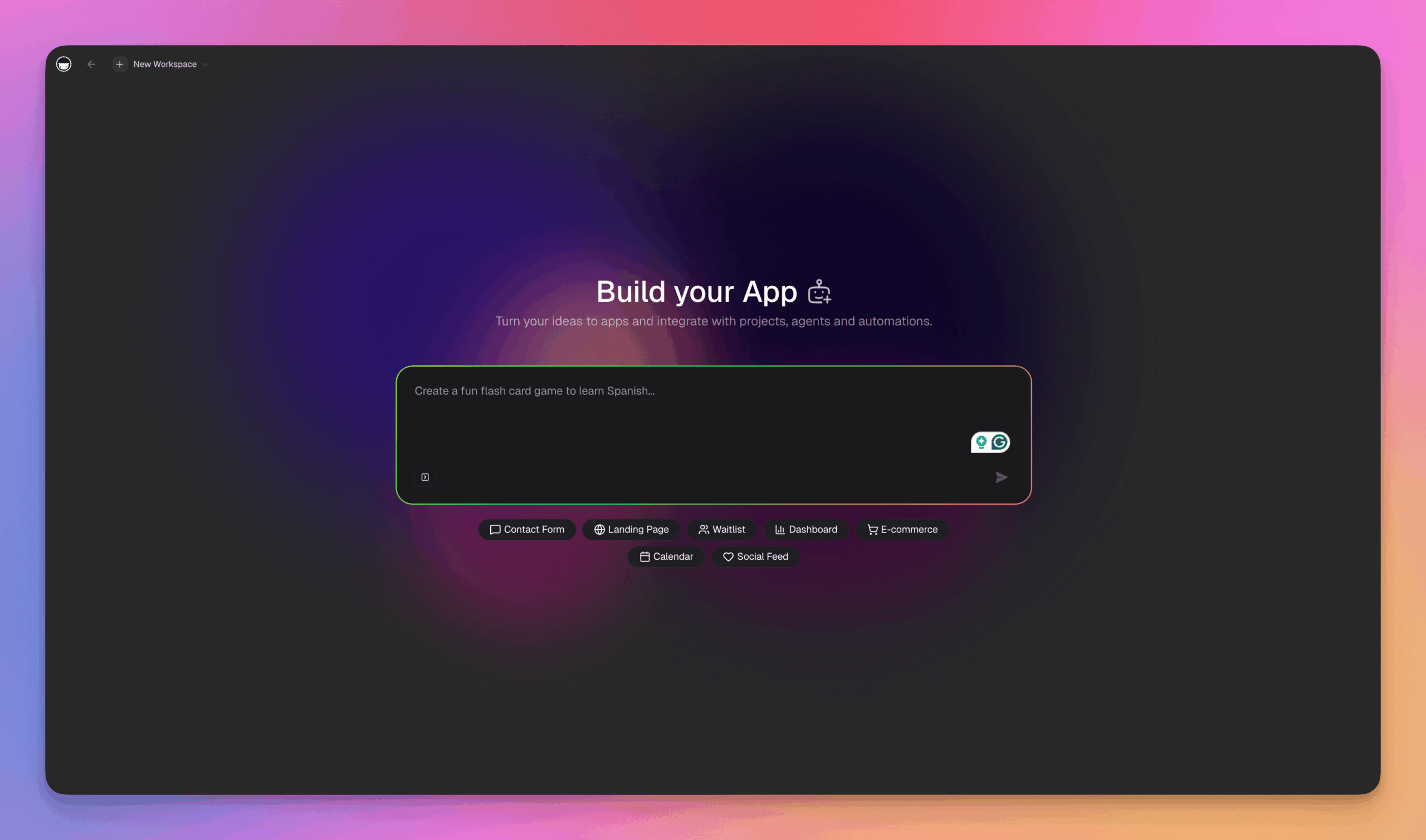
Taskade Genesis: one prompt creates a deployed app with AI agents, automations, and persistent memory. Try it free →
What Genesis Generates From a Single Prompt
| Layer | What You Get | Competitors Require |
|---|---|---|
| Interface | Responsive React UI with 8 views (List, Board, Calendar, Table, Mind Map, Gantt, Org Chart, Timeline) | Manual frontend build |
| Database | Auto-generated Projects with custom fields (string, number, datetime, select, password) | External DB setup (Supabase, Firebase) |
| AI Agents | Workspace-aware agents with 22+ tools, persistent memory, custom slash commands | OpenAI API integration + prompt engineering |
| Automations | Temporal durable execution with 100+ integrations, branching, looping, filtering | Zapier/Make setup + webhook config |
| Publishing | One-click deploy with custom domains (.com, .org, .net, .app, .dev), password protection, OG images | Vercel/Netlify deploy + DNS config |
| Collaboration | Real-time editing, 7-tier RBAC, video calls, shared workspace memory | Separate collaboration tool |
Genesis by the Numbers
150,000+ apps built          11+ AI models (OpenAI, Anthropic, Google)
100+ integrations            22+ built-in agent tools
8 project views              50+ automation templates
7-tier RBAC                  6 custom domain TLDs
$16/mo for 10 users          2-15 min prompt → production
What People Are Building
Teams use Genesis to build CRM dashboards, client portals, sales pipelines, booking systems, invoice generators, e-learning platforms, project trackers, content calendars, internal wikis, fitness trackers, and e-commerce stores — all from natural language prompts. Browse 70+ examples in the Community Gallery or build your own →.
Watch: 5 ways to start building with Taskade Genesis — from blank prompts to cloning community apps. Source: Taskade YouTube
💡 The bottleneck in software was never typing. The bottleneck is shipping. Genesis eliminates the shipping gap: your app is live the moment generation finishes. Deployment delta = zero.
Core Building Blocks in Taskade Genesis
Every Genesis app is assembled from four interconnected building blocks. Understanding them helps you write better prompts and build more powerful systems.
Intents and prompts: Describe outcomes, audiences, constraints, and acceptance criteria. The more specific you are about what you need (not how to build it), the better the output.
AI Agents with tools: Genesis generates workspace-aware agents with 22+ built-in tools (web search, code execution, file operations, data analysis, image generation) plus custom tool schemas you define. Agents have persistent memory — they remember past conversations and learn from your workspace context. Train them with files (PDF, DOCX, XLSX), projects, web links, or YouTube videos.
Automation flows: Define triggers (task events, form submissions, webhooks, schedules, Slack messages, GitHub pushes, Stripe payments) and actions (create projects, ask AI, send HTTP requests, branch/loop/filter). Powered by Temporal durable execution — the same infrastructure Netflix and Uber use for mission-critical workflows.
Connected UI with 8 views: Genesis creates responsive interfaces that bind to your workspace data. Switch between List, Board, Calendar, Table, Mind Map, Gantt, Org Chart, and Timeline views. Every view reflects the same underlying data in real time.
Watch: Step-by-step tutorial on training custom AI agents with your own data in Taskade. Source: Taskade YouTube
Vibe Coding Workflow With Taskade Genesis
You describe the goal and let Taskade Genesis generate a first version. Then, you refine and connect data before sharing and publishing your app.
Step 1: Capture the intent
Write a problem statement, specify your audience, and set acceptance criteria.
Problem statement: What outcome do you need and why?
Audience: Who will use this app, and what do they already know?
Acceptance criteria: What has to be true for you to call it done?
Add two or three concrete examples to anchor generation, for instance, short sample records or task scenarios.
Pick an initial layout that matches the goal, like a board for pipelines, a list for backlogs, a calendar for schedules, or a form for intake.
Step 2: Generate a first version
Ask Genesis to produce a clickable UI and a baseline workflow. Validate navigation, empty states, and data placeholders. Confirm that states and transitions match the way your team actually works. Note immediate gaps to address next.
Step 3: Refine with prompts
Request adjustments to fields, validation, conditional logic, and copy. Control tone and clarity in labels, helper text, and notifications. Create quick variants for comparison and pick the best one after a short review.
Step 4: Connect data and actions
Bind views to internal tables or external data where appropriate. You can connect directly to your Taskade workspace so all your data is visible in one workspace.
Configure actions for create, update, assign, comment, and notify. Test edge cases, add error messages that help users recover, and define sensible defaults.
Step 5: Review, share, and publish
Invite stakeholders for inline feedback and lightweight approvals. Track versions, document changes, and enable rollback when needed. Publish your app and capture external feedback for iteration.
Example Use Cases That Demonstrate Value
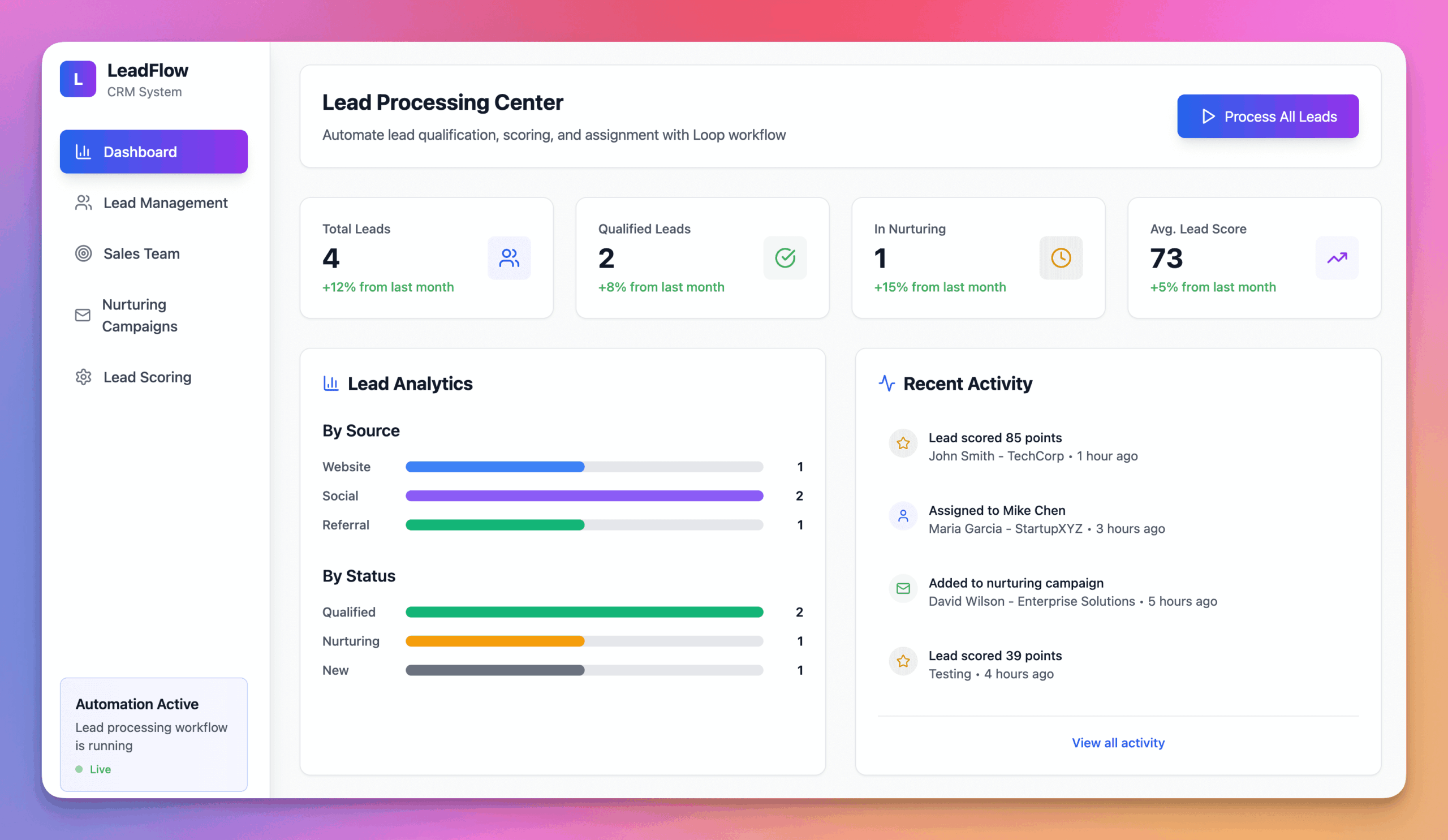
Lead Processing App, created using Taskade Genesis
Applicant tracking: Manage pipeline stages, coordinate interviews, and send notifications.
Landing page prototyping: Generate page sections, iterate on copy and layout, and capture leads with forms so you can test quickly.
Lead management: Collect submissions, score and tag leads, assign owners, and trigger follow ups across email and chat.
Personal CRM for freelancers: Track contacts, reminders, follow ups, and notes.
Editorial planner: Plan ideas on a Kanban board, schedule posts on a calendar, and track checklists.
Lightweight helpdesk: Intake requests, triage categories, route assignments, and respond with canned replies.
When Is Vibe Coding Not the Right Approach?
Vibe coding prioritizes speed and simplicity, but it's not suitable for every scenario.
Highly regulated environments often require extensive audit trails, multi-stage approvals, and granular permission controls that need precise configuration and documentation. Industries like healthcare, finance, and government typically need the explicit control that traditional development provides.
Performance-critical applications also fall outside vibe coding. Customer-facing websites requiring sub-two-second load times, complex data visualizations processing thousands of records, or interactive experiences with custom animations need the optimization capabilities of specialized frontend frameworks.
Complex integrations can exceed vibe coding capabilities when connecting to legacy systems, proprietary databases, or highly customized enterprise software that require bespoke integration work or aren't supported by available connectors.
The key is matching the tool to the problem. Vibe coding excels at functional solutions delivered quickly, but recognizing these boundaries helps you choose the most effective approach for each project.
Best Vibe Coding Tools: Quick Comparison Matrix
Which vibe coding tool is right for you? Here's how the leading platforms compare across the dimensions that matter most:
| Tool | Best For | Price | Outputs Code? | Deploys Instantly? | AI Agents? | Workspace? |
|---|---|---|---|---|---|---|
| Taskade Genesis | Teams, non-coders, living apps | $16/mo (10 users) | No (runtime) | Yes | 22+ tools | Full workspace |
| Cursor | Developers, codebase editing | $20/mo | Yes | No | No | No |
| Bolt.new | Quick MVPs, prototyping | $20/mo | Yes | Partial | No | No |
| Lovable | Designers, landing pages | $20/mo | Yes | Yes (Netlify) | No | No |
| Replit | Learning, solo projects | $25/mo | Yes | Yes | Limited | No |
| Claude Code | Power developers, CLI | $20/mo (API) | Yes | No | No | No |
Key insight: Every tool except Taskade Genesis outputs code files that you deploy, host, and maintain yourself. Genesis creates deployed, intelligent systems with Workspace DNA — Memory, Intelligence, and Execution connected from day one.
→ Full comparison: 17 vibe coding tools ranked | Try Taskade Genesis free →
Watch: Independent review ranking vibe coding tools on prompt-to-app speed, no-code friendliness, built-in backend, real-world usability, and value. Source: Mikey No Code
The Productivity Paradox: Why AI-Assisted Developers Are Actually Slower
The most counterintuitive finding in vibe coding research comes from the METR study (2025), a randomized controlled trial with experienced open-source developers:
| Finding | Value |
|---|---|
| Actual speed change with AI tools | 19% slower |
| Predicted speed change (before study) | 24% faster |
| Perceived speed change (after study) | 20% faster |
| Developers who report feeling more productive | 95% |
| Actual productivity increase | Negative |
The perception gap is staggering: developers believed they were 20% faster while actually being 19% slower. This isn't a failure of AI — it's a measurement problem. AI tools change how work feels more than how fast it gets done.
What this means for vibe coding:
- For code generators (Cursor, Bolt, Lovable): The speed gains from code generation may be offset by debugging, deployment, and integration time — the hidden costs that the METR study captured.
- For living system builders (Taskade Genesis): The productivity advantage comes not from writing code faster, but from skipping code entirely. When you prompt for a deployed app with agents and automations built in, there's no code to debug, no deployment to configure, no integration to wire up.
The real productivity question isn't "how fast can AI write code?" — it's "how much code can you skip writing altogether?"
The AI Design Slop Problem: Why Every Vibe-Coded Site Looks the Same
"Slop" — Merriam-Webster's 2025 Word of the Year — has a design cousin: AI design slop. When every startup runs the same prompt through the same LLM, the output converges on identical aesthetics. Y Combinator noticed this pattern and dedicated a design review episode to dissecting it.
Watch: YC's design review of vibe-coded startup websites — what works, what doesn't, and how to stand out. Source: Y Combinator
The 10 Anti-Patterns of Vibe-Coded Design
Raphael Schaad (YC Visiting Partner, ex-founder of Cron/Notion Calendar) and Aaron Epstein identified these recurring mistakes across vibe-coded startup sites:
| # | Anti-Pattern | Why LLMs Do This | Why It's Bad |
|---|---|---|---|
| 1 | Purple gradients everywhere | Tailwind bg-indigo-500 is the default demo color; LLMs learn it as "safe" |
Every site looks identical |
| 2 | Hover effects that hide content | LLMs add interactivity without UX reasoning | Hover should reveal, not conceal |
| 3 | Scroll hijacking | "Impressive" scroll animations are easy to generate | Breaks native browsing and accessibility |
| 4 | Fade-in animations on every section | Animation for animation's sake | Slows content discovery; users scroll past |
| 5 | Emojis as icons | LLMs take the path of least resistance | Lazy, unprofessional, no brand identity |
| 6 | Inconsistent visual hierarchy | LLMs invent extra label styles that no designer would | Muddled information architecture |
| 7 | Cursor-chasing buttons | Easy to implement, so LLMs suggest it | Annoying, unusable UX |
| 8 | Decorative particles/meteors | Trained on trendy landing pages | Visual noise with zero functional value |
| 9 | Fake dashboards (Google colors) | Red/yellow/green/blue is the default palette | Screams "template," not real data |
| 10 | Missing QA (shipped bugs) | Humans don't catch what they didn't build by hand | LLM-introduced bugs erode trust |
"Just because we now can — just because LLMs are good at SVG buildups or transforms — doesn't mean it's actually good design."
Raphael Schaad, YC Visiting Partner
"If you look at a demo and that demo does not have a base level of quality design, it seems like the person just didn't even try — because it's so easy to do it now."
Aaron Epstein, Y Combinator
The technical explanation is distributional convergence: LLMs are trained on the most popular, most-linked-to websites. When a good site uses a purple gradient, it enters the training data. Then every site gets a purple gradient. A trend that used to take months to spread now propagates in a week.
Why Workspace-Native Apps Avoid the Slop Trap
The design slop problem is unique to code generators — tools that output raw React/Next.js code and hand you a blank canvas to style. When the LLM makes your design choices, you get the same choices as everyone else.
Taskade Genesis sidesteps this entirely because it doesn't output code files for you to style. It generates deployed applications within your workspace — apps that inherit a consistent, professional design system with responsive layouts, proper typography hierarchy, and functional interactions. The design decisions are made by the platform, not improvised by an LLM on every prompt.
This is the same principle that made tools like Notion and Linear successful: constrained design systems produce better output than infinite blank canvases. Genesis applies this to vibe coding.
Comparative View: Vibe Coding vs Traditional No-Code
| Dimension | Vibe coding | Outcome and behavior oriented with a guided structure |
|---|---|---|
| Learning curve | Natural language and examples | Tool-specific concepts and component logic |
| Time to first value | Very fast first version and conversational edits | Fast once you learn the builder and manual wiring |
| Flexibility | Outcome and behavior oriented with guided structure | Traditional no-code |
| Governance | Prompts and versions as living specs | Component-oriented with manual composition |
| Extensibility | Connectors and prompt patterns, handoff to code when needed | Integrations through plugins and manual API work |
Bottom line: Vibe coding complements no-code. Use vibe coding to get clarity, validation, and momentum. Move to no code or code when you need deep customization.
Common Vibe Coding Patterns: Prompts That Work
After analyzing 10,000+ apps built with Taskade Genesis, we've identified the most effective vibe coding patterns that consistently produce high-quality results.
Pattern 1: The CRUD App (Most Common)
When to use: Building database-driven apps (CRMs, inventory trackers, directories)
Effective prompt structure:
"Build a [type] tracker for [audience] with:
- Database for [entity] with fields: [field1, field2, field3]
- [View type] view for browsing (Kanban/List/Table/Calendar)
- Form for adding new [entity]
- Filters for [criteria1, criteria2]
- Search by [field]
- Export to CSV"
Real example:
"Build a freelance client tracker with database for clients (name, company, email, project type, status, value), Kanban board view, intake form, filters for status and project type, search by company name, export to CSV."
Build time: 60-90 seconds
Pattern 2: The Workflow Automation
When to use: Automating multi-step business processes
Effective prompt structure:
"Create a [process] workflow that:
1. Starts when [trigger event]
2. [Action 1] automatically
3. If [condition], then [Action 2], else [Action 3]
4. Notify [person/team] via [channel]
5. Create [artifact] in [location]"
Real example:
"Create a customer onboarding workflow that starts when Typeform 'New Customer' is submitted, creates a project named '[Customer Name] Onboarding', adds 12 standard onboarding tasks, assigns project manager (rotate team), sends Slack notification to #customer-success, creates shared Google Drive folder."
Build time: 2-3 minutes (includes automation configuration)
Pattern 3: The Dashboard
When to use: Visualizing data, tracking KPIs, team overviews
Effective prompt structure:
"Build a [purpose] dashboard with:
- Chart showing [metric] over [time period]
- Table of [top/recent items]
- Counter for [KPI]
- Status indicators for [categories]
- Pull data from [source]
- Refresh [frequency]"
Real example:
"Build a sales team dashboard with chart showing deals closed per month (last 6 months), table of top 10 deals by value, counter for total pipeline value, status indicators for each sales rep's quota attainment, pull data from CRM project, refresh daily at 8am."
Build time: 3-5 minutes
Pattern 4: The AI-Powered Assistant
When to use: Adding intelligence to existing workflows
Effective prompt structure:
"Add an AI assistant to [app/workflow] that:
- Understands [context/domain]
- Can [capability 1, capability 2, capability 3]
- Responds to commands like '[example command]'
- Has access to [data sources]
- Follows [rules/constraints]"
Real example:
"Add an AI content coach to editorial calendar that understands SEO and content marketing, can suggest post topics based on trending keywords, generate outlines for approved topics, recommend publish dates based on team capacity, has access to past posts and performance data, follows brand voice guidelines in workspace knowledge."
Build time: 2-4 minutes (after initial app is built)
Pattern 5: The Integration Hub
When to use: Connecting multiple tools and data sources
Effective prompt structure:
"Connect [Tool A] and [Tool B] so that:
- When [event in Tool A], automatically [action in Tool B]
- Sync [data field] between systems every [frequency]
- If [condition], create [item] in [Tool C]
- Log all actions in [location]"
Real example:
"Connect Stripe and project tracker so that when a payment succeeds in Stripe, automatically create a project named '[Customer Name] - [Plan]', add tasks from '[Plan] template', assign to sales rep who closed deal (from Stripe metadata), send welcome email via SendGrid, log action in #sales Slack channel."
Build time: 4-6 minutes (first-time integration setup can take longer)
Prompting Tips for Better Results
✅ Do:
- Be specific about data fields ("name, email, phone" not "contact info")
- Name your views ("Deals by Stage" not "board view")
- Define conditions explicitly ("if value > $10,000" not "if big deal")
- Provide 2-3 example records
- Specify automation triggers clearly
❌ Avoid:
- Vague descriptions ("make it look good")
- Assuming context ("the usual fields")
- Complex nested logic in first prompt (iterate instead)
- Technical jargon ("implement RBAC" → say "only managers can delete")
When Vibe Coding Gets Stuck
Symptom: Generated app doesn't match your vision
Fix: Break your prompt into smaller pieces:
- First prompt: Core structure (data model + main view)
- Second prompt: Add specific features one at a time
- Third prompt: Refinements and edge cases
Symptom: Automation doesn't trigger correctly
Fix: Test with explicit example data:
"Test this automation with: Customer name 'Acme Corp', email '[email protected]', plan 'Enterprise', show me exactly what happens step by step."
These patterns cover 80% of vibe coding use cases. Master these five, and you'll build faster than most traditional developers.
→ Try these patterns in Genesis | Browse 500+ community templates
Best Practices for Vibe Coding With Taskade Genesis
Write outcomes and guardrails: State what success looks like, then list what to avoid. Include an outcome paragraph, acceptance criteria, and non-goals. Add constraints like roles, privacy, and performance so Genesis stays inside your guardrails.
Provide concrete examples: Include two or three sample records, short scenarios, and edge cases in your prompt. Paste lightweight tables or link to sample docs in your Taskade workspace so the generated views and validations mirror real data.
Specify the audience: Name who will use the app and how they speak. Set tone and microcopy that match that audience, and define practical defaults like time zone, labels, and notification channels that your workspace already uses.
Iterate in small passes: Generate, review, and request changes one dimension at a time such as fields, logic, copy, or layout. Use versions in your workspace to snapshot progress, compare variants, and roll back if needed. Save strong prompts as reusable patterns.
Name states and actions clearly: Use verb-first labels for buttons like Create, Assign, Notify. Keep states consistent across views like Idea, In Progress, and Done. Match validation and error messages to those names so filters, automations, and users stay aligned.
Watch: How to feed screenshots, spreadsheets, and documents as context to Genesis for better app generation. Source: Taskade YouTube
Apple's App Store Crackdown: The Quality Reckoning (March 2026)
In March 2026, Apple began quietly blocking updates for iPhone apps built with vibe coding tools. Developers using Replit and Vibecode reported that Apple rejected their submissions, citing App Store Review Guideline 4.7 — which prohibits apps that download or execute code in ways that alter the app's functionality after review.
This crackdown signals a critical inflection point for vibe coding:
- Quality concerns are real: Apple's move validates the security data — 45% of AI-generated code contains OWASP vulnerabilities, and 41% of developers admit pushing AI code to production without full review.
- Code output ≠ production-ready: Apps that generate and ship standalone code are vulnerable to App Store rejection. The code generation model has a fundamental distribution problem.
- Platform-native apps are safer: Apps built within managed platforms like Taskade Genesis don't face this issue because they deploy as workspace-native applications, not standalone code packages submitted to app stores.
This is why the distinction between code generators and living systems matters more than ever. Code generators give you files to deploy and defend. Living systems give you deployed, managed applications from day one.
The Second Brain Connection: Obsidian + Claude Code + Vibe Coding
Vibe coding doesn't exist in a vacuum. A parallel trend in 2026 is reshaping how people work: pairing AI agents with personal knowledge systems to create persistent context that makes every AI interaction smarter.
How the Workflows Converge
A growing community of knowledge workers now uses Obsidian — a local-first note-taking app with 6M+ users — as a persistent context layer for AI agents like Claude Code. The setup:
- Build a knowledge vault — Structured folders of Markdown files covering strategy, projects, brand voice, ICP, meeting notes
- Add a CLAUDE.md file — Instructions telling the AI agent how to navigate, retrieve, and update the vault
- Point Claude Code to the vault — The AI reads your context before responding, and writes decisions back into the vault
The result: AI that remembers everything about you and your business across conversations — no re-explaining, no context loss, no starting from zero.
Why Context Changes Vibe Coding
The second brain + AI agent workflow solves the context problem that limits vibe coding outputs today:
| Without Persistent Context | With Second Brain Context |
|---|---|
| Generic AI outputs | Outputs tailored to your brand, ICP, and style |
| Re-explain your business every prompt | AI already knows your strategy and constraints |
| Each conversation starts from zero | Every conversation builds on accumulated intelligence |
| AI skills need embedded reference files | Skills point to shared context — update once, all skills update |
"The value of this setup isn't in the setup itself. It's in the context that builds over time. Every decision that gets logged, every correction that gets saved — it all compounds. If your competitor starts 6 months after you, they're not just behind on the tool — they're behind on 6 months of intelligence."
Claude Code's March 2026 Evolution: WAT Framework, Channels & Computer Use
The Obsidian + Claude Code workflow is getting even more powerful with three developments that push Claude Code beyond coding into full agentic workflow territory:
The WAT Framework (Workflows, Agent, Tools) provides a structured methodology for building production agentic workflows with Claude Code. Workflows are natural-language markdown files (like recipes). Tools are code functions that call APIs and process data. The Agent (Claude Code) reads workflows, runs tools, handles errors, and self-heals during the build process — fixing tool configurations and updating workflows when things break. Once battle-tested, workflows and tools deploy to services like trigger.dev for scheduled execution.
Channels (experimental, v2.1.80+) let you interact with Claude Code via Discord, Telegram, or custom webhooks. Text commands from your phone, forward webhook events, or build custom chat interfaces — all connecting to your running Claude Code session and its Obsidian vault context.
Computer Use (research preview, macOS) gives Claude Code native mouse, keyboard, and screenshot control. Combined with Dispatch (remote command access), Claude Code becomes an always-available agent that works on your desktop while you're away.
Agent Teams (experimental) coordinate 2-5 specialized Claude Code instances working in parallel — each with its own context window, file ownership, and role. A practical walkthrough shows the full flow: plan mode (Claude Code asks clarifying questions), then bypass permissions for autonomous execution. In a live demo, a team of frontend dev + backend dev + QA agent one-shot a complete website with animations, responsive design, and polished copy — the QA agent caught 3 critical issues and sent work back for fixes before approving.
For a detailed breakdown of these features and how they compare to Cursor and other tools, see Claude Code vs Cursor vs Taskade Genesis and 15 best Claude Code alternatives.
The Native Alternative: Workspace DNA
The Obsidian + Claude Code + WAT framework workflow is powerful but requires significant manual configuration — vault structure, file routing, CLAUDE.md maintenance, tool development, and deployment infrastructure. Taskade Genesis offers the same persistent context and agentic workflow capabilities natively through Workspace DNA:
- Projects = Memory — Your workspace history feeds AI context automatically
- Agents = Intelligence — 22+ built-in tools with persistent memory, no file routing needed
- Automations = Execution — Reliable workflows with 100+ integrations that act on your context
No vault to maintain. No CLAUDE.md to write. No trigger.dev to configure. One prompt → one living app with full workspace context.
For the complete origin story of how Obsidian grew from a Dynalist side project to the center of the AI knowledge OS movement — and how it compares to AI-native alternatives — read our History of Obsidian.
Parting Words
Vibe coding shortens the distance between idea and impact, and it helps non-coders ship working tools that teams can adopt quickly. Taskade Genesis makes that shift practical because it turns clear intent into usable interfaces, workflows, and data connections that you can refine together.
Projects remember. Agents think. Automations execute. One prompt → one living app.
What will you build? Create your app for free with Taskade Genesis today.
The Vibe Coding Evolution: From Code to Runtime
Vibe coding is not the destination — it is the bridge. Here is how the paradigm is evolving:
- Vibe Coding (2025) — Describe what you want, AI writes code. You still deploy and maintain it. Tools: Cursor, Bolt.new, Lovable.
- Vibe Workflows (2025–2026) — Describe processes, AI builds the automation. Taskade Automations handle execution with durable execution.
- Vibe Workspaces (2026) — Describe a system, AI builds the workspace with memory, intelligence, and execution. This is where Taskade Genesis operates today.
- Vibe Runtime (2026+) — Describe an outcome, AI generates a deployed, living system. No code, no deploy, no maintenance. One prompt → one living app.
Code generators stop at Vibe Coding. Taskade Genesis operates at Vibe Runtime — your prompt produces a living system with Workspace DNA, not files that need assembly.
The difference between generating code and generating runtime is the difference between a recipe and a meal. Between a genome and an organism. Between dead artifacts and living software.
Karpathy's Updated View: Vibe Coding as a Stepping Stone (March 2026)
Andrej Karpathy coined "vibe coding" in February 2025 and named it Collins Dictionary Word of the Year. But his March 2026 interview on the No Briars podcast revealed that he now sees vibe coding as a transitional phase — not the destination.
The shift happened in December 2025. Karpathy went from writing 80% of his code to delegating over 98% to AI agents:
"In December is when it really just something flipped where I kind of went from 80/20 to 20/80 of writing code by myself versus just delegating to agents. I don't think I've typed a line of code probably since December basically."
If the person who coined vibe coding stopped typing code entirely, the implication for non-coders is even more dramatic: the barrier between intent and working software is disappearing faster than anyone predicted.
What Comes After Vibe Coding
Karpathy described a progression beyond vibe coding that maps to three layers:
- Vibe Coding (today) — You describe what you want, AI builds it. Still requires design decisions, prompting skill, and human presence.
- Claws (emerging) — Persistent autonomous agents with sophisticated memory that loop independently, handling tasks without your involvement. Karpathy's "Dobby the House Elf" controls his entire smart home through WhatsApp. The OpenClaw ecosystem — 250K+ GitHub stars, MyClaw.ai managed hosting, and a $4,700/week service economy — is the most visible expression of this layer.
- Ephemeral Software (future) — Software generated on demand and discarded when done. No apps, no maintenance, no subscriptions.
"Today it's vibe coding, it's involved and not many people are going to do it. But this kind of stuff should be free in a year or two or three. There's no vibe coding involved. This is trivial. This is table stakes."
"The barrier will just come down and it's just ephemeral software on your behalf and some kind of claw is handling all the details for you but you're not involved."
His vision of the endpoint:
"These apps that are in the app store shouldn't even exist. Shouldn't it just be APIs and shouldn't agents be just using it directly? Agents kind of crumble them up."
OpenClaw creator Peter Steinberger echoes this prediction even more bluntly: "I think 80% of apps are going away. Why do I need MyFitnessPal? My agent already knows I'm making bad decisions. Why do I need a to-do app? Every app that basically just manages data could be managed in a more natural way by agents." Read the full OpenClaw history for the complete breakdown of this shift — from 250K+ GitHub stars to a $4,700/week service economy.
Why This Validates Taskade Genesis
Karpathy's progression — from vibe coding to claws to ephemeral software — maps directly to Workspace DNA. While code generators stop at step one (generating files), Taskade Genesis already operates at the intersection of steps one and two:
- Memory (projects as persistent state) provides what Karpathy calls "sophisticated memory systems" that default agents lack
- Intelligence (AI agents with 22+ tools) provides the autonomous decision-making of a claw
- Execution (automations with 100+ integrations) provides the independent looping that runs without human presence
The question is not whether vibe coding survives. It is whether your platform is building toward the claw era or stuck generating code files. Taskade Genesis is building toward the future Karpathy describes — one prompt, one living system, no human in the loop.
🧬 See Vibe Coding in Action
Experience vibe coding through these ready-to-clone applications built with Taskade Genesis:
| Category | Apps |
|---|---|
| 📊 Dashboards | Finance Tracker • Investor Dashboard • Team Capacity Planner |
| 📅 Booking Systems | Room Booking • Class Booking Portal • Appointment System |
| 🌐 Landing Pages | SaaS Landing Page • Real Estate Page • Nonprofit Website |
| 💼 Business Tools | Neon CRM • Invoice Generator • Simple Store |
| 🛠️ Productivity | Time Tracker • Minimalist ToDo • Note Tiles |
🔍 Explore All 50+ Community Apps →
Your living workspace includes:
- 🤖 Custom AI Agents — The intelligence layer
- 🧠 Projects & Memory — The database layer
- ⚡️ 100+ Integrations — The automation layer
Get started:
- Create Your First App → — Step-by-step tutorial
- Learn Workspace DNA → — Understand the architecture
Related Guides:
- 10 Best AI App Builders — Complete comparison
- 10 Best AI Website Generators — Build sites without code
- 10 Best AI Dashboard Builders — Analytics made easy
- 10 Best AI CRM Software — Customer management
Compare Vibe Coding Tools:
- Taskade vs V0 — Component generation vs live apps
- Taskade vs Cursor — AI code editors vs no-code
- Taskade vs Bolt — Code generation vs workspace-powered apps
- Taskade vs Lovable — Full-stack code vs living software
- Taskade vs Replit — Cloud IDE vs prompt-to-app
- Taskade vs Windsurf — Agentic coding vs agentic workflows
- All Taskade Reviews — What users say
Open Source Resources:
- Awesome Vibe Coding — Curated list of vibe coding tools
Frequently Asked Questions
What is vibe coding in simple terms?
Vibe coding is describing what you want to build instead of how to build it. You use natural language prompts to describe the outcome, and AI generates the working app with UI, data, and automations automatically.
Example: Instead of writing code for a CRM, you say "Build a sales CRM with contact database, pipeline Kanban board, and follow-up reminders" and Genesis creates it in 90 seconds.
How is vibe coding different from no-code tools like Webflow or Bubble?
| Aspect | No-Code Tools | Vibe Coding (Genesis) |
|---|---|---|
| How you build | Drag-and-drop UI components | Natural language prompts |
| Learning curve | Learn tool-specific concepts | Describe intent in plain English |
| Customization | Limited to available components | Describe any behavior, AI implements |
| AI & Automation | Requires third-party integrations | Built-in with Workspace DNA |
| Data Management | Manual database setup | Auto-generated Projects (instant) |
Bottom line: No-code is like building with LEGO blocks (fast but constrained). Vibe coding is like describing what you want to an expert builder who handles the assembly.
Can non-technical people really use vibe coding?
Yes—if you can write a clear email, you can vibe code.
Real examples from Taskade community:
- Marketing manager (zero coding) built a lead tracker with automated follow-ups → 4 minutes
- Operations coordinator built employee onboarding workflow → 8 minutes
- Freelance designer built client project portal → 12 minutes
The skill required: Clear communication of what you want, not technical knowledge.
Common beginner mistake: Being too vague ("make a CRM"). Instead, be specific: "CRM for freelancers with clients table (name, email, project status, deal value), pipeline Kanban board, and form to add new clients."
What can I actually build with vibe coding?
Apps built by Taskade users (all via vibe coding):
Business Tools:
- CRMs, lead trackers, sales pipelines
- Invoice generators, time trackers
- Client portals, project dashboards
- HR onboarding systems, PTO trackers
Content & Marketing:
- Editorial calendars with AI content coach
- Social media schedulers with analytics
- SEO keyword trackers, backlink monitors
- Email campaign managers
Operations & Workflows:
- Inventory management systems
- Helpdesk ticket trackers
- Equipment booking portals
- Vendor management databases
Personal Productivity:
- Habit trackers, goal dashboards
- Personal CRMs (networking)
- Learning plans, course organizers
- Finance trackers, budget planners
What you CAN'T build (yet): High-performance consumer apps, real-time multiplayer games, complex data visualizations requiring custom algorithms.
How does Taskade Genesis implement vibe coding?
Genesis uses a four-layer architecture called Workspace DNA:
- You write a prompt describing what you want
- AI generates:
- Memory layer: Projects (database) with custom fields and views
- Intelligence layer: AI agents that understand your workspace
- Execution layer: Automations connecting triggers and actions
- Interface layer: Custom UI (React/Vue components)
- You refine with follow-up prompts: "Add a calendar view", "Send Slack notification when status changes"
- Deploy instantly with one click—no external setup required
Time from idea to deployed app: 2-15 minutes average
Can I export or modify the generated apps?
Yes, multiple ways:
Within Taskade:
- Edit fields, views, automations through natural language
- Modify AI agent behavior by updating training
- Adjust UI layout, colors, text directly
For developers:
- Export Projects as JSON (your database schema)
- Use Taskade API to integrate with external systems
- Treat Genesis app as a living specification for traditional development
- Hand off to engineering team with working prototype and requirements
What you DON'T get: Raw React/Next.js code files (Genesis apps live within Taskade platform)
Why this matters: Genesis apps aren't just code—they're living systems with AI, automation, and workspace memory. Exporting code alone loses the intelligence and motion layers.
How much does vibe coding cost?
Taskade Genesis Pricing:
- Free tier: Unlimited apps, limited AI credits ($0/month)
- Starter: $6/month (annual billing)
- Pro plan: $16/month for 10 users (annual billing)
- Business: $40/month
- Enterprise: Custom pricing
Compare to traditional development:
| Approach | Cost | Time |
|---|---|---|
| Hire developer | $5,000-20,000 per app | 4-12 weeks |
| No-code tool + integrations | $50-300/month | 2-4 weeks |
| Vibe coding (Genesis) | $6/month Starter (unlimited apps) | 2-15 minutes per app |
ROI example: Build 5 internal tools with Genesis ($6/month) vs hiring developer for one tool ($8,000). Savings: $7,992 and 10 weeks faster.
Is vibe coding secure? Can I use it for business-critical apps?
Taskade Security:
- ✅ SOC 2 Type II aligned (certification in progress)
- ✅ End-to-end encryption
- ✅ Data protection aligned with industry standards
- ✅ Two-factor authentication
- ✅ Role-based permissions
- ✅ Audit logs for all actions
Best practices:
- Use for internal tools: Approved for most business workflows
- External/customer-facing apps: Review with security team first
- Sensitive data: Leverage Taskade's enterprise features (data residency, SSO)
What to avoid: Storing unencrypted passwords, PII without compliance review, regulated financial data without legal approval.
What's the future of vibe coding?
2026 trends (based on industry data):
- 25% of startups use AI-generated code for 95% of their codebase (Y Combinator report)
- $15B spent globally on AI coding tools
- Emergence of "living software": Apps with memory, intelligence, and autonomous behavior
What's coming:
- Multi-agent app building: Specialized AI agents collaborating to build complex systems
- Visual + prompt hybrid: Sketch UI, vibe code the logic
- Cross-platform export: Generate for web, mobile, desktop from single prompt
- Self-healing apps: AI agents that detect and fix bugs autonomously
The shift: From "AI helps developers code faster" → "Anyone can build software by describing intent."
Your opportunity: Early adopters (2024-2026) will have 5-10x productivity advantage over competitors still using traditional development for business apps.
How do I get started with vibe coding today?
30-minute quick start:
Minute 0-5: Create free Taskade account, explore community apps
Minute 5-10: Clone a template similar to what you want to build, test how it works
Minute 10-20: Click "Create New App", write your first prompt:
"Build a [type] for [audience] with:
- [Feature 1]
- [Feature 2]
- [Feature 3]"
Minute 20-25: Refine with follow-up prompts, test the app
Minute 25-30: Share with team, deploy, gather feedback
Best first projects:
- Personal task tracker
- Team meeting notes with action items
- Simple CRM for contacts
- Content calendar
Learning resources:
- Vibe Coding Best Practices Guide
- How to Build Your First App (Video)
- Taskade Community (ask questions, share apps)
→ Start vibe coding now (free)
Also in the Vibe Coding & App Builder series:
- Vibe Coding for Non-Developers — Build apps without writing code (the 63% non-dev guide)
- Vibe Coding for Teams — How teams ship 10x faster with collaborative vibe coding
- Vibe Coding vs No-Code vs Low-Code — Three approaches compared
- Best Vibe Coding Tools 2026 — 7 AI app builders ranked
- Best Genspark Alternatives — AI workspace tools compared
- Claude Code vs Cursor vs Genesis — Three paradigms compared
- 17 Best AI App Builders — Comprehensive platform comparison
- Best AI Website Generators — Build sites without code
- State of Vibe Coding 2026 — Market size, adoption rates, and industry trends
- Will Vibe Coding Kill SaaS? — The Garry Tan vs Zoho debate
- Vibe Apps Directory — Complete guide to no-code AI app categories
AI Intelligence Deep Dives:
- They Generate Code. We Generate Runtime — The Taskade Genesis manifesto
- The BFF Experiment — From Noise to Life — Computational abiogenesis and living software
- What Is Artificial Life? — How intelligence emerges from code
- What Is Intelligence? — From neurons to AI agents
- What Is Grokking in AI? — When models suddenly learn