






AI is everywhere. You interact with it when you chat with your smartphone's voice assistant, shop online, or reply to emails. But do you use it effectively? In 2026, the question is no longer whether to adopt AI but how deeply to integrate it into your daily workflow.
This article breaks down 7 AI-powered features in Taskade that will help you supercharge your personal and professional life, including Taskade Genesis, custom AI agents, workflow automations, and the Workspace DNA system that ties everything together.
TL;DR: Taskade combines custom AI agents with built-in tools, Genesis app building from prompts, and workflow automations across 100+ integrations in a single workspace. Teams save 15-25 hours per week by replacing fragmented tool stacks with one AI-native platform. Free to start, with Pro from $10/mo billed annually, and AI included in every plan. Try Taskade free -->

How Taskade's AI Features Work Together: Workspace DNA
Before diving into individual features, it helps to understand how they connect. Taskade's AI is not a collection of isolated features bolted onto a project manager. It is built on Workspace DNA, a self-reinforcing loop where every action feeds the next.
Memory (your data in Projects) feeds Intelligence (custom AI Agents), Intelligence triggers Execution (Automations), and Execution creates new Memory. The more you use Taskade, the smarter and more capable your workspace becomes.
| DNA Layer | What It Powers | Example |
|---|---|---|
| Memory | Projects, docs, knowledge bases | Sales playbook with win/loss data |
| Intelligence | Custom agents trained on your data | Sales agent that knows your pricing and objections |
| Execution | Automated workflows and integrations | Lead scoring automation triggered by form submission |
Feature Overview
Here is a quick look at the 7 AI-powered features covered in this guide and the estimated time savings for each.
| Feature | Category | Time Saved/Week | Best For |
|---|---|---|---|
| AI Project Studio | Generation | 2-3 hours | Planning and project setup |
| Custom AI Agents | Intelligence | 3-5 hours | Task delegation and automation |
| Agent Training (RAG) | Intelligence | 2-4 hours | Context-aware AI responses |
| Automation Flows | Execution | 4-6 hours | Multi-step workflow automation |
| Team AI Chat | Collaboration | 3-4 hours | Real-time AI-assisted teamwork |
| Taskade Genesis | App Building | 5-10 hours | Building live apps from prompts |
| Multi-Model AI | Flexibility | 1-2 hours | Choosing the right AI for each task |
1. Generate Projects with AI
Every project has a start and an end. But planning can eat up more time than you would prefer. Taskade's AI Project Studio takes your ideas and turns them into well-structured plans complete with tasks, milestones, and timelines.
Here is how to generate projects with AI Project Studio:
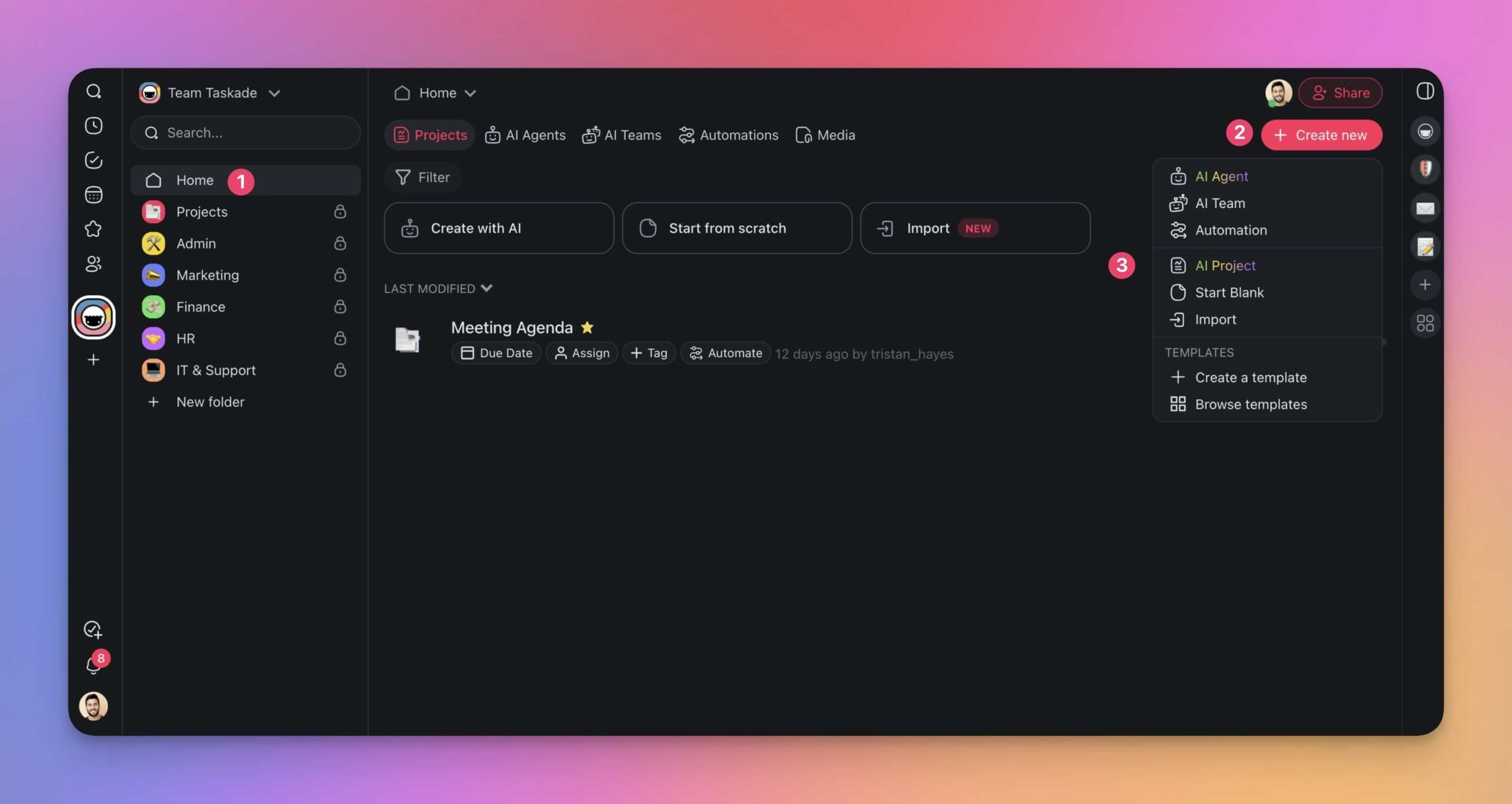
- Go to your workspace and click Create new (top right).
- Choose AI Project from the drop-down menu.
- Describe what you need in plain language. No technical know-how required.
For example, you can use this prompt to generate a team-building program:
"Generate a three-week plan for a virtual team-building program aimed at improving communication and collaboration. Include engaging online games and a feedback mechanism."
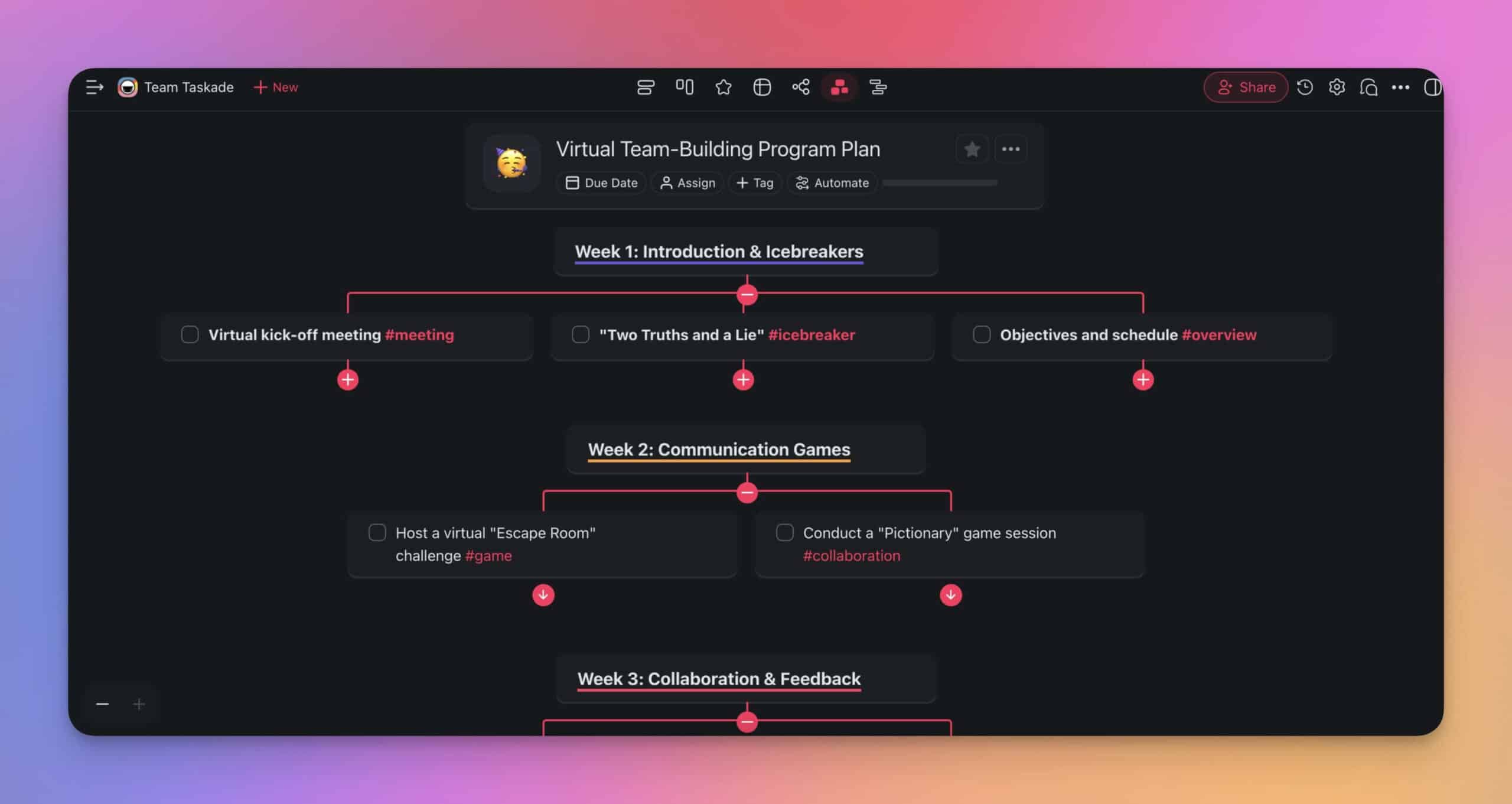
You can personalize the output by uploading documents and online resources as seeds for the generator. Upload a list of employees with roles and interests to customize activities automatically.
What You Can Generate
| Input | Output | Use Case |
|---|---|---|
| Brief description | Structured project with tasks | Project kickoff |
| Meeting notes | Action items and assignments | Post-meeting follow-up |
| Product spec | Development roadmap | Sprint planning |
| URL or document | Organized knowledge base | Research synthesis |
2. Build Custom AI Agents
AI chatbots are useful. But they are far from the autonomous assistants that modern work demands. Taskade goes beyond chatbots and lets you build and deploy Custom AI Agents, each with unique skills, knowledge, and built-in tools tailored to your workflow.
Think of AI agents as specialized entities programmed to handle specific tasks within your Taskade workspace. They do not just answer questions. They take action.
Agent Roles You Can Create
| Agent | Role | Example Tasks |
|---|---|---|
| Data Analyst Agent | Analyzes data to provide insights | Compiles data, identifies trends, generates reports |
| CEO Agent | Assists in decision-making | Aggregates KPIs, writes summaries, simulates business cases |
| Project Manager Agent | Coordinates projects and automates tasks | Tracks milestones, allocates resources, sends updates |
| SEO Agent | Optimizes content for search engines | Aids SEO research, optimizes content, analyzes traffic |
| Finance Agent | Manages financial data and budgeting | Tracks expenses, generates reports, helps with budget planning |
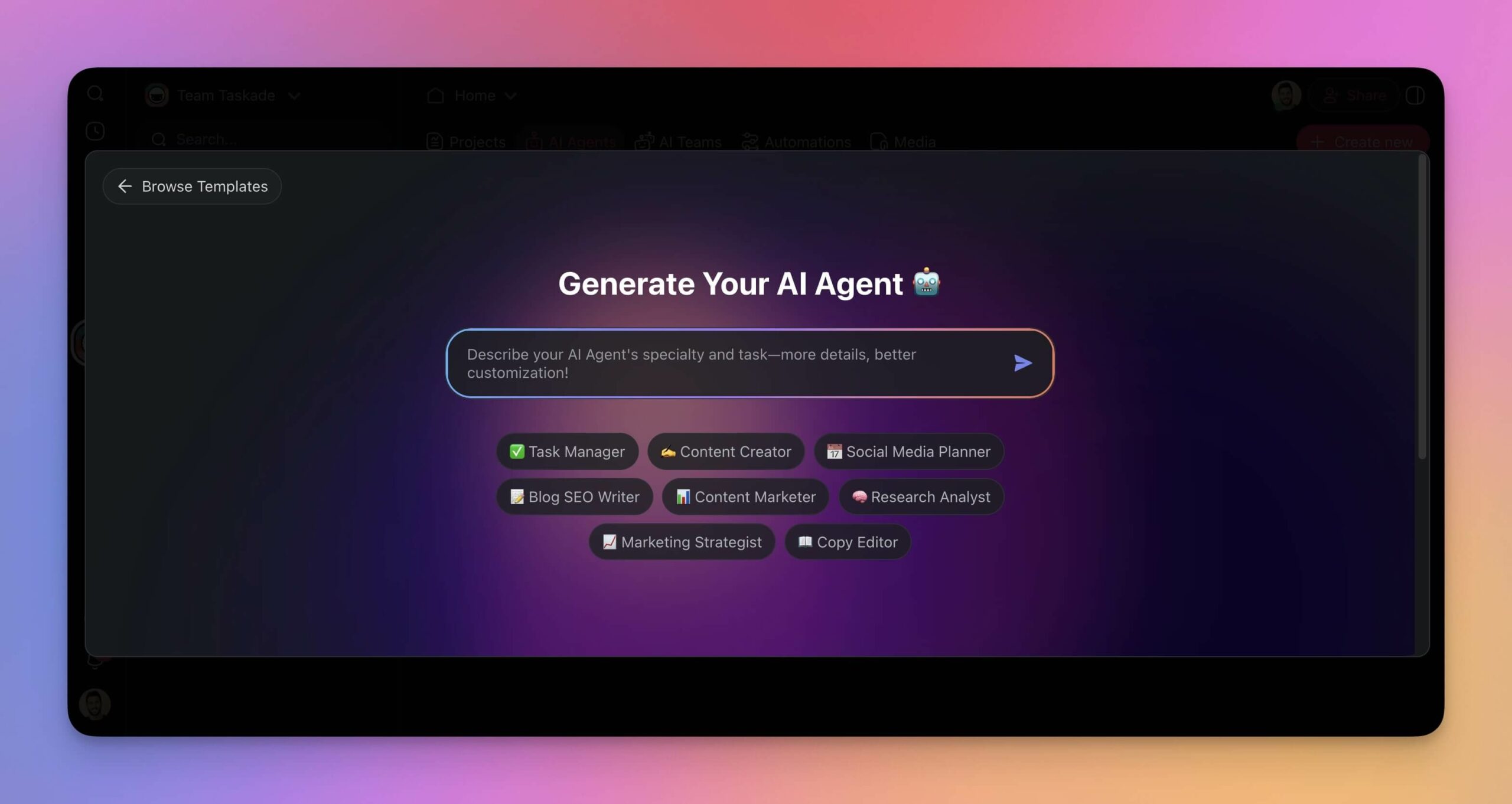
To build custom AI agents in Taskade, go to the Agents tab and click Create agent.
Agent Tools and Capabilities
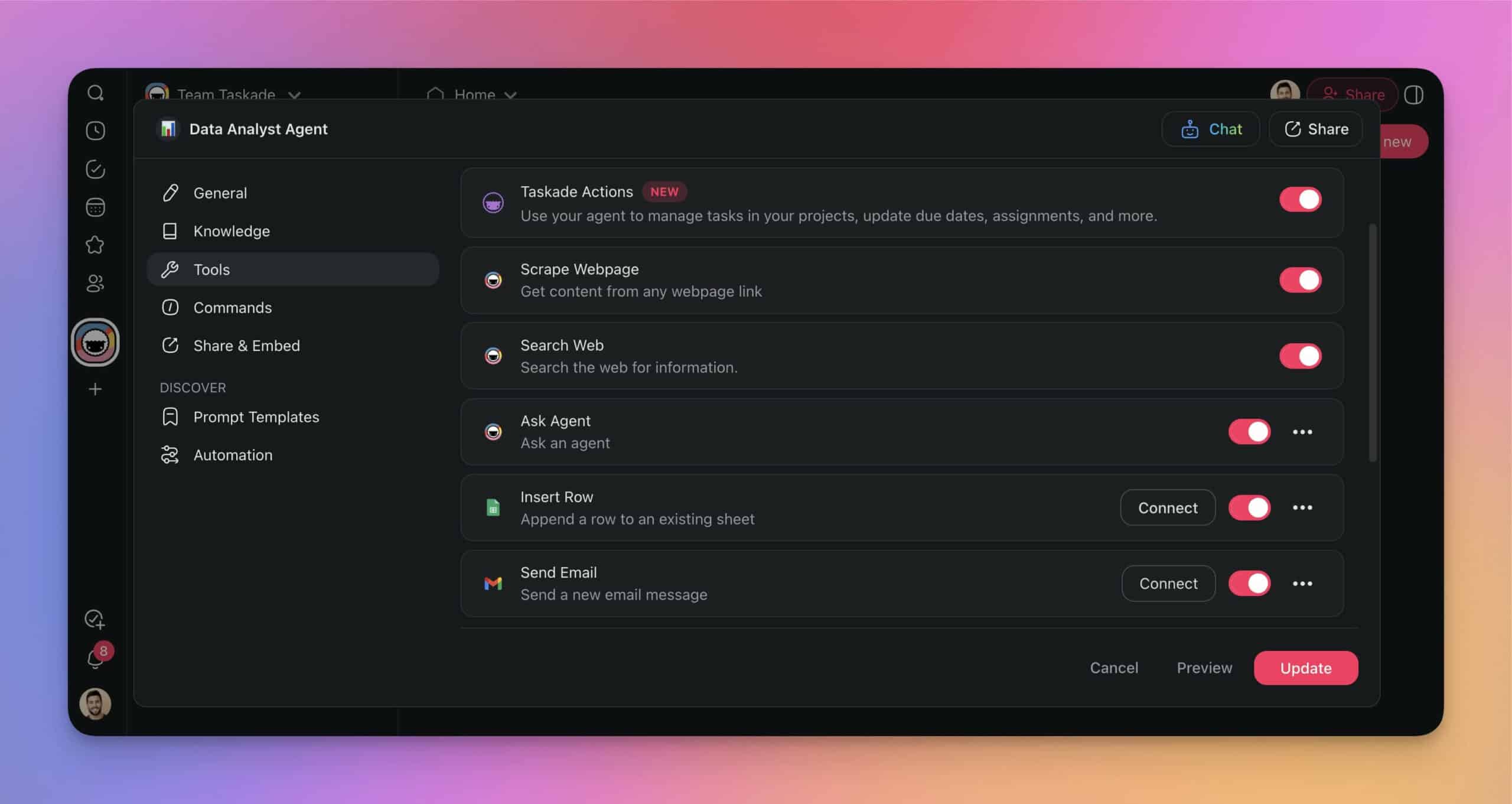
Each agent can be equipped with tools that extend its capabilities beyond text generation:
| Tool Category | Examples | What Agents Can Do |
|---|---|---|
| Productivity | Google Sheets, Google Drive | Read/write spreadsheets, organize files |
| Communication | Gmail, Slack | Send messages, route notifications |
| Web | Web scraping, URL reading | Access real-time data, monitor pages |
| Workspace | Project management, task creation | Create tasks, update boards, manage projects |
3. Train AI for Any Task
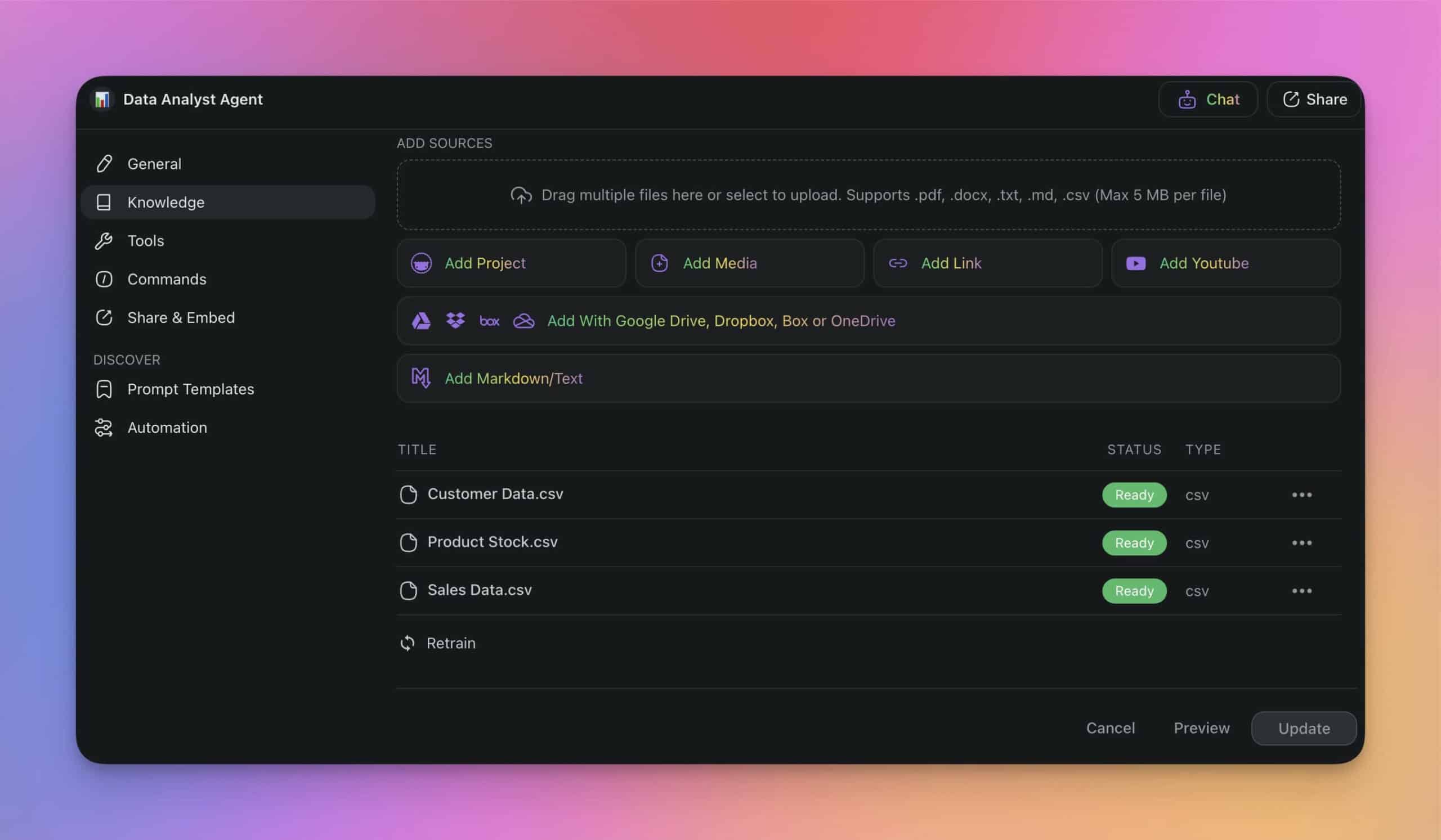
You can fine-tune and train AI agents for specific tasks without technical know-how inside Taskade. Taskade uses Retrieval Augmented Generation (RAG) to combine pre-trained language models with your proprietary data for context-aware AI responses.
How Agent Training Works
Upload documents directly to your agent's knowledge base. The agent synthesizes the information and generates outputs grounded in your specific data.
Training Examples by Agent Type
| Agent Type | Documents for Training | Expected Output |
|---|---|---|
| Data Analyst Agent | Sales reports, market analysis, historical data | Trend reports, forecasts, anomaly alerts |
| Project Manager Agent | Project plans, timelines, resource docs | Status updates, risk assessments, task assignments |
| SEO Agent | SEO audits, keyword research, analytics | Content recommendations, ranking reports |
| Finance Agent | Budget reports, financial statements | Expense summaries, budget forecasts |
| Support Agent | Help docs, FAQs, product guides | Customer responses, ticket routing |
4. Automate With AI
AI agents have autonomy and agency. But to put your workflow in full autopilot mode, you need Taskade Automation Flows connecting agents to your tools and services.
Every Taskade automation consists of three core elements:
| Element | What It Does | Example |
|---|---|---|
| Trigger | Event that kicks off the automation | Form submission, scheduled time, webhook |
| Actions | Steps executed by the automation | AI agent analysis, project creation, notification |
| Integrations | External tools connected to the flow | Gmail, Slack, Google Sheets, WordPress |
Building an Automation
- Go to the Automations tab and click Create Automation.
- Choose a Trigger (form, schedule, webhook, or integration event).
- Add Actions including AI agent steps.
- Connect integrations for external outputs (Slack, email, CMS).
- Save and activate.
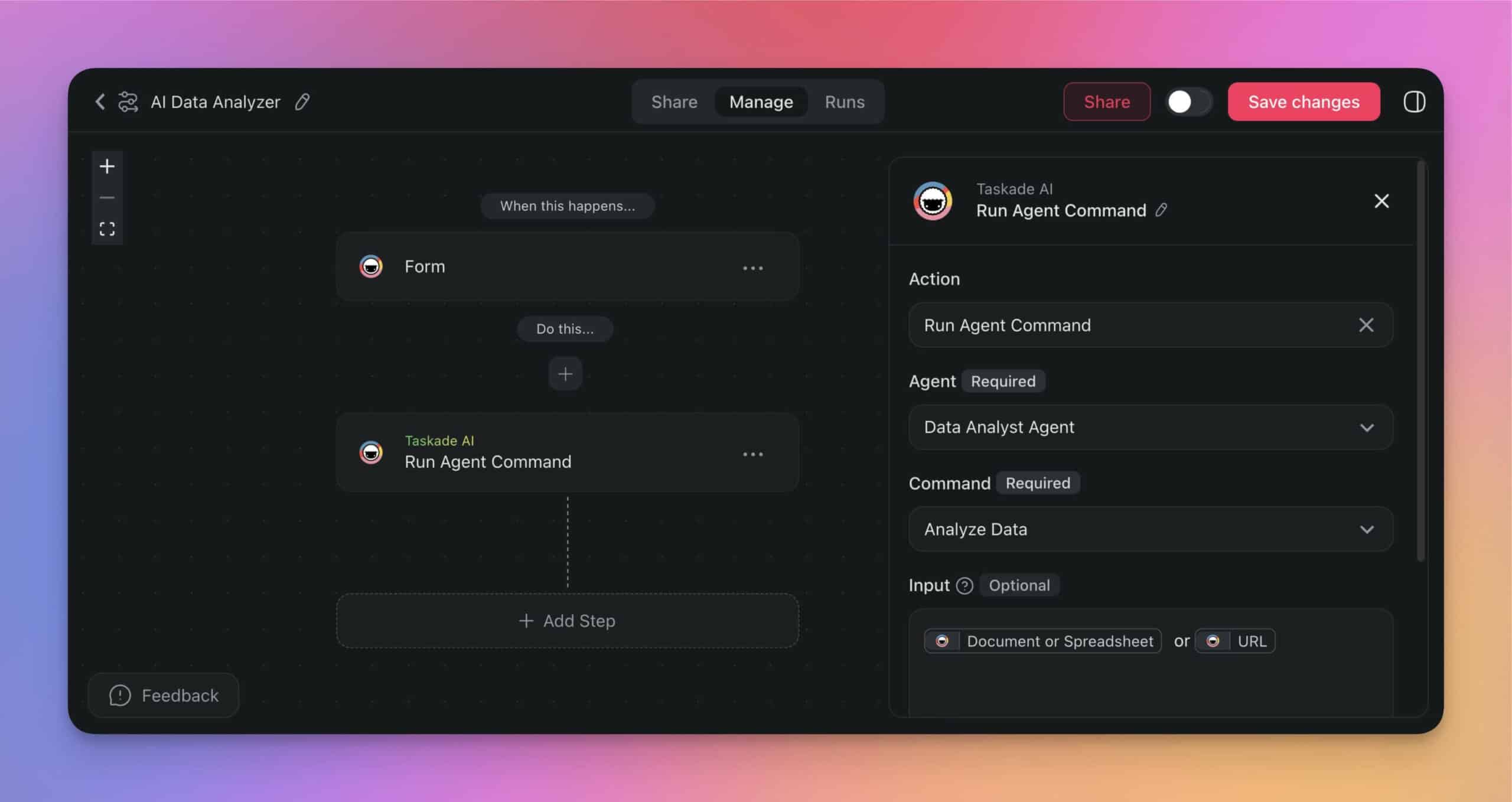
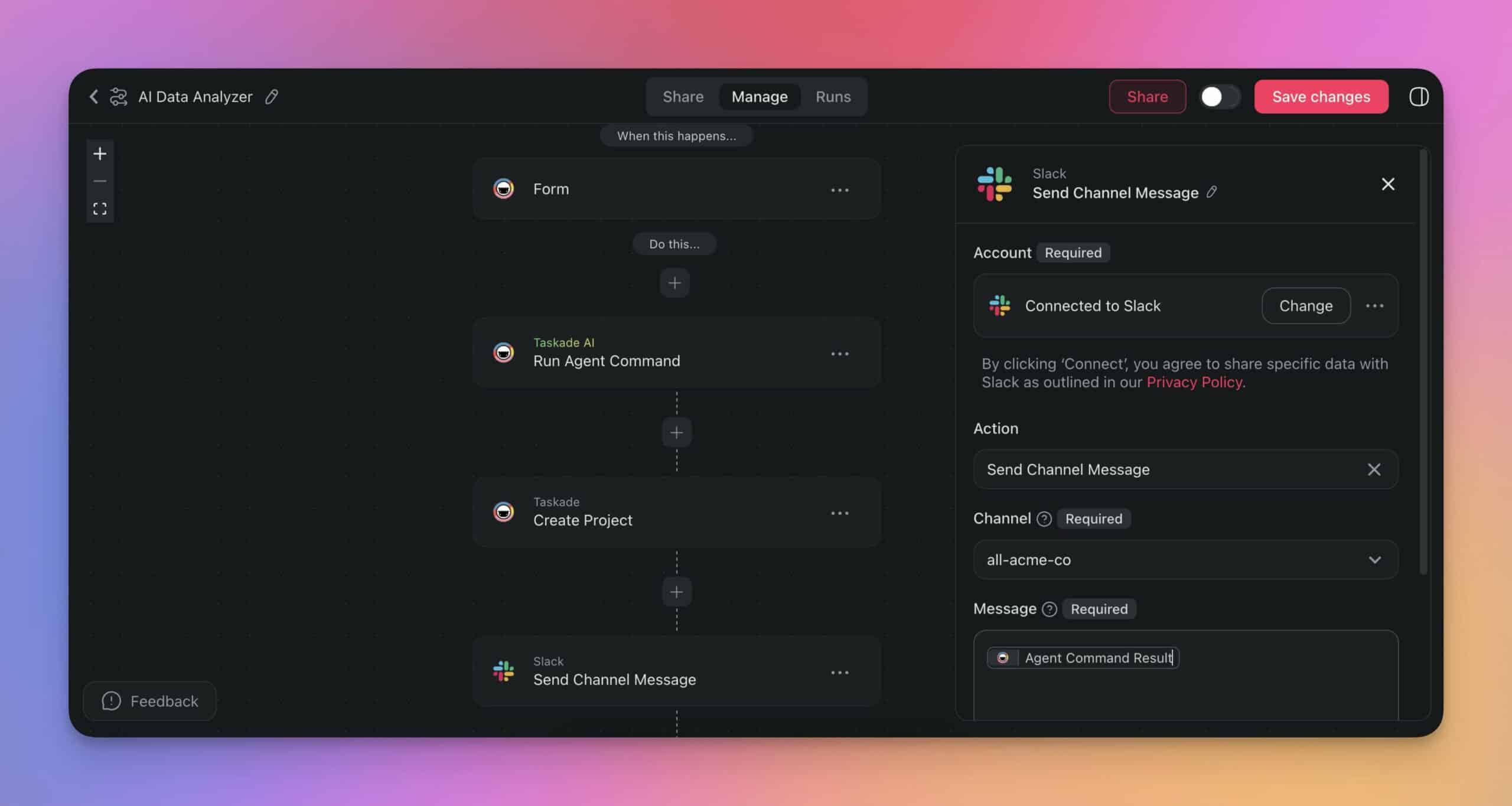
The automation can feed AI-generated insights into a new project and send summaries to a team-wide Slack channel automatically.
Common Automation Recipes
| Automation | Trigger | Agent Action | Output |
|---|---|---|---|
| Content Pipeline | Daily schedule | Blog Writer Agent drafts article | Published to WordPress |
| Lead Scoring | Form submission | Sales Agent evaluates lead | Score + notification to Slack |
| Data Analysis | File upload | Data Analyst Agent processes CSV | Report in project + email summary |
| Support Routing | Customer message | Support Agent classifies ticket | Routed to correct team |
| SEO Monitoring | Weekly schedule | SEO Agent audits site | Ranking report in Google Sheets |
You can Publish or Share automated workflow solutions to help others work more efficiently through the Taskade community.
5. Team Up With AI
One of the biggest limitations of AI in workplace productivity is that most tools work within walled gardens. While you can interact with AI models, it is usually a solitary experience.
Taskade's Team AI Chats change how humans and AI interact. Instead of confining AI to 1-on-1 exchanges, they allow you to collaborate with Taskade AI and other people at the same time.
Team AI Chat Benefits
| Benefit | How It Works |
|---|---|
| AI-driven planning | Teams engage AI during project planning sessions |
| Real-time brainstorming | AI suggests solutions and facilitates ideation |
| Knowledge retrieval | AI retrieves team knowledge during meetings |
| Onboarding | AI helps new members find resources and context |
To get started, open the chat box in a shared project and choose Taskade AI at the top. Every project member can see the conversation and contribute. You are not limited to generic AI. You can collectively interact with your custom AI agents for tailored knowledge and expertise.
6. Build Live Apps With Taskade Genesis
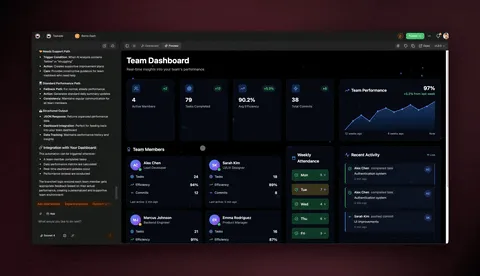
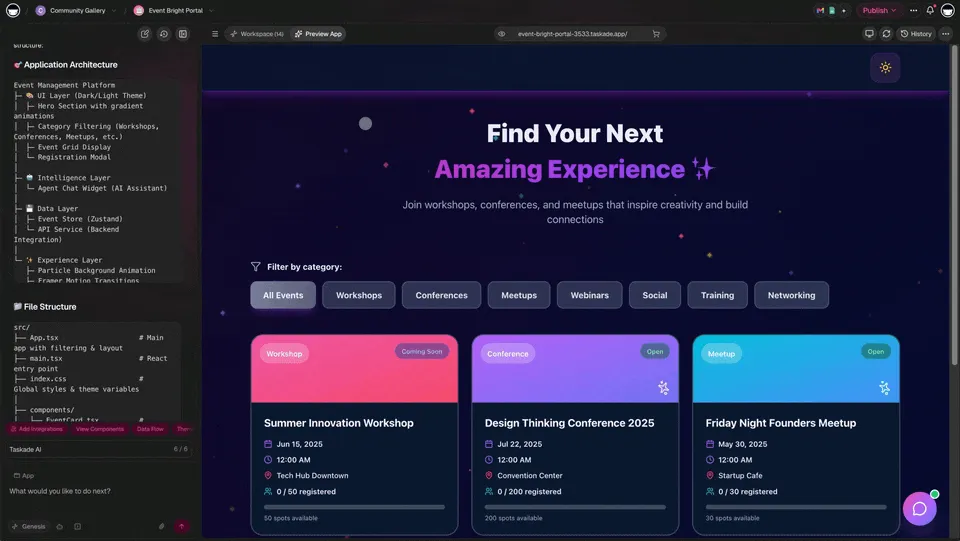
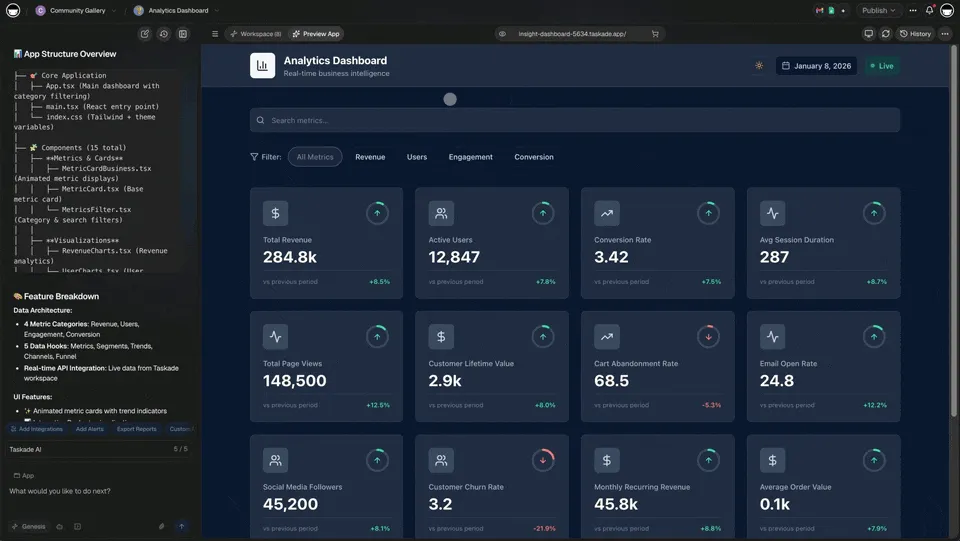
Taskade Genesis is the feature that separates Taskade from every other productivity tool. Instead of managing projects manually, you can build complete, live applications from a single prompt.
Genesis is not a prototype generator. It creates production-ready apps with custom domains, password protection, and embedded AI agents that you can publish to the Community Gallery.
What You Can Build With Genesis
| App Type | Description | Example |
|---|---|---|
| Dashboards | Live data visualization with real-time updates | Sales performance tracker |
| Portals | Client-facing interfaces with access control | Customer onboarding portal |
| Forms | Intelligent forms with AI processing | Lead qualification form |
| Websites | Full websites with custom domains | Landing page for a product launch |
| Internal Tools | Team-specific applications | Inventory management system |
How Genesis Differs From AI Assistants
| Dimension | AI Assistants (ChatGPT, Notion AI) | Taskade Genesis |
|---|---|---|
| Output | Text responses | Live, deployed applications |
| Persistence | Conversation disappears | App stays live, evolves |
| Agents | None or generic | Custom agents embedded in app |
| Sharing | Copy-paste text | Share URL, embed, custom domain |
| Automations | None | Connected to 100+ integrations |
Over 150,000 apps have been built with Genesis since launch. The platform supports frontier AI models from top AI labs.
Build your first Genesis app -->
7. Choose the Right AI Model for Every Task
Taskade supports frontier AI models from top AI labs. Instead of being locked into a single model, you can choose the best AI for each specific task.
Model Selection by Use Case
| Use Case | Best Model Type | Why |
|---|---|---|
| Creative writing | Large language models | Better at tone, style, creativity |
| Data analysis | Reasoning-focused models | Better at logic, calculations |
| Code generation | Code-optimized models | Better at syntax, debugging |
| Research | Multimodal models | Can process text, images, documents |
Multi-model flexibility means your agents are not limited by the strengths and weaknesses of any single AI provider. The system auto-routes to the best model for premium plan users.
Taskade AI vs. the Competition
How does Taskade's AI stack compare against popular alternatives?
| Capability | Taskade | Notion AI | ClickUp AI | Monday AI | Asana AI |
|---|---|---|---|---|---|
| Custom agents | Unlimited | None | None | None | None |
| Agent tools | built-in | None | None | None | None |
| App building | Genesis | None | None | None | None |
| Automations | 100+ integrations | Limited | Limited | Limited | Limited |
| Project views | multiple views | 5 views | 15+ views | 8+ views | 5 views |
| AI pricing | Included | +$10/user/mo | +$5/user/mo | +$12/seat/mo | Add-on |
| Starting price | Free / $10/mo | $8/user/mo | $7/user/mo | $9/seat/mo | $10.99/user/mo |
| RBAC | Role-based access (Owner to Viewer) | 4-tier | 5-tier | 3-tier | 4-tier |
The fundamental difference is architectural. Notion, ClickUp, Monday, and Asana added AI features to existing project management tools. Taskade built project management, collaboration, and AI as a unified system from the ground up. That is the Workspace DNA advantage.
Getting Started With Taskade AI
Ready to integrate AI into your daily workflow? Here is a step-by-step path:
- Create a free account -- AI features are included in every plan.
- Build your first AI agent -- Follow the 60-second agent guide.
- Train the agent on your data -- Upload docs, URLs, and projects to the agent knowledge base.
- Create an automation -- Connect your agent to 100+ integrations via automation flows.
- Try Genesis -- Build a live app from a prompt at taskade.com/create.
- Invite your team -- Share projects and agents for real-time collaboration.
Start your AI productivity journey with Taskade -->
Related Resources
- How to Build Your First AI Agent in 60 Seconds
- What Are AI Agents?
- Best Practices for Building AI Agent Teams
- How to Train AI Agents With Your Own Knowledge
- The Ultimate Guide to Task Automation
- Agentic AI Systems: The Next Evolution of Work
- Single-Agent vs Multi-Agent AI Teams
- AI Agent Builders: Empowering Automation
- Browse community apps and templates
Frequently Asked Questions
What are Taskade's most important AI-powered features?
Taskade's top AI features include autonomous AI agents with custom tools and persistent memory, Taskade Genesis for building live apps from prompts, an AI-powered writing and editing assistant, intelligent project generation from natural-language descriptions, multi-model support across frontier models from top AI labs, workflow automations with 100+ integrations, and real-time AI chat inside projects.
How do Taskade's AI agents differ from standalone chatbots like ChatGPT?
Taskade AI agents live inside your workspace with access to your projects, documents, and knowledge sources. They take actions such as creating tasks, updating boards, and generating content rather than just answering questions. Agents support built-in tools, slash commands, persistent memory, and multi-agent collaboration for end-to-end workflow automation.
Can Taskade's AI features replace multiple productivity tools?
Yes. Taskade combines project management with multiple views, note-taking, real-time collaboration, automation with 100+ integrations, and AI agents in a single platform. Instead of switching between a chat tool, a project tracker, a docs app, and an AI assistant, teams handle all workflows inside one unified workspace, free to start, with Pro from $10/mo billed annually.
Does Taskade's AI work across different project views?
Yes. Taskade's AI features work seamlessly across multiple project views: List, Board, Calendar, Table, Mind Map, Gantt, and Org Chart. You can generate content, automate tasks, and interact with AI agents regardless of which view you are using.
What is Taskade Genesis and how does it differ from AI assistants?
Taskade Genesis is an AI app builder that creates fully functional live applications from natural-language prompts. Unlike AI assistants that help you write or answer questions, Genesis builds complete apps with custom domains, password protection, and embedded AI agents. Over 150,000 apps have been built with Genesis since launch.
How does Workspace DNA work in Taskade?
Workspace DNA is the self-reinforcing loop that powers Taskade's AI productivity. Memory (your data in Projects) feeds Intelligence (custom AI Agents), Intelligence triggers Execution (Automations), and Execution creates new Memory. This means the system learns and improves the more you use it, unlike static productivity tools.
Can I train Taskade AI agents on my own data?
Yes. Taskade uses Retrieval Augmented Generation to combine pre-trained language models with your proprietary data. You can upload documents, spreadsheets, URLs, and project content as agent knowledge. The agent then produces context-aware responses based on your specific information rather than generic outputs.
What automations can I build with Taskade AI?
Taskade automations combine triggers, actions, and AI agents into multi-step workflows. You can connect to 100+ integrations including Gmail, Slack, Google Sheets, WordPress, and Shopify. Common automations include content publishing pipelines, data analysis workflows, customer support routing, and lead scoring sequences.