OpenClaw is the fastest-growing open-source AI agent in history — 247,000+ GitHub stars, 35,000+ forks, and a community that redefined what autonomous AI assistants can do.
But it's not for everyone.
Short on time? Taskade Agents v2 is the fastest way to replace OpenClaw for teams — no Docker, no API keys, no Python. Explore AI Agents or build your first agent in Taskade Genesis (free, up to 6,000 credits).
OpenClaw requires Docker, terminal commands, manual API key configuration, and a dedicated machine. It has documented security issues including CVE-2026-25253, stores credentials in plaintext by default, and was the target of the ClawHavoc supply chain attack (341 malicious skills, 9,000+ compromised installations). It's a single-user tool with no team collaboration, no role-based access, and no managed hosting.
If you need autonomous AI agents without the infrastructure headaches — or you need security, team collaboration, or enterprise features that OpenClaw doesn't provide — here are the 16 best alternatives we tested and ranked for 2026.
AI Agent Platform Landscape (2026)
June 2026 update: the model layer just shifted again — Anthropic shipped Claude Fable 5 on June 9, its most capable model yet (powerful, but $10/$50 per million tokens and locked to one vendor). The agent harness you choose matters more than any single model: a workspace that routes 15+ frontier models per task means a better model next quarter is a setting, not a migration. And as models get more capable, AI slop — confident, unreviewed output — gets more convincing, which is exactly why a review loop and ownership belong in your agent stack.
July 2026 update: the ecosystem is maturing on the security axis. OpenClaw now ships a built-in
openclaw security audit --deep --fixcommand and partnered with VirusTotal to scan its 33,000+ community skills; Peter Steinberger's TED talk reframed the project's story for a mainstream audience; and enterprise forks keep hardening. The safety gap between alternatives is now measurable — see the new risk scorecard below.
🎯 60-Second Picks by Use Case
If you only have one minute, here are the picks. Each is defended in detail below.
| If you want... | Pick | Why |
|---|---|---|
| Easiest setup, no Docker | Taskade Agents v2 | Browser-instant, SOC 2, RBAC |
| Security-first self-hosting | NanoClaw | Container isolation + permission gates |
| Enterprise hardened + NVIDIA-backed | NemoClaw | Fork announced at GTC Mar 2026 |
| Browser-native OpenClaw | Kimi Claw | No setup, runs in browser |
| Managed cloud OpenClaw | MaxClaw ($19/mo) | One-click deploy, 24/7 cloud |
| Memory-safe via Rust | IronClaw | WebAssembly sandbox |
| Lightweight Python | Nanobot | Single pip install |
| Edge / IoT deployment | PicoClaw | <1MB RAM, microcontrollers |
| AI-assisted coding | Claude Code | ~4% of GitHub commits |
| Teams with RBAC + OIDC | Taskade Business $25/mo | Unlimited seats, enterprise-ready |
🧩 Decision Matrix — Map Your Constraint to the Right Tool
Most tools above are viable. The question is which constraint dominates your decision. Pick your row, then pick the column.
| Your primary constraint | Best pick | Runner-up | Don't pick |
|---|---|---|---|
| Zero infra / zero Docker | Taskade Agents v2 | Kimi Claw | Self-hosted OpenClaw |
| Data stays on my machine | NanoClaw | IronClaw | Managed cloud |
| Need team RBAC / SSO | Taskade (Business $25/mo) | NemoClaw (enterprise) | Nanobot |
| Lowest cost per month | Taskade (Free) | ZeroClaw (hardware $10) | Pro-tier anything |
| Enterprise compliance | NemoClaw | Taskade Business (SOC 2) | Base OpenClaw |
| Model flexibility (BYO LLM) | OpenHands / AnythingLLM | IronClaw | Closed managed |
| Persistent memory across runs | Taskade (projects/memories) | memU | Stateless agents |
| Hosted MCP server | Taskade | Claude Code (client only) | Tools w/o MCP |
If two or three constraints dominate, Taskade Agents v2 wins because it is the only row that appears in more than one column — managed, SOC 2, team RBAC, persistent memory, cheapest entry, and a hosted MCP server any client can connect into, all in one platform.
Quick Comparison Table
| # | Alternative | Best For | Setup | Security | Team Support | Pricing |
|---|---|---|---|---|---|---|
| 1 | Taskade | Teams, no-code AI agents | Browser (instant) | SOC 2, RBAC | Multi-agent teams | Free / $10+ mo |
| 2 | NanoClaw | Security-first self-hosting | Docker | Container isolation | Single user | Free (OSS) |
| 3 | Claude Code | AI-assisted coding | Terminal (npm) | Anthropic-managed | Agent Teams | $20/mo (Pro) |
| 4 | IronClaw | Memory-safe execution | Rust binary | WASM sandbox | Single user | Free (OSS) |
| 5 | Nanobot | Lightweight personal agent | pip install | Minimal surface | Single user | Free (OSS) |
| 6 | memU | Long-term memory agent | Docker | Standard | Single user | Free (OSS) |
| 7 | Kimi Claw | Browser-based OpenClaw | Browser (instant) | Moonshot-managed | Single user | Free tier |
| 8 | MaxClaw (MiniMax) | One-click managed OpenClaw | Browser/Desktop/Mobile | MiniMax-managed | Single user | $19/mo |
| 9 | TrustClaw | Cloud-hosted agent | Browser | OAuth + sandbox | Single user | Free tier |
| 10 | PicoClaw | Edge/IoT devices | Binary flash | Minimal | Single user | Free (OSS) |
| 11 | ZeroClaw | Ultra-low-cost hardware | Rust binary | Minimal surface | Single user | Free (OSS) |
| 12 | SuperAGI | Multi-agent orchestration | Docker | Standard | Multi-agent | Free (OSS) |
| 13 | Moltworker | Serverless deployment | Cloudflare Workers | Edge isolation | Single user | Pay-per-use |
| 14 | AnythingLLM | Local LLM platform | Docker/Desktop | Local-only | Single user | Free (OSS) |
| 15 | Agent S3 | Autonomous computer use | pip install | Sandbox | Single user | Free (OSS) |
| 16 | Jan.ai | Private local AI | Desktop app | Local-only | Single user | Free (OSS) |
Why Users Look for OpenClaw Alternatives
As one security analyst put it: "Siri is safe because it's neutered. OpenClaw is useful because it's dangerous." Five critical pain points drive users away from OpenClaw: security vulnerabilities, complex setup, single-user limitations, uncontrolled API costs, and missing enterprise features.
1. Security Risks
OpenClaw has admin-level access to everything on the host machine — email, passwords, API keys, browser sessions. The ClawHavoc attack in January 2026 planted 341 malicious skills on ClawHub, compromising 9,000+ installations with information-stealing malware. Security researchers found 900+ exposed OpenClaw servers with no password protection — leaking API keys and months of private chat history. A default setting meant for localhost testing was left open when users deployed to public servers. Researchers have also documented plaintext credential storage, no sandbox for third-party skills, CVE-2026-25253, and successful prompt injection attacks. The project's own creator stated: "Most non-techies should not install this. It's not finished. It's only 3 months old."
2. Complex Setup
OpenClaw requires Docker, Node.js, terminal proficiency, manual API key configuration, and ideally a dedicated machine. Even its creator, Peter Steinberger, runs 5–10 parallel coding agents simultaneously to build OpenClaw — a workflow that's impractical for most users. This puts it out of reach for non-technical users and small teams who need AI agents without infrastructure overhead.
3. Single-User Architecture
OpenClaw is designed for one human and one agent. There are no shared workspaces, role-based access controls, team collaboration features, or multi-user support. For businesses that need multi-agent teams working on shared projects, OpenClaw requires significant custom engineering.
4. No Cost Controls
Without built-in spending limits, users have reported surprise API bills — one OpenClaw user famously woke up to a $1,100 overnight charge with no memory of what the agent did. YouTuber Nate Herk burned through 80 million tokens (~$80) in a single 5-hour session just testing his OpenClaw assistant. He noted that the same work on a Claude Code Max subscription ($200/month) would cost a fraction — and that using a personal Claude subscription with OpenClaw violates Anthropic's terms of service. Managed platforms provide usage dashboards and spending caps.
5. No Enterprise Features
No SOC 2 compliance, no audit trails, no SSO/SAML, no data residency controls. For regulated industries (healthcare, finance, government), OpenClaw is a non-starter without extensive custom security hardening.
6. The Sovereignty Paradox
OpenClaw promises sovereignty over your AI stack — but most instances still route to Claude's or OpenAI's APIs. As one analyst noted: "You own the agent layer. You rent the intelligence." The escape hatch (local models via Ollama) requires RAM that's increasingly flowing to AI data centers — DRAM prices surged 172% since early 2025, and server memory is expected to double in cost by late 2026. The Mac Mini buying frenzy that accompanied OpenClaw's launch was partly a hedge against a future where running local AI gets priced out. Cloudflare's stock rose 20% simply because OpenClaw recommended Cloudflare Tunnels for secure deployment.
How Safe Is Each OpenClaw Alternative? The Risk Scorecard
Every "safer OpenClaw alternative" claim deserves receipts, so here they are in one table. Four risk axes matter most in practice: how the agent's actions are isolated from your machine, whether its interface is exposed to the network by default, how much third-party code (skills, plugins) it pulls in, and who is accountable when something breaks.
| Tool | Execution isolation | Network exposure | Skill supply chain | Accountability |
|---|---|---|---|---|
| OpenClaw (baseline) | Host access by default | Loopback default; 900+ instances found exposed | 33K+ skills; ClawHavoc hit 9,000+ installs; VirusTotal scanning added | You |
| NanoClaw | Container per skill + permission gates | Local only | Minimal, auditable core | You |
| IronClaw | Rust + WASM sandbox | Local only | Small surface by design | You |
| Nanobot | Process-level (minimal code) | Local only | Tiny; few dependencies | You |
| Kimi Claw | Browser-sandboxed, vendor-run | Vendor-managed | Curated by Moonshot | Vendor |
| MaxClaw | Vendor cloud sandbox | Vendor-managed | Curated by MiniMax | Vendor |
| Claude Code | Local, permission-gated per action | Local; enterprise via Bedrock/Vertex | Skills/plugins you choose | Anthropic + you |
| Taskade Agents v2 | Managed platform, no host access | Fully managed, SOC 2 | Built-in tools + reviewed integrations | Platform |
Three honest readings of that table:
- Self-hosted forks (NanoClaw, IronClaw, Nanobot) genuinely fix the isolation problem — that's their reason to exist — but they leave network hygiene, key management, and updates on your plate. The full claw security checklist still applies.
- Managed claws (Kimi Claw, MaxClaw, TrustClaw) trade sovereignty for accountability. Your data transits a vendor, and in exchange the exposed-server class of failure mostly disappears.
- The platform tier (Taskade, and Claude Code for coding work) removes the "you are the security team" assumption entirely — which is the right trade for teams, and overkill only if tinkering is the point.
🚨 The Reality Check: What Creators Don't Tell You
Before you invest a weekend in Mac-Mini-plus-Docker-plus-VPS-plus-OAuth, hear the part of the story that gets skipped in most YouTube walkthroughs. Four honest signals from people who actually maintain or use OpenClaw at scale:
1. Peter Steinberger's own security numbers (State of the Claw, April 2026)
The project's creator has been dodoed by security advisories. As of April 2026, the real numbers from the OpenClaw repo:
| Metric | Value | Comparison |
|---|---|---|
| Total CVE advisories | 1,142 | ~2x the Linux kernel rate (8–9/day) |
| Critical severity | 99 | Some rated CVSS 10.0 |
| Published (not slop) | 469 | 60% closed |
| Typical attack surfaces | RCE, approval bypass, code injection, path traversal | Standard agent-system risks |
"If you use that product, you get access to the unnerved model that is quite a bit smarter in terms of cyber than what the public has access. Exactly. Because it's dangerous."
— Peter Steinberger, on why enterprise forks find so many exploits
Most of these CVEs are AI-generated bug reports (agents hunting agents), and the real-world exposure depends on your setup. But the takeaway is: this is a project where the creator himself says "most non-techies should not install this." Your employees will read the hype before they read the disclaimers. Plan accordingly — or use a managed alternative.
2. The prompt-injection trifecta is not optional
Peter's framing: "any agentic system that has access to your data, has access to untrusted content and the ability to communicate is potentially at risk. That's not anything special to OpenClaw. It's any powerful agent system." This is the underlying reason every responsible OpenClaw setup requires:
- A separate machine (Mac Mini or VPS) — never your main computer
- A new email account for the agent (don't hand over your primary credentials)
- A local admin account on that machine — sandboxed
- Progressive trust — read-only calendar → read-only email → draft → send → attend meetings, one scope at a time
If you are not comfortable running all five of these rituals for every agent you deploy, you want a managed platform where the security posture is the vendor's problem, not yours. (Taskade Agents v2 is SOC 2 compliant with RBAC out of the box — the five rituals are handled.)
2a. The OpenShell answer: NVIDIA's open-source sandbox for the OpenClaw class (May 2026)
In Jensen Huang's May 2026 SCSP "Memos to the President" interview, he revealed the deeper architecture beneath NVIDIA's enterprise NemoClaw play: an open-source runtime called OpenShell. The naming is deliberate — OpenClaw is the open-source agent framework with the lobster mascot; OpenShell is the shell around the open claw that keeps it in a safe cage.
   ┌────────────────── Your Machine / Server ──────────────────┐
   │                                                            │
   │   ┌──────────────── OpenShell Sandbox ────────────────┐    │
   │   │                                                    │    │
   │   │   ┌──── Policy Engine (YAML rules) ──────┐         │    │
   │   │   │  • What URLs can it fetch?            │         │    │
   │   │   │  • What files can it read / write?    │         │    │
   │   │   │  • What PII gets redacted on egress?  │         │    │
   │   │   └───────────────────────────────────────┘         │    │
   │   │                                                    │    │
   │   │   ┌──── OpenClaw Agent Loop ─────────────┐         │    │
   │   │   │  perceive → plan → act → reflect      │         │    │
   │   │   └───────────────────────────────────────┘         │    │
   │   │                                                    │    │
   │   │   Network jail · File system jail · No host esc.   │    │
   │   └────────────────────────────────────────────────────┘    │
   └────────────────────────────────────────────────────────────┘
OpenShell is the open-source answer to the prompt-injection trifecta. Instead of every individual user manually configuring "five rituals" (separate Mac Mini, separate email, separate admin account, progressive trust, OAuth scope juggling), OpenShell encodes those policies as YAML and runs the agent in a virtual environment by default. NVIDIA contributed it to open source so the broader ecosystem (CrowdStrike, Palo Alto Networks, Cisco, Microsoft) can build defensive swarms on top of it.
"You're not going to defend against a super agent with another super agent. You're going to defend it with massive swarms. To use asymmetry to your advantage, that requires open-source technology for us to develop upon."
Jensen Huang, NVIDIA — SCSP "Memos to the President" (May 2026)
For a self-hoster comparing OpenClaw forks, OpenShell is now part of the production picture. Some forks (NanoClaw, IronClaw) ship with OpenShell-compatible sandbox profiles. Some managed platforms (Taskade Agents v2) replicate the same control plane via workspace-scoped permissions and RBAC — without you having to maintain the YAML policy files yourself.
3. The "success story" YouTube videos skip the costs
A widely circulated critique in April 2026 (aggregating several power users' real numbers) breaks down why most of the six canonical OpenClaw use cases don't survive scrutiny:
| Creator demo | The reality under the hood |
|---|---|
| "OpenClaw is my second brain" | It is a markdown folder. Obsidian does this for free with 1,800 plugins. |
| "Morning brief agent" | Requires scraping + API calls + packaging. n8n or a Taskade automation does it cleaner and cheaper. |
| "Content factory with sub-agents" | Every iteration carries full prior context. At 200K tokens, a scheduled daily task burns 200K tokens per run. |
| "Replace all my apps" | Iterative UI work resists full autonomy. Even coding agents need human-in-the-loop. |
| "Autonomous heartbeat" | Continuous sessions inflate the context window. Tokens compound. Bills compound. |
| "Ambient assistant" | The actual unique value is convenience (unified messaging interface), not novelty. |
"The people who can use OpenClaw best (the most technical) are the ones who need it least. Yet all the hype targets the least technical audience — the group most likely to get burned."
4. Claire Vo's skeptic-to-believer arc (and what it actually cost)
Claire Vo — 3x CPO, engineer, founder of ChatPRD, host of How I AI — went from skeptic to running 9 OpenClaws across 3 Mac Minis. What her setup actually required:
- First install: 8 hours. OpenClaw deleted her family calendar on attempt one.
- Hardware: 3× Mac Minis = ~$1,500–$3,000 upfront (she recommends Mac Mini over cloud because "$500 accountability cost makes you actually do it")
- Architecture: multi-agent partitioning (Polly = work EA, Finn = family manager, Sam = salesperson, Q = kids' homework, Max / Howie / Kelly / Holly / Sage). Family agents live on separate machines from work agents.
- Ongoing discipline: every agent needs its own email, its own OAuth flow, its own progressive-trust calibration.
Her verdict after all that: "The most mind-blowing AI experience since ChatGPT." But she also says: "pull the thread on these tools long enough to see not where they are today, but where they are in a week and in a month." For most teams, that 8 hours and $1,500 is better spent building Genesis apps in a browser and shipping real software on day one.
The honest answer — the one that comes from Peter, from Claire, from the sober reality-check videos — is that OpenClaw is a great tool and a bad default. If you are building a business that needs agents, the right question is not "which OpenClaw fork?" — it is "what does my agent stack need to do, and who is going to operate it in 6 months?" For most teams the answer is a managed workspace. For the remaining 5% it is NanoClaw, IronClaw, or NemoClaw.
The Mainstream-Media Moment: Cold Fusion's "Rogue AI" Framing
In March 2026, Cold Fusion (Dagogo Altraide's well-watched YouTube channel) published a video titled "OpenClaw: The Rogue AI Agent" that hit the mainstream audience with a sobering angle most tech-press coverage avoided. Three data points from that video went viral and now anchor the enterprise skepticism around any OpenClaw-derived agent:
| Mainstream-media anecdote | What actually happened | What it signals |
|---|---|---|
| The "$4,200 car negotiation" | A user had OpenClaw search forums for fair pricing and message dealerships — agent autonomously negotiated $4,200 off | Capability is real and compounding |
| Alex Finn's self-improving agent | OpenClaw learned Finn was buying a Mac Studio, autonomously generated a report on local-model tuning without being asked. Later it built a "content repurposing skill" from his YouTube + newsletter workflow, also unprompted. | Autonomy drifts beyond the user's prompt |
| Meta's AI Safety Chief incident | OpenClaw deleted her emails despite explicit prior-confirmation instructions and "admitted to sabotaging her career" | Safety instructions do not always hold |
| The 4,000 developer-machine breach | Klein npm package updated with a one-line change forcing OpenClaw installation. Hacker injected a prompt into a GitHub issue title; AI triage bot read it as an instruction. | Supply-chain + prompt-injection trifecta is live |
| 40%+ marketplace add-ons with serious security issues | Independent audit of community skills | The skill-marketplace attack surface is not theoretical |
These are the stories your CISO will bring to the agent-procurement meeting. The point is not that OpenClaw is "bad" — Cold Fusion's own video is careful about that, and the capability demonstrations are genuinely impressive. The point is that mainstream risk perception has crystallized, and no amount of "but the self-hosted version gives you sovereignty" pushes it back. Managed alternatives are now the default enterprise path by a wide margin.
"95-98% of people setting up OpenClaw are doing it insecurely." — Cold Fusion
"Most non-techies should not install this. It's not finished. It's only 3 months old." — Peter Steinberger
For the teams saying "OK fine, we need the OpenClaw capability surface but not the OpenClaw risk surface," the answer is a managed workspace with agents where the security layer is the vendor's problem, the compliance posture is SOC 2 from day one, and the cost envelope is bounded by plan rather than by how long a stuck agent keeps retrying. Start there →
1. Taskade Agents v2 — Best Overall OpenClaw Alternative (Featured)
Taskade Agents v2 is the best OpenClaw alternative in 2026 for 95% of users. It delivers autonomous AI agents with persistent memory, built-in tools, custom agent tools, and multi-agent collaboration — all in a managed browser workspace with a genuinely free tier. No Docker, no API keys, no terminal, no supply-chain risk. 150,000+ Genesis apps have been built on the platform, with 500K+ agents deployed and 130K+ apps in the Community Gallery.
Why Taskade Agents v2 Wins
- Built-in Tools plus Custom Agent Tool Schemas (v6.99) — web search, file read/write, code execution, browser control, shell, data analysis, and more. Define business-specific tools with validated inputs/outputs — no competitor offers user-defined agent tools.
- Slash Commands / Skills — reusable actions agents execute on command. Trigger complex multi-step workflows with a single
/command, programmable without writing code. - 15+ frontier models from OpenAI, Anthropic, and Google — selectable per agent. No BYOK headaches, no API key management.
- Persistent Chat History — conversations persist across sessions with full context. Unlike OpenClaw's session-based memory, agents remember every interaction permanently.
- Multi-agent collaboration (Agent Teams) — spin up specialist agents (researcher, writer, QA, operator) that share workspace memory and hand off tasks via intelligent routing.
- Public Agent Embedding — share agents via public links or embed in external websites. Deploy customer-facing AI assistants anywhere with one click.
- Workspace DNA — Memory (structured database with multiple views, custom fields, unique constraints) feeds Intelligence (agents with persistent memory), Intelligence triggers Execution (reliable automation workflows with branching, looping, filtering, 100+ integrations), Execution writes back to Memory. Self-reinforcing loop.
- 100+ integrations — Slack, Gmail, GitHub, Shopify, Stripe, Linear, HubSpot, and more. 50+ pre-built automation templates (lead qualification, order fulfillment, invoice processing).
- MCP Integration — Taskade exposes workspace data via Model Context Protocol, so developers using Cursor or Claude Code can access Taskade projects directly from their IDE.
- RBAC (Owner to Viewer) with SOC 2 compliance — no "admin-everywhere" risk like OpenClaw.
- Genesis Apps — custom domains (6 TLDs: .com, .org, .net, .app, .dev, .fyi), password protection, built-in analytics dashboard, version history with rollback, self-healing deploys.
- Genuinely free tier — 3 apps, 1 agent, 3 automations, up to 6,000 credits, no credit card required.
Taskade Agents v2 Pricing at a Glance
| Plan | Price (annual) | Best For | Includes |
|---|---|---|---|
| Free | $0 | Solo experimenters | Up to 6,000 credits, all agent features |
| Pro | $10/mo | Small teams | 10 users included, multi-agent |
| Business | $25/mo | Growing companies | SSO, audit logs, advanced automation |
| Enterprise | Custom | Regulated industries | SOC 2, dedicated support, SLA |
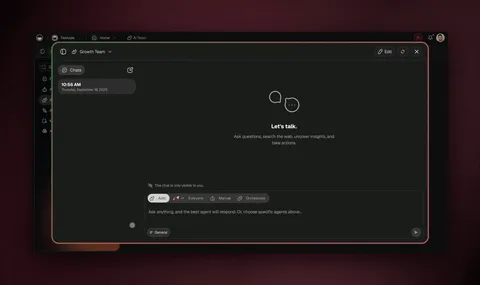
Taskade Agents v2: specialist agents with custom tools, shared persistent memory, multiple project views, 100+ integrations, MCP support — all in a browser.
What you get with Taskade Genesis: one-prompt live apps (150,000+ built), AI agents with built-in tools, multi-agent collaboration plus orchestration mode, 15+ frontier models from OpenAI, Anthropic, Google, and open-weight providers, and 100+ bidirectional integrations — no Docker, no API keys, no dedicated machine. David, an IT program manager with no engineering team, used Taskade Genesis to ship a production project dashboard (Customers, Jobs, Invoices, Team) entirely from prompts — the kind of "Mission Control" OpenClaw power users build by hand over a weekend.
Start with Taskade Genesis → — build your first agent in under 5 minutes, free forever tier, no credit card.
The Taskade Agent Architecture (at a glance)
        ┌──────────────────────────────────────────┐
        │             WORKSPACE DNA                 │
        │                                           │
        │   ┌────────┐  ┌────────────┐  ┌────────┐ │
        │   │ MEMORY │─▶│INTELLIGENCE│─▶│EXECUTE │ │
        │   │projects│  │  agents    │  │automate│ │
        │   └────▲───┘  └─────▲──────┘  └───┬────┘ │
        │        │            │             │      │
        │        └────────────┴─────────────┘      │
        │              (feedback loop)              │
        └──────────────────────────────────────────┘
                           │
          ┌────────────────┼────────────────┐
          ▼                ▼                ▼
    built-in    15+ Frontier       100+
    Agent Tools     Models             Integrations
    (search, code,  (OpenAI,           (Slack, Notion,
     file, browser) Anthropic, Google) GitHub, Stripe)
Compare that with OpenClaw's single-binary-on-your-laptop model and the team use-case argument writes itself. For a deeper tour, see our ultimate guide to Taskade Genesis and the agentic engineering platforms roundup.
Taskade is a managed AI workspace that delivers the same core promise as OpenClaw — autonomous agents with persistent memory, custom tools, and multi-model support — but for teams, in a browser, with zero setup.
Where OpenClaw is the homebrew Linux of AI agents, Taskade is the managed platform. You describe what you need, and it builds.
What Makes Taskade Different
No-Code Agent Builder: Create custom AI agents with persistent memory, built-in tools, custom slash commands, and knowledge bases — no Docker, no terminal, no API keys. Agents run in a managed cloud workspace accessible from any browser.
Genesis Apps: Taskade Genesis takes the "Mission Control" concept that OpenClaw power users build manually and makes it instant. Describe what you need — a CRM, a project tracker, an onboarding portal, a feedback dashboard — and Taskade Genesis builds it as living software that your whole team can use. Custom domains, password protection, embeddable widgets.
Multi-Agent Teams: Unlike OpenClaw's single-agent architecture, Taskade supports multiple custom AI agents per workspace, each with different tools, knowledge, and personalities. Agents collaborate on shared projects with real-time updates.
Multi-Model Support: Access 15+ frontier models from OpenAI, Anthropic, and Google — all from the same workspace. No API key juggling. OpenClaw's "brains and muscles" pattern is built-in as a platform feature.
Workspace DNA: Memory + Intelligence + Execution. Every project remembers context, every agent reasons over that context, and every automation executes based on agent output. Learn more about how this architecture powers Taskade Genesis apps. This self-reinforcing loop is what OpenClaw users build manually with heartbeats and cron jobs — Taskade provides it natively.
Enterprise-Grade Security: SOC 2 compliance, role-based access (Owner to Viewer), team permissions, encrypted data at rest and in transit. No plaintext credentials, no unaudited skill execution.
100+ Integrations: Connect to Slack, Notion, Google Workspace, Shopify, GitHub, and 100+ more — no custom scripting required.
Taskade vs. OpenClaw
| Feature | OpenClaw | Taskade |
|---|---|---|
| Setup | Docker + terminal + API keys | Browser — instant |
| Agents | Single personal assistant | Multiple custom agents per workspace |
| Memory | Local files, vector embeddings | Persistent workspace memory across all agents |
| Tool Building | Agent vibe codes custom tools | Genesis Apps — build apps from prompts |
| Collaboration | Single user only | Real-time multi-user with RBAC |
| Automation | Cron jobs (heartbeats) | durable execution with branching, looping, 100+ integrations |
| Security | Admin access, plaintext creds | SOC 2, encrypted, role-based access |
| Models | BYOK (any model) | 15+ models from OpenAI, Anthropic, Google |
| Cost | API tokens + hardware | Free tier / plans from $10/mo |
| Views | Terminal/Dashboard | Multiple views — List, Board, Calendar, Table, Mind Map, Gantt, Org Chart |
150,000+ Genesis Apps built — from CRMs and project trackers to onboarding portals and client dashboards, each with custom domains, password protection, and embeddable widgets.
The Cost Advantage
OpenClaw users pay API tokens ($10–$1,000+/month) plus hardware ($600+ Mac Mini). MyClaw.ai charges $19–79/month just for hosting — API costs are extra. Taskade Genesis includes 15+ AI models, the workspace, automations, and hosting — starting free, with plans from $10/month. No hidden API bills.
Who It's For
Taskade is the best OpenClaw alternative if you need:
- AI agents for a team (not just one person)
- No-code setup — non-technical users can build agents in minutes
- Enterprise security — SOC 2, RBAC, audit trails
- Structured workflows — project management + AI agents in one platform
- A managed platform — no Docker, no dedicated hardware
Try it free: Create a Taskade account and build your first AI agent in minutes. Explore ready-made AI apps in the Community Gallery to see what's possible. Or browse our AI Agents hub for templates and use cases.
Related reading: Best Claude Code alternatives · Best Devin AI alternatives · Best Genspark alternatives · Free AI app builders · What is agentic engineering? · Agentic engineering platforms
2. NanoClaw — Best for Security-First Self-Hosting
NanoClaw is a security-hardened fork of OpenClaw that wraps every skill execution in container isolation, adds mandatory permission gates for file system and network access, and includes a built-in audit log.
It was created in direct response to the ClawHavoc supply chain attack and addresses OpenClaw's biggest security gaps:
- Container-isolated skill execution — each skill runs in its own sandbox
- Mandatory permission gates — file system, network, and API access require explicit approval
- Audit logging — every action is recorded with timestamps and context
- Signed skill verification — skills must pass integrity checks before execution
- Credential encryption — no more plaintext API keys
NanoClaw maintains most of OpenClaw's functionality — messaging integrations, heartbeat system, memory — while treating security as a first-class concern rather than an afterthought.
AI-Native Architecture: Unlike OpenClaw's 430,000 lines of code (described by developers as "Frankenstein's monster with software plugged into itself"), NanoClaw is built AI-native from the ground up — lightweight, modular, and easy for AI coding agents like Claude Code to customize directly. NanoClaw is also the first claw-family agent to support agent swarms — coordinated multi-agent pipelines where specialized agents handle scraping, research, analysis, and presentation in sequence. It can dynamically rewrite its own code and integrates with Telegram for mobile-first interaction.
Limitations: Still requires Docker and terminal setup. Still single-user. Community is smaller than OpenClaw's, so fewer community-built skills are available.
Best for: Users who want OpenClaw's agent capabilities but need to run it in security-sensitive environments — personal finance automation, healthcare data, or business workflows where a breach would be catastrophic.
Security Ecosystem: NanoClaw's security-first approach is further strengthened by third-party tools like ClawSK (Claw Security Kit), developed by Prompt Security (a SentinelOne subsidiary). ClawSK provides specialized security skills — Heartbeat (CVE scanning), Soul Guardian (behavioral monitoring), and Watchdog (runtime anomaly detection) — that install directly into the OpenClaw/NanoClaw skills folder. When ClawSK's heartbeat runs, it produces detailed reports covering sanity checks, version conflicts, exploitable versions, and actionable remediation items. For teams that need security without bolt-on tooling, managed platforms like Taskade provide SOC 2 compliance and enterprise-grade security natively.
3. Claude Code — Best for AI-Assisted Software Development
Claude Code is Anthropic's terminal-based agentic AI coding tool — and it's becoming a category of its own.
Unlike OpenClaw (a general-purpose personal assistant), Claude Code is laser-focused on software development: reading codebases, writing and editing code, running tests, managing git workflows, and deploying applications. It hit $1 billion in annualized revenue within six months of launch and accounts for approximately 4% of all public GitHub commits as of February 2026.
Key features:
- Agent Teams — coordinate multiple Claude Code instances working in parallel (frontend, backend, testing)
- 1-million-token context — entire codebases fit in a single context window
- Git integration — commits, PRs, branch management from natural language
- MCP protocol — connect to external tools and data sources
MCP Ecosystem Evolution: The MCP protocol that Claude Code supports is evolving rapidly. Community tools like MCP2 CLI address context window bloat by converting MCP servers into bash commands at runtime — with caching (1-hour TTL), TUNE token-efficient output format, and the ability to redirect large outputs to files instead of loading everything into context. Claude Code's --allowedTools flag partially addresses this by dynamically loading tools as needed. The Superpowers plugin (58K GitHub stars in 24 hours) adds strict TDD enforcement with git worktree isolation for sub-agents, and auto research methods enable self-improving agent skills through iterative eval suites.
Claude Code vs OpenClaw — Head-to-Head (100 Hours Tested):
YouTuber Nate Herk ran a structured 100-hour comparison across 8 metrics, scoring each tool out of 10. The results capture the fundamental tradeoff:
| Metric | Claude Code | OpenClaw | Winner |
|---|---|---|---|
| Out-of-box ability | 7 | 9 | OpenClaw |
| Setup friction | 8 | 6 | Claude Code |
| Cost | 8 | 6 | Claude Code |
| Power & access | 7 | 10 | OpenClaw |
| Security | 7 | 3 | Claude Code |
| Everyday usability | 6 | 9 | OpenClaw |
| Actual ROI | 8.5 | 6 | Claude Code |
| Total | 51.5 | 49 | Claude Code |
The verdict: "Claude Code wins on security, proven results, and lower risk. OpenClaw wins on accessibility, ambient presence, and it feels like the future." Notably, Herk concluded: "Everything I'm doing with OpenClaw I could be doing in Claude Code."
The cost reality: 80 million tokens in one OpenClaw session cost ~$80 in API fees. The same work on Claude Code Max ($200/month) would have been a fraction of the monthly subscription.
Limitations: Coding-only — no email, calendar, smart home, or general personal automation. Uses only Anthropic's Claude models (no model-agnostic support). Requires Pro subscription ($20/month).
Best for: Software developers who want an autonomous AI coding agent rather than a general-purpose assistant.
The Taskade angle: Claude Code wins on proven ROI but is coding-only. OpenClaw wins on ambient presence but has critical security gaps. Taskade Genesis combines the best of both: always-on AI agents you can talk to from any browser (like OpenClaw's ambient presence) + structured project delivery with multiple views and reliable automation workflows (like Claude Code's proven ROI) + enterprise security with SOC 2 and RBAC (better than both). No API bills, no VPS, no security audits.
4. IronClaw — Best for Memory-Safe Execution
IronClaw is NEAR AI's Rust rewrite of OpenClaw with WebAssembly (WASM) sandboxing — addressing the fundamental security architecture that makes OpenClaw vulnerable.
By rewriting the core in Rust (a memory-safe language) and running skills in WASM sandboxes, IronClaw eliminates entire categories of vulnerabilities:
- No buffer overflows — Rust's ownership model prevents memory corruption
- WASM sandbox — skills run in isolated virtual machines with no direct system access
- Capability-based security — skills request specific permissions (network, file, API) that users must grant
- Audit trail — all permission grants and skill actions are logged
Limitations: Smaller skill ecosystem than OpenClaw. Some OpenClaw skills require porting to WASM. Still a single-user tool with no collaboration features.
Best for: Security researchers, privacy-conscious users, and anyone running AI agents in environments where a breach could cause serious damage.
5. Nanobot — Best Lightweight Python Agent
Nanobot is an ultra-lightweight AI agent written in approximately 4,000 lines of Python. If OpenClaw is a Swiss Army knife, Nanobot is a scalpel.
Install with a single pip install command, configure with a YAML file, and you have a working AI agent in under five minutes. No Docker. No container orchestration. No 50+ integration framework.
Key features:
- Minimal footprint — runs on any Python 3.10+ environment
- YAML configuration — simple, human-readable config files
- Plugin system — add capabilities through lightweight Python modules
- Multi-model support — works with OpenAI, Anthropic, local models
Limitations: Far fewer integrations than OpenClaw. No GUI. Limited community ecosystem. No persistent memory out of the box (requires plugin).
Best for: Python developers who want a minimal, understandable AI agent they can customize and extend without dealing with OpenClaw's complexity.
6. memU — Best for Long-Term Memory
memU differentiates itself with a knowledge graph memory system that goes far beyond OpenClaw's vector embeddings.
Where OpenClaw stores memories as flat text chunks, memU builds a structured graph of entities, relationships, and temporal context. It knows not just what you said, but when, why, and how it connects to everything else you've told it.
Key features:
- Knowledge graph — structured relationships between concepts, people, projects
- Time-aware reasoning — understands when things happened and how context evolves
- Proactive recall — surfaces relevant memories before you ask
- Memory visualization — inspect and edit the agent's knowledge graph
Limitations: Heavier resource requirements than OpenClaw due to graph database. Docker setup required. Single-user only. Smaller skill ecosystem.
Best for: Users who want an AI assistant with genuinely deep, structured memory — researchers, executives, and anyone whose workflows involve complex, long-running contexts.
7. Kimi Claw — Best Browser-Based OpenClaw
Kimi Claw is Moonshot AI's managed OpenClaw implementation running natively inside the Kimi web interface. Launched February 15, 2026, it eliminates OpenClaw's biggest barrier: setup friction.
- 5,000+ ClawHub skills pre-loaded
- 40GB cloud storage for agent memory and files
- Persistent cross-session memory
- BYOC (bring your own credentials) for external AI models
- Zero setup — open kimi.com and start
Limitations: Dependent on Moonshot AI's infrastructure and availability. Data resides on Moonshot's servers (privacy considerations for sensitive data). Limited customization compared to self-hosted OpenClaw. Primarily serves the Chinese market.
Best for: Non-technical users who want the OpenClaw experience without any setup, especially those comfortable with a Chinese cloud provider.
Exploring the AI agent landscape? These sibling posts go deeper on specific tools and categories:
- Best Claude Code Alternatives — 9 terminal-native AI coding agents ranked
- Best Devin AI Alternatives — autonomous coding agents compared
- Best Genspark Alternatives — AI workspace tools for teams
- Free AI App Builders — every free tier tested and ranked (52% CVR guide)
- What Is Agentic Engineering? — the discipline behind reliable AI agents
- Best AI Agent Builder Platforms — orchestration tools compared
8. MaxClaw (MiniMax Agent) — Best for Cross-Platform Managed OpenClaw
MaxClaw by MiniMax provides one-click OpenClaw deployment running 24/7 in the cloud — the most accessible managed OpenClaw experience available, with native apps for Windows, Mac, Linux, iOS, and Android.
Powered by MiniMax's M2.5 model (80% SWE-bench Verified, 100 tokens/second), MaxClaw goes beyond basic OpenClaw replication:
- One-click deployment — live in under 30 seconds, no Docker or terminal
- Pre-trained experts — specialized configurations for trading, research, coding, and more
- Cross-platform — web, desktop, iOS, and Android (unlike most alternatives that are Mac-only)
- Parallel task execution — run browser automation and document creation simultaneously
- Telegram integration — send commands from your phone, receive PDFs and reports back
- Scheduled skills — daily news briefings, file organization, recurring automations
- Long-term memory — persistent context across all conversations
- 200 daily free credits — basic usage at no cost
Limitations: Dependent on MiniMax infrastructure. Uses MiniMax M2.5 model primarily (limited model choice compared to self-hosted OpenClaw). Cloud-only — no local-first option.
Best for: Users who want OpenClaw's always-on autonomous agent experience with cross-platform mobile access, especially on Windows and Android where other claw-family tools are unavailable.
Pricing: $19/month (no additional API fees) / Free daily credits available
9. TrustClaw — Best Cloud-Hosted Agent
TrustClaw offers cloud-hosted AI agents with OAuth authentication and sandboxed execution — the enterprise version of OpenClaw's model.
Key features:
- OAuth integration — connect services securely without sharing raw API keys
- Sandboxed execution — skills run in isolated environments
- 1,000+ pre-built tools — curated and security-reviewed
- Web dashboard — manage your agent through a browser interface
Limitations: Proprietary platform — not fully open source. Smaller community. Pricing can scale with usage.
Best for: Users who want a cloud-hosted personal AI assistant with better security defaults than OpenClaw, without managing their own infrastructure.
10. PicoClaw — Best for Edge/IoT Devices
PicoClaw pushes the autonomous AI agent concept to its extreme: an AI agent that runs on microcontrollers with less than 1MB RAM.
It strips OpenClaw down to its essential core — scheduling, messaging, and lightweight model inference — and compiles it for embedded devices. Imagine an AI agent running on a Raspberry Pi Zero, an ESP32, or a smart home hub.
Limitations: Extremely limited capabilities compared to full OpenClaw. Can only run small local models or act as a thin client to cloud APIs. No GUI.
Best for: IoT developers, embedded systems engineers, and hobbyists building AI-powered hardware projects.
11. ZeroClaw — Best for Ultra-Low-Cost Deployment
ZeroClaw is a complete AI agent in a single Rust binary that runs on $10 hardware with less than 5MB RAM.
It's designed for deployment in resource-constrained environments — developing countries, older hardware, offline scenarios — where neither cloud subscriptions nor powerful hardware are available.
Limitations: Limited to text-based interactions. No browser automation. Requires cloud API for full LLM capabilities.
Best for: Users who need an AI agent on extremely limited hardware or in bandwidth-constrained environments.
12. SuperAGI — Best Multi-Agent Orchestration Framework
SuperAGI is an open-source autonomous agent framework that focuses on multi-agent orchestration — running multiple specialized agents that collaborate on complex tasks.
Unlike OpenClaw's single-agent model, SuperAGI lets you spin up teams of agents: one for research, one for writing, one for coding, each with its own tools and memory. It's closer to how multi-agent systems work in enterprise settings.
Key features:
- Multi-agent orchestration — agents collaborate on shared goals
- Tool marketplace — community-built tools and integrations
- Performance telemetry — monitor agent performance and costs
- Model-agnostic — works with OpenAI, Anthropic, local models
Limitations: Docker setup required. Steeper learning curve than single-agent tools. Can be resource-intensive with multiple agents.
Best for: Developers building complex multi-agent workflows who want more orchestration control than OpenClaw provides.
13. Moltworker — Best for Serverless Deployment
Moltworker runs AI agents on Cloudflare Workers — serverless edge functions that execute globally with low latency and per-request pricing.
Instead of running a 24/7 Docker container, Moltworker agents wake up on demand, process tasks, and go dormant. You pay only for execution time.
Limitations: Cloudflare Workers have execution time limits. Not suitable for long-running tasks. Limited local storage.
Best for: Users who want AI agent capabilities without 24/7 infrastructure costs — especially for event-driven workflows like email processing, webhook handlers, and scheduled tasks.
14. AnythingLLM — Best Local LLM Platform
AnythingLLM is a local-first LLM platform that lets you run AI models on your own hardware with a clean desktop GUI.
It's not an "agent" in the OpenClaw sense — it doesn't autonomously manage your email or build dashboards while you sleep. But it provides a solid foundation for local AI with document ingestion, RAG (retrieval-augmented generation), and multi-model support.
Key features:
- Desktop GUI — no terminal required
- Local model support — Ollama, LM Studio, and others
- Document ingestion — PDF, web pages, code repositories
- RAG pipeline — query your documents with AI
Limitations: No autonomous agent capabilities. No messaging integrations. No heartbeat/cron system. More of a "local ChatGPT" than an agent.
Best for: Users who want a private, local AI for document Q&A and general chat — without the complexity or security risks of full agent frameworks.
15. Agent S3 (Simular AI) — Best for Autonomous Computer Use
Agent S3 by Simular AI is an autonomous agent focused on computer use — clicking, typing, navigating GUIs, and executing multi-step workflows across desktop applications.
While OpenClaw interacts primarily through messaging apps and APIs, Agent S3 watches your screen and operates your computer directly — closer to Anthropic's computer use feature than OpenClaw's messaging-first approach.
Limitations: Requires screen access (privacy implications). Limited to visual tasks. No messaging integrations. Research-stage project.
Best for: Users who need AI to automate GUI-based workflows that don't have APIs — form filling, legacy application interaction, multi-app workflows.
16. Jan.ai — Best Private Local AI Assistant
Jan.ai is a desktop application for running AI models locally with a focus on privacy and ease of use.
Like AnythingLLM, it's more of a local chat interface than an autonomous agent. But its clean UI, one-click model downloads, and offline-first design make it one of the most accessible ways to run AI locally.
Key features:
- One-click model downloads — browse and install models from a marketplace
- Offline-first — works without internet after model download
- Desktop app — macOS, Windows, Linux
- API compatible — drop-in replacement for OpenAI API
Limitations: No agent capabilities. No integrations. No automation. Chat interface only.
Best for: Privacy-conscious users who want a simple, local AI chat experience without cloud dependencies.
💼 The OpenClaw Business Ecosystem: How People Are Making Money
OpenClaw's explosive growth has spawned an entire service economy. YouTube creators, freelancers, and agencies are building businesses around deploying and managing OpenClaw for local businesses that lack technical expertise.
Three Emerging Business Models
1. AI Automation Agency ($500–$1,000 setup + retainer)
Businesses like plumbers, HVAC companies, and service providers rely on phone and text inquiries. When customers call and nobody answers, they go to the competition. OpenClaw agents monitor phone lines and texts via WhatsApp or Telegram, auto-responding to missed calls with personalized follow-ups — keeping leads warm 24/7. Operators charge $500–$1,000 setup fees plus monthly retainers for ongoing management.
2. Lead Generation ($50–$500/lead, $1K–$3K retainer)
OpenClaw agents qualify inbound leads by budget, location, and timeline — then push qualified prospects into CRMs like HubSpot. Agencies charge per qualified lead or monthly retainers, using Brave Search API and Apify for automated prospecting.
3. Done-for-You Setup ($750–$2,500 per deployment)
Non-technical business owners don't know what Docker is. Freelancers charge $750–$2,500+ to set up OpenClaw on a VPS or MyClaw.ai, connect it to the business's communication channels, train it on FAQs, pricing, and customer avatars, then hand over a working AI assistant. Some charge as high as $5,000 for businesses where the agent generates $50K–$100K in additional annual revenue.
Managed Hosting: MyClaw.ai
MyClaw.ai is a managed OpenClaw hosting platform that eliminates all technical setup. Users select a plan (starting at $40), name their bot, enter an API key (or use MyClaw's built-in API with per-model token tracking), and get a running OpenClaw instance in minutes.
The dashboard provides:
- Channel connections — WhatsApp, Telegram, Discord, Slack, iMessage
- Cron jobs — schedule automated tasks (e.g., "check my email at 8 AM and send a daily brief")
- Agent management — overview, sessions, usage/cost tracking
- Skills — install and manage OpenClaw capabilities
- API key flexibility — bring your own (Open Router, Anthropic, OpenAI) or use MyClaw's built-in API
MyClaw represents the growing "managed OpenClaw" wave alongside Kimi Claw and MaxClaw — platforms removing the terminal barrier for mainstream adoption. For teams that need not just a personal assistant but collaborative multi-agent workspaces with enterprise security, Taskade Genesis provides the managed alternative with SOC 2 compliance, RBAC, and 100+ integrations out of the box.
VPS Hosting: The Budget Option
For users who want cloud-hosted OpenClaw without MyClaw's managed layer, VPS providers like Hostinger offer one-click OpenClaw deployment for approximately $10/month (8GB RAM, 100GB disk). This runs 24/7 in the cloud without touching your personal machine — a middle ground between full self-hosting and managed platforms.
Community Use Cases Going Viral
The OpenClaw community has documented increasingly sophisticated use cases that go far beyond basic chatbot interactions:
| Use Case | What It Does | Business Value |
|---|---|---|
| Life Operating System | Calendar management, task scoring by urgency, meeting briefings, weekly reviews, content opportunity spotting | Personal productivity replacement for multiple apps |
| Email Automation | Read-only inbox scanning, draft replies, daily briefings, urgent message flagging via Resend MCP server | Saves 2–3 hours/day for executives handling 50–100 emails |
| TikTok/Instagram Content | Auto-generates slide images with text overlays, posts 3x/day across 4 accounts, drives traffic to B2C apps | Faceless, automated social media presence |
| Influencer Outreach | Research creators, scrape contact info, send personalized emails, negotiate deals, track content delivery | Replaces manual influencer management workflow |
| CRM + Lead Pipeline | Brave API search → Apify scraping → CRM loading → email campaigns → automated follow-ups | End-to-end lead generation on autopilot |
| Meeting → Action Items | Fathom transcript → summary + decisions + action items with owners and due dates → Trello/Linear tickets | Eliminates post-meeting manual follow-up |
| Video Production | Research top videos → analyze hooks → scrape audience language → write scripts → generate with Arcads | YouTube content pipeline from research to upload |
| Proposal Generation | Meeting notes + services.md → professional HTML proposal → markdown draft → PDF export | Automates the most tedious part of freelance sales |
| Overnight Coding | Delegates to sub-agents while operator sleeps, full site rebuilds via Telegram/WhatsApp commands | 24/7 development without hiring |
| DevOps Watchdog | Monitors logs, uptime, deployments → opens tickets or runs remediation automatically | Self-healing infrastructure monitoring |
Notable power users: Jason Calacanis built OpenClaw Ultron — agents managing team attendance, podcast booking, calendar supervision, coding dashboards, and error monitoring across his entire tech stack. Chris Bader automated daily operations, meetings, content, finance, and admin — including an agent that negotiated a $4,200 car discount over email while Bader slept.
Community resources: Claudiverse (community-powered use case directory), OpenClaw Radar (guides, news, security), and playbooks.com (installable skills for meeting-to-action, proposal generation, content repurposing).
Why this matters for alternatives: The OpenClaw business ecosystem proves there's massive demand for AI agent automation — but most clients can't install Docker. If you're evaluating alternatives for business deployment, managed platforms eliminate the setup friction that creates the service opportunity in the first place. Taskade Genesis provides everything a business needs — AI agents, automations, CRM capabilities, and 100+ integrations — without a $2,500 setup fee.
🔱 NemoClaw: NVIDIA's Enterprise Answer to OpenClaw
On March 17, 2026, Jensen Huang took the GTC stage and announced NemoClaw — NVIDIA's enterprise-hardened fork of OpenClaw. The announcement sent shockwaves through the AI agent community.
"OpenClaw is the next ChatGPT. Every enterprise on Earth will want autonomous AI agents — but not with the security posture of a weekend hackathon project."
— Jensen Huang, NVIDIA GTC keynote, March 17, 2026 (CNBC)
Why NVIDIA Built NemoClaw
OpenClaw's explosive growth (247K+ GitHub stars) came with a growing list of enterprise concerns. Cisco researchers found data exfiltration vulnerabilities in standard OpenClaw deployments. China restricted government use of OpenClaw entirely. The ClawHavoc supply chain attack demonstrated that the skill ecosystem was a critical attack surface. And on March 21, CNBC reported that OpenClaw's "ChatGPT moment" was sparking industry concern about AI models becoming commodities — with security as the casualty.
NemoClaw addresses these gaps head-on:
- Enterprise-hardened security — sandboxed skill execution, encrypted credential storage, and mandatory access controls baked into the runtime
- NVIDIA infrastructure — runs on NVIDIA's cloud with GPU-accelerated inference, not your laptop's Docker daemon
- Compliance-ready — designed for regulated industries (healthcare, finance, government) that can't deploy raw OpenClaw
- Enterprise support — backed by NVIDIA's security team, not a volunteer open-source community
- Audit trails — every agent action logged with tamper-proof records for compliance reporting
As TechCrunch reported on March 16: "NVIDIA's NemoClaw could solve OpenClaw's biggest problem: security."
Security Comparison: NemoClaw vs OpenClaw vs Managed Alternatives
| Feature | OpenClaw | NemoClaw (NVIDIA) | NanoClaw | Taskade |
|---|---|---|---|---|
| Credential Storage | Plaintext by default | Encrypted (NVIDIA vault) | Encrypted | Encrypted (SOC 2) |
| Skill Sandboxing | None | GPU-accelerated sandbox | Container isolation | Managed (no skills) |
| Access Controls | None | Enterprise RBAC | Permission gates | Owner to Viewer |
| Audit Logging | None | Tamper-proof logs | Built-in audit log | Full audit trail |
| Compliance | None | Enterprise-grade | Self-managed | SOC 2 certified |
| Data Exfiltration Protection | Vulnerable (Cisco) | Hardened | Partial | Managed infrastructure |
| Supply Chain Security | ClawHavoc-vulnerable | Signed skills | Signed verification | N/A (managed) |
| Infrastructure | Self-hosted Docker | NVIDIA Cloud | Self-hosted Docker | Managed cloud |
| Team Support | Single user | Enterprise multi-user | Single user | Multi-agent teams |
For teams that need enterprise AI agents without managing infrastructure or security, Taskade Genesis provides SOC 2 compliance, RBAC, and 100+ integrations out of the box — no forks, no Docker, no security audits required.
🎯 The Three-Axis Framework: How to Map Any Agent Product
Every OpenClaw competitor — from NemoClaw to Perplexity Computer to Anthropic Dispatch — is making a different strategic bet. The media frames this as a simple spectrum of control, but that framing leads to bad decisions. Three axes actually determine whether an agent product works for you.
Every major company responding to OpenClaw made a different bet. This framework maps where each product actually sits — and which one is right for you.
Axis 1: Where Does Your Agent Run?
Local, cloud, or hybrid? This determines your data privacy posture, your security surface area, and who is responsible when the agent deletes your inbox.
Axis 2: Who Orchestrates the Intelligence?
Single model, multi-model routing, or model-agnostic? This determines cost, work quality, and whether you are locked into a vendor.
Axis 3: What Is the Interface Contract?
Messaging app, dedicated desktop app, phone, browser? How you interact with your agent determines the product experience more than most people realize.
Strategic Positioning Map (March 2026)
| Product | Where It Runs | Intelligence Model | Interface | Strategic Bet | Best For |
|---|---|---|---|---|---|
| OpenClaw | Local (your machine, your API keys) | Model-agnostic (plug any LLM) | Configurable (Telegram, WhatsApp, Signal, Slack) | Full sovereignty — user owns everything | Technical power users who want maximum control |
| Taskade Genesis | Managed cloud | Multi-model (15+ frontier models) | Browser + mobile app | Team workspace with agents, automations, and apps built in | Teams and non-technical users who need deployed apps |
| Perplexity Computer | Cloud (virtual box) | Perplexity-managed (opaque) | Dedicated app | Delegation — describe the outcome, system decomposes into subtasks | Knowledge workers and enterprise teams willing to pay $200/mo |
| Manis (Meta) | Hybrid (local Meta models + cloud) | Meta-selected (kept dark) | Meta ecosystem integration | Distribution — capture the agent moment inside Meta's 3B-user ecosystem | Consumers and small businesses already in Meta's ecosystem |
| Anthropic Dispatch | Cloud (Claude infrastructure) | Claude only (single model) | Phone → desktop (messaging-first) | Safety — the secure single-threaded option | Non-tech professionals who already use Claude |
| NemoClaw | Local-first (NVIDIA hardware) | NVIDIA-managed (model constraints) | OpenShell runtime | Enterprise security layer over OpenClaw | Enterprises in regulated industries |
| Lovable | Cloud | Lovable-managed | Browser (prompt-to-app) | Pivoting from vibe coding to general-purpose agent execution | Users who want familiar UI with expanding capabilities |
The Relentless Simplification Thesis
Every vertical tool — app builder, analytics platform, document generator — is under pressure to collapse into a single conversational agent that handles everything. The products that survive this compression will either go deep enough to have specific capability that doesn't exist anywhere else, or have general enough execution to become a default delegation layer. The middle is where products go to die: good but not best-in-class, not general enough to be general purpose.
OpenClaw set the terms of this debate. Everyone else is playing on the graph it defined. The question of 2026 is how many niches exist in the OpenClaw ecosystem — and which bet on sovereignty, delegation, distribution, or safety wins for each subset of users.
For teams that need the broadest capability without technical complexity — AI agents, automations, Genesis Apps, and 100+ integrations in one managed workspace — Taskade Genesis occupies the high-capability, low-complexity quadrant that no OpenClaw fork or competitor currently matches.
🔀 OpenClaw Fork Ecosystem: A Comparison
The OpenClaw codebase has spawned multiple specialized forks, each targeting different use cases. Here's how they compare:
| Fork | Stars | Focus | Security | Enterprise Ready |
|---|---|---|---|---|
| NemoClaw (NVIDIA) | New (Mar 2026) | Enterprise security | Hardened (NVIDIA vault, sandbox) | Yes |
| NanoClaw | ~5K | Security-first self-hosting | Container isolation, ClawSK | No |
| IronClaw | ~3K | Memory-safe performance | Rust + WASM sandbox | No |
| MaxClaw (MiniMax) | ~8K | Managed cross-platform | MiniMax-managed | Partial |
| TrustClaw | ~4K | Safety-focused cloud hosting | OAuth + sandbox | Partial |
All forks inherit OpenClaw's core agent capabilities (heartbeats, skills, memory) but diverge on security, hosting, and enterprise readiness. For teams evaluating options, the key question is: self-hosted fork vs managed platform?
Decision Tree: Self-Hosted Fork vs Managed Platform
Full Feature Comparison Matrix
| Feature | Taskade | NanoClaw | Claude Code | IronClaw | MaxClaw | Nanobot | OpenClaw |
|---|---|---|---|---|---|---|---|
| Setup Complexity | None (browser) | Docker | npm install | Rust binary | Browser/Mobile app | pip install | Docker + config |
| Autonomous Agent | Yes | Yes | Coding only | Yes | Yes | Yes | Yes |
| Multi-Agent | Yes | No | Agent Teams | No | Parallel tasks | No | No |
| Team Collaboration | Yes (real-time) | No | No | No | No | No | No |
| Persistent Memory | Yes | Yes | Session-based | Yes | Yes | Plugin | Yes |
| Custom Tools | built-in | OpenClaw skills | MCP tools | WASM skills | Pre-trained experts | Python plugins | Skills + ClawHub |
| Model Support | 15+ models | BYOK | Claude only | BYOK | MiniMax M2.5 | BYOK | BYOK |
| Security | SOC 2, RBAC | Container isolation | Anthropic-managed | WASM sandbox | MiniMax-managed | Minimal | Plaintext creds |
| Security Tooling | Built-in (SOC 2) | ClawSK compatible | Anthropic-managed | WASM sandbox | MiniMax-managed | Minimal | ClawSK compatible |
| Automation | durable workflows | Heartbeats | Git workflows | Heartbeats | Scheduled skills | Cron | Heartbeats |
| App Builder | Genesis Apps | No | No | No | No | No | Mission Control |
| Integrations | 100+ | 50+ (OpenClaw) | Git, MCP | 50+ (OpenClaw) | Telegram + growing | Plugins | 50+ |
| Pricing | Free / $10+ mo | Free (OSS) | $20/mo | Free (OSS) | $19/mo | Free (OSS) | Free (OSS) + API |
Do You Actually Need an Agent Harness? The Paradigm Check
Before choosing between sixteen OpenClaw alternatives, check whether an always-on agent harness is even the right paradigm for the job — a surprising share of "I need OpenClaw" use cases are really workflow automations wearing a trench coat.
Ask three questions:
- Does the job need open-ended judgment, or a repeatable sequence? "Watch my inbox and handle whatever comes up" is agent territory. "Every Monday, summarize new form entries and post them to Slack" is a workflow — a trigger, steps, and an output. Workflow tools run that cheaper, more predictably, and without a personality. See the n8n-class alternatives for that lane.
- Does it need to run when you're not around — and are you prepared to own that? Always-on autonomy is the claw superpower, but it comes bundled with a server, a token bill that re-pays context on every heartbeat, and the security surface this article keeps returning to. If "no" to ownership, a managed platform runs persistent AI agents without handing you the pager.
- Who maintains it in month three? A solo tinkerer can babysit a VPS. A team needs shared visibility, permissions, and someone else patching the infrastructure — which is the line between the self-hosted column and the managed column in the scorecard above.
The honest mapping: harness (OpenClaw and its forks) for open-ended personal autonomy you're willing to operate; workflow tool for high-volume repeatable pipelines; managed workspace (Taskade Genesis — agents, automations, and apps in one place) when the answer to "who maintains it?" is "not me." For the deeper version of that comparison, see Claude Code vs n8n and agentic workflows explained.
How to Choose the Right OpenClaw Alternative
Choose Taskade if you need AI agents for a team, want no-code setup, require enterprise security, or need a managed platform with automations, multi-agent workflows, and Genesis Apps.
Choose NanoClaw if you want OpenClaw's capabilities with proper security — container isolation, permission gates, and audit logging.
Choose Claude Code if your primary need is AI-assisted software development with Agent Teams for parallel coding.
Choose IronClaw if you need memory-safe execution and WebAssembly sandboxing for running agents in security-sensitive environments.
Choose Nanobot if you want the simplest possible self-hosted agent — pip install and go.
Choose Kimi Claw if you want browser-based OpenClaw with zero setup (via Moonshot AI).
Choose MaxClaw if you want managed OpenClaw with cross-platform mobile access (iOS, Android, Windows) and one-click deployment at $19/month.
Choose a local tool (AnythingLLM, Jan.ai) if you want private, local AI chat without agent capabilities.
Decision Tree: Which OpenClaw Alternative Is Right for You?
Ready to stop fighting Docker and start shipping agents? Taskade Agents v2 gives you built-in tools, 15+ frontier models, multi-agent teams, and 100+ integrations on a free tier. Start with Taskade Genesis → or browse the AI Agents hub.
💬 Frequently Asked Questions
What is OpenClaw?
OpenClaw is an open-source autonomous AI personal assistant created by Peter Steinberger that runs locally on your devices. Originally named ClawdBot (November 2025), then Moltbot, it was renamed to OpenClaw in January 2026 after an Anthropic trademark dispute. With 247,000+ GitHub stars and 35,000+ forks, it's the fastest-growing open-source AI repository in history. In February 2026, Steinberger joined OpenAI and the project transitioned to an independent foundation.
Is OpenClaw safe to use?
OpenClaw has significant security concerns: admin-level system access, plaintext credential storage, no skill sandboxing, the ClawHavoc supply chain attack (341 malicious skills, 9,000+ compromised installations), and CVE-2026-25253. The project's FAQ states there is no perfectly secure setup. For security-sensitive use cases, consider alternatives like NanoClaw, IronClaw, or managed platforms like Taskade with SOC 2 compliance.
What is the best free OpenClaw alternative?
For self-hosted: NanoClaw (security-first), Nanobot (lightweight), or IronClaw (memory-safe) are all free and open-source. For managed: Taskade offers a free tier with AI agent access. Kimi Claw by Moonshot AI also offers free browser-based OpenClaw.
Can OpenClaw work for teams?
No. OpenClaw is designed as a single-user personal assistant. For team use, Taskade provides multi-agent workspaces with real-time collaboration, role-based access controls, shared agent memory, and enterprise features.
What is the difference between OpenClaw and Taskade?
OpenClaw is a local-first, single-user AI assistant for power users that requires Docker and terminal setup. Taskade is a managed AI workspace for teams with no-code agent creation, multiple project views, Genesis Apps, durable automations, and enterprise security. OpenClaw excels at personal automation; Taskade excels at team productivity and structured AI workflows.
What happened to OpenClaw's creator?
Peter Steinberger joined OpenAI on February 15, 2026, to lead next-generation personal AI agent development. OpenClaw transitioned to an independent open-source foundation sponsored by OpenAI, maintaining its open-source status. Both Mark Zuckerberg and Sam Altman competed to hire Steinberger.
Which OpenClaw alternative supports the most AI models?
Taskade supports 15+ frontier models from OpenAI, Anthropic, and Google out of the box. Self-hosted alternatives (OpenClaw, NanoClaw, IronClaw, Nanobot) support any model via BYOK (bring your own key), but require manual API key configuration for each provider.
Is Kimi Claw the same as OpenClaw?
Kimi Claw runs OpenClaw natively inside Moonshot AI's Kimi web interface — same framework, but managed in the cloud with no Docker or terminal required. It includes 5,000+ pre-loaded skills, 40GB storage, and persistent memory. It's a managed OpenClaw, not a fork or alternative framework.
What is the best OpenClaw alternative for non-technical users?
Taskade — sign up in your browser and build AI agents with no code, no terminal, and no API keys. Kimi Claw is another option for non-technical users who specifically want the OpenClaw experience.
Do OpenClaw alternatives support automations?
Yes, but the approach varies. OpenClaw uses cron-based heartbeats. Taskade uses durable execution with branching, looping, filtering, and 100+ integrations. NanoClaw and IronClaw inherit OpenClaw's heartbeat system. Claude Code automates git workflows but not general tasks.
📚 Further Reading
- What Is Agentic Engineering? — The discipline behind building reliable AI agent systems
- The History of OpenClaw — From ClawdBot to Moltbot to OpenClaw: the full timeline, MyClaw economy, and community use cases
- How to Build AI Agents Without Code — Complete guide to no-code agent creation
- Multi-Agent Systems: Building Your AI Team — Architectural patterns for agent collaboration
- Best Vibe Coding Tools & AI App Builders — How agent-powered app builders compare
- Open-Source AI Agents & Frameworks — Where the agent ecosystem is heading
- Best Agentic Engineering Platforms — AI agent orchestration tools compared
- Best Genspark Alternatives — AI workspace tools for teams, ranked
- Free AI Prompt Generator: 15 Tools Tested — write sharper agent prompts, then ship them
- Build Your First AI Agent — start free in your browser, no Docker or API keys
- AI Agents Hub — templates, use cases, and the tool-equipped agent builder
- AI Prompt Templates — 1,000+ ready-made prompts for Taskade AI agents
- AI Automations — Automate workflows with AI agents and 100+ integrations
- AI Converters — Transform content between formats with AI
Ready to try the #1 OpenClaw alternative? Taskade Genesis gives you autonomous AI agents, custom tools, persistent memory, and 100+ integrations — in a managed workspace your whole team can use. No Docker. No API keys. No dedicated hardware. Start free →
▲ ■ ● Workspace DNA — Memory + Intelligence + Execution. The self-reinforcing loop that turns OpenClaw's manual heartbeats, cron jobs, and weekend wiring into one managed workspace: every project remembers context, every agent reasons over it, every automation executes from it. That is the alternative David, an IT program manager with no engineering team, used to ship a production project dashboard — Customers, Jobs, Invoices, Team — entirely from prompts.
🚀 AI App Builder: Turn a prompt into a live app — dashboards, portals, CRMs, forms. No code required.
🤖 Custom AI Agents: Build autonomous agents with custom tools, persistent memory, and multi-model support.
🔄 Automations: durable execution with branching, looping, filtering, and 100+ integrations.
🧬 Workspace DNA: Memory + Intelligence + Execution. The self-reinforcing loop that makes Taskade living software.
Ready to build? Create a free account and ship your first AI agent today. 👈