






Short on time? If you want UI code you own, pick v0. If you want a deployed, intelligent app without 60 hours of integration work, see the 7 best v0 alternatives or try Taskade Genesis free.
What is V0?
v0 by Vercel is an AI code generator that turns natural-language prompts into React, Next.js, and shadcn/ui components. Launched October 2023 and rebranded to v0.app in January 2026, it now has 6M+ developers, 80K+ active teams, and an estimated $42M ARR. v0 targets React developers who want production-grade UI scaffolding in minutes instead of hours.
v0 originally launched as v0.dev in October 2023 as an experimental UI component playground, then rebranded to v0.app in January 2026 to reflect its evolution from a component scaffold into a full-stack application builder with a sandbox runtime.
V0 by the numbers (March 2026):
- 6M+ developers on the platform
- 80,000+ active teams using V0 for production work
- ~$42M estimated ARR, growing ~25% month-over-month
- Backed by Vercel, now valued at $9.3 billion
V0 is designed for developers who want to scaffold UI quickly and then customize the code. It's excellent for prototyping and accelerating frontend development.
New in 2026: V0 now includes a sandbox-based runtime for full-stack apps, a Git panel for branch creation and PRs directly from chat, database integrations (Snowflake, AWS), and token-based billing that replaced fixed credit counts.
Where V0 Fits in the AI Builder Landscape
The key distinction: V0 generates components (left side). Code generators produce codebases (middle). Taskade Genesis produces deployed, intelligent systems (right side). The gap between "code" and "live app" is 40-60 hours of integration work.
What Changed in V0 in 2026
V0 has evolved significantly since its October 2023 launch. Here is a timeline of the major changes:
| Date | Event | Impact |
|---|---|---|
| Late 2025 | Sandbox-based runtime launched | Full-stack apps, not just components |
| Jan 2026 | v0.app rebrand from v0.dev | Reflects evolution beyond components |
| Jan 2026 | Git panel added | Branch creation and PRs directly from chat |
| Feb 2026 | Database integrations | Snowflake, AWS connections from within v0 |
| Feb 2026 | Token-based billing | Replaces fixed message/credit counts |
| Mar 2026 | 6M+ users, ~$42M ARR est. | Growing approximately 25% month-over-month |
The sandbox runtime is the biggest shift. V0 can now import GitHub repositories, pull Vercel environment variables, and build complete applications inside a sandboxed environment. This moves V0 from a "component generator" to something closer to a full-stack development environment -- though it remains tightly coupled to the Vercel/Next.js ecosystem.
V0 Pricing
| Plan | Price | What You Get |
|---|---|---|
| Free | $0 | $5/month in credits |
| Premium | $20/month | $20/month in credits, Figma imports, API access |
| Team | $30/user/month | Shared credits, collaboration features |
| Enterprise | Custom | SSO, SLA, dedicated support |
Updated February 2026: V0 switched from fixed credit counts to token-based pricing. Each generation costs a variable number of tokens depending on complexity. The free tier includes $5/month in credits, but complex full-stack generations can consume credits faster than simple component requests. This makes costs less predictable than the previous fixed-credit model.
We Tested It: Building a Contact Manager in v0 vs Taskade Genesis
We built the same contact management app on both platforms to show what "generate code" vs "deploy a system" actually means in practice.
v0 (component generation + manual integration):
- v0 generated a beautiful contacts table, search bar, and detail modal in ~3 minutes (outstanding UI quality)
- We spent 50 minutes wiring Supabase for the database, adding NextAuth for login, building API routes for CRUD, and deploying to Vercel
- No automation — we'd need Zapier ($20/mo) to send welcome emails or sync to HubSpot
- Total time to live app: ~55 minutes. Result: clean React code, beautiful UI, but 50 of those minutes were plumbing
Taskade Genesis (one prompt):
- Described "contact manager with company tracking, deal pipeline, and automated follow-up emails" → live app in 7 minutes
- Board view for deal pipeline, Table view for contacts, Calendar view for follow-ups — all connected automatically
- AI agent trained on contact data suggests next actions. Automation sends follow-up emails via Gmail integration on day 3, 7, 14
- Total time to live app: ~7 minutes. Result: working CRM with intelligence and automation, less UI customization than v0
The takeaway: v0 outputs the best React components in the category — if you're a developer building custom UI, it's unbeatable. Genesis outputs a working business system. For the 80% of apps where "working system" matters more than pixel-perfect UI, the 48-minute gap is decisive.
Should You Use v0? (Decision Tree)
Use v0 if you are a React developer who wants production-grade UI scaffolding and already owns your backend. Skip v0 if you are non-technical, need a database and AI baked in, or want a deployed app instead of a codebase. The flowchart below maps the five most common decision paths based on team, stack, and output needs.
v0 vs Every Major AI Builder: Feature Matrix
Here is the honest, side-by-side feature matrix for the 7 AI app builders most teams consider alongside v0 in 2026. Use it as a first-pass filter before running free-tier trials. Full alternative reviews are linked in the alternatives section below.
| Feature | v0 | Taskade Genesis | Bolt.new | Lovable | Cursor | Claude Code | Windsurf |
|---|---|---|---|---|---|---|---|
| Output | React code | Live deployed app | Project files + preview | Full-stack code | Code in editor | Code in terminal | Code in editor |
| Backend included | Partial (sandbox) | Yes (Workspace DNA) | Partial | Yes (Supabase) | No | No | No |
| Database | BYO | Built-in | BYO | Supabase | BYO | BYO | BYO |
| AI agents | No | 15+ frontier models, 33 tools | No | No | No (chat only) | Agent SDK | Cascade agent |
| Automations | No | 100+ integrations | No | No | No | Tool calls | Tool calls |
| Real-time collab | No | Yes | No | Limited | No | No | No |
| Non-coder friendly | No | Yes | Partial | Partial | No | No | No |
| Free tier | $5 credits/mo | 3,000 credits one-time | Limited daily | Limited daily | Pro trial | API credits | Free tier |
| Starts at | $20/mo | $6/mo | $20/mo | $20/mo | $20/mo | Pay-per-token | $15/mo |
See the full 7-way review in best vibe coding tools compared.
Pricing Comparison: v0 vs the Field
v0 charges $20/mo for Premium, matching Bolt, Lovable, and Cursor — but the real cost is hosting, database, auth, and AI API bills that show up after the generator stops. Taskade Genesis bundles all of that at $6/mo Starter.
| Tool | Free Tier | Entry Paid | Team Plan | What's Bundled |
|---|---|---|---|---|
| v0 | $5/mo credits | $20/mo Premium | $30/user | Code only. Hosting, DB, auth not included |
| Taskade Genesis | 3,000 credits | $6/mo Starter | $16/mo Pro (10 users) | Apps, 15+ models, agents, 100+ integrations, hosting, database |
| Bolt.new | Limited daily | $20/mo Pro | $50/mo Teams | Code + WebContainer preview |
| Lovable | Limited daily | $20/mo Pro | $50/mo Teams | Code + Supabase connection |
| Cursor | Limited requests | $20/mo Pro | $40/user | Editor + AI code completion |
| Claude Code | N/A | Pay-per-token | Team SSO | CLI + Agent SDK access |
| Windsurf | Free tier | $15/mo Pro | $35/user | Editor + Cascade agent |
| Replit Agent | Limited | $20/mo Core | $35/user | Editor + hosting + preview |
Free-Tier Generosity Compared
v0's $5/mo free credits are the tightest in the category for anything beyond a single component. Here is how every major tool's free tier stacks up on total usable generations per month, normalized against a mid-complexity prompt.
Numbers are approximate, compiled from public docs and user reports as of April 2026. Taskade Genesis's 3,000 one-time credits convert to the most mid-complexity full-app generations of any platform in the chart — see free AI app builders for the full methodology.
v0 Workflow vs Taskade Genesis Workflow
v0 stops at code. Taskade Genesis stops at a live, shared app. The sequence diagram below shows what the two flows actually look like from prompt to working software — and where the 60-85 hours of hidden integration work sit inside the v0 path.
The Component-to-App Gap (Visual)
v0 delivers roughly 20% of a working business app. The other 80% is what kills timelines. Here is the structural breakdown of what is actually required to ship a SaaS portal, with v0 covering only the top layer.
 +----------------------------------------------------+
 |  UI Components (React + Tailwind + shadcn/ui)      |  <- v0 ships this (20%)
 +----------------------------------------------------+
 |  Routing, state, API client, forms                 |
 +----------------------------------------------------+
 |  Backend: API endpoints, validation, rate limits   |
 +----------------------------------------------------+
 |  Database: schema, migrations, indexes, backups    |  <- you ship this (80%)
 +----------------------------------------------------+
 |  Auth: OAuth, sessions, RBAC, password reset       |
 +----------------------------------------------------+
 |  AI: model integration, prompts, token budgeting   |
 +----------------------------------------------------+
 |  Automations: webhooks, email, Slack, Stripe       |
 +----------------------------------------------------+
 |  Deploy: CI/CD, env vars, DNS, SSL, monitoring     |
 +----------------------------------------------------+
 |  Ongoing: maintenance, updates, on-call            |
 +----------------------------------------------------+
Taskade Genesis orchestrates all 9 layers from a single prompt through Workspace DNA: Memory (Projects database), Intelligence (15+ frontier models from OpenAI, Anthropic, Google, with 33 built-in agent tools), and Execution (100+ integrations and reliable automation workflows).
What V0 Does Well
1. Beautiful UI Generation
V0 creates polished, production-ready components. The designs look professional out of the box, using modern patterns from shadcn/ui.
"V0 components are genuinely beautiful. I use it to scaffold UI and it saves me hours. The shadcn/ui integration means the code is already using best practices."
— r/nextjs
2. Developer-Friendly Output
The generated code is clean React/Next.js that developers can immediately understand and extend. No proprietary runtime or lock-in.
3. Iteration Speed
You can refine components through conversation. "Make the button larger" or "Add a dark mode variant" and V0 updates the code.
4. Vercel Integration
Deploying V0 output to Vercel is seamless. One click and your component is live.
Where V0 Falls Short
1. Code, Not Apps
V0 generates code, not running applications. You still need to:
- Set up a project
- Connect a database
- Build authentication
- Handle deployment
- Manage state
For non-developers, this is a blocker.
2. No Backend
V0 creates frontends only. You need to build or integrate your own:
- Database
- API endpoints
- Authentication
- File storage
3. No Collaboration
V0 is single-player. There's no real-time editing, commenting, or team workspace.
4. Credit Burnout
Heavy users report burning through credits fast. Complex prompts eat credits quickly.
The Honest Catch: What V0 Reviews Don't Tell You
V0 has improved dramatically in 2026, but there are real trade-offs that most reviews gloss over:
1. Token-based pricing makes costs unpredictable. The shift from fixed credits to token-based billing means you do not know what a generation will cost until it runs. A simple button component might cost pennies, but a full-stack app generation could burn through your monthly credits in a few prompts. Budgeting is harder than with flat-rate tools.
2. Tightly coupled to the Vercel/Next.js ecosystem. V0 outputs React/Next.js code designed for Vercel deployment. If you use Vue, Svelte, or deploy on AWS/GCP, V0 is not a natural fit. The new sandbox runtime deepens this coupling -- database integrations and Git panel features work best within Vercel's infrastructure. This is vendor lock-in by design.
3. Weaker on complex backend logic. While the sandbox runtime added full-stack capabilities, V0 still trails tools like Bolt and Replit for complex backend logic, multi-service architectures, and non-JavaScript backends. If your app is backend-heavy, V0's frontend DNA shows.
4. Each generation costs variable tokens depending on complexity. There is no way to predict costs upfront. A team running dozens of generations per day can see wildly different bills month to month. For teams needing cost predictability, this is a real concern compared to flat-rate platforms like Taskade where unlimited apps are included in every plan.
The Frontend-Only Problem: Why Beautiful Components Aren't Complete Apps
V0 is genuinely impressive at generating beautiful React components. Open V0, describe a UI, and watch it create polished components using modern patterns from shadcn/ui and Tailwind CSS. The output looks professional, the code is clean, and iteration is fast.
But here's the critical gap most people miss: Components are 20% of a working application. The other 80% — backend, database, authentication, AI integration, automation — V0 doesn't touch.
Understanding the Component-to-App Gap
What V0 Delivers: Beautiful, responsive React components
What Business Apps Require: Components + Database + Backend + Auth + AI + Automation + Deployment + Maintenance
Let's break down exactly what happens after V0 generates your components:
The Integration Work After V0 Component Generation
Hour 1-8: Project Setup & Infrastructure
Even with beautiful components from V0, you start with setup work:
Initialize Project (30-60 minutes)
- Create Next.js project structure
- Install dependencies (react-hook-form, zod, etc.)
- Configure TypeScript
- Set up linting and formatting
Database Configuration (3-5 hours)
- Choose database provider (Supabase, PlanetScale, PostgreSQL, MongoDB)
- Design database schema for your use case
- Set up database migrations
- Configure connection pooling
- Create database indexes for performance
Authentication Setup (2-4 hours)
- Choose auth provider (Auth0, Clerk, NextAuth, Supabase Auth)
- Configure OAuth providers (Google, GitHub, etc.)
- Implement protected routes
- Build login/signup flows
- Handle session management
- Set up role-based access control
Hour 9-20: Backend & API Development
V0 components need data. Now you build the backend:
API Endpoints (4-8 hours)
- Create API routes for CRUD operations
- Implement data validation with Zod
- Add error handling and logging
- Set up rate limiting
- Implement pagination for large datasets
- Add API authentication middleware
File Upload System (2-4 hours)
- Choose storage provider (AWS S3, Cloudinary, Vercel Blob)
- Configure upload endpoints
- Implement file size/type validation
- Add image optimization
- Handle file deletion and cleanup
Email System (2-4 hours)
- Choose email provider (SendGrid, Resend, Postmark)
- Create email templates
- Implement notification triggers
- Handle email queue for reliability
- Add email tracking (opens, clicks)
Hour 21-35: AI & Intelligence Layer
Modern apps need intelligent features:
AI Integration (6-10 hours)
- Choose AI provider (OpenAI, Anthropic, etc.)
- Obtain and manage API keys
- Design and engineer prompts for your use case
- Implement streaming responses
- Add token counting and cost management
- Build rate limiting to prevent abuse
- Handle AI errors and fallbacks
- Test AI outputs for quality
Search & Filtering (3-5 hours)
- Implement full-text search
- Build advanced filtering UI
- Optimize database queries
- Add search result ranking
- Cache frequent searches
Hour 36-50: Automation & Integrations
Business workflows need automation:
Webhook System (4-8 hours)
- Build webhook receivers for external services
- Implement webhook security (signature verification)
- Handle retry logic for failed webhooks
- Add webhook logging and monitoring
Third-Party Integrations (6-10 hours)
- Integrate Slack for notifications
- Connect to Stripe for payments
- Add Google Sheets sync for reporting
- Implement CRM webhooks (Salesforce, HubSpot)
- Build Zapier/Make integration endpoints
Hour 51-65: Deployment & DevOps
Getting beautiful components into production:
Deployment Pipeline (4-8 hours)
- Configure Vercel/Netlify deployment
- Set up environment variables for prod/staging
- Configure custom domains and SSL
- Set up CDN and caching strategies
- Configure database connection pooling
- Implement monitoring and error tracking
Performance Optimization (3-5 hours)
- Analyze bundle size and optimize
- Implement code splitting
- Add lazy loading for heavy components
- Optimize images and assets
- Set up proper caching headers
Testing & QA (3-6 hours)
- Write unit tests for critical functions
- Test edge cases and error scenarios
- Cross-browser compatibility testing
- Mobile responsiveness verification
- Load testing for expected traffic
Total Integration Work: 65-85 hours after V0 generates components
Developer Cost: $6,500-17,000 (at $100-200/hour)
Monthly Infrastructure: $80-300/month
Ongoing Maintenance: 8-12 hours/month
Component Generators (V0 by Vercel): The Beautiful Frontend
What V0 Does Exceptionally Well:
1. Stunning UI Components
- Modern, polished designs using shadcn/ui component library
- Professional typography, spacing, colors out of the box
- Responsive layouts that work on mobile, tablet, desktop
- Accessibility best practices (ARIA labels, keyboard navigation)
- Dark mode support built-in
2. Clean, Maintainable Code
- Well-structured React components
- TypeScript types included
- Modern patterns (hooks, composition, server components)
- Tailwind CSS for styling (easy to customize)
- No proprietary runtime or lock-in
3. Rapid Iteration
- Conversational refinement ("make button larger", "add animation")
- Multiple variations to choose from
- Copy/paste directly into your codebase
- See changes immediately in preview
What V0 Doesn't Provide:
- ❌ Database schemas or data persistence
- ❌ Backend API endpoints
- ❌ Authentication or user management
- ❌ File upload or storage
- ❌ AI integration or intelligent features
- ❌ Automation workflows or webhooks
- ❌ Email sending or notifications
- ❌ Deployment configuration
- ❌ Ongoing infrastructure management
Time to Working Business App:
- Component generation: 10-30 minutes ✅
- Integration + Backend + Infrastructure: 65-85 hours ⏰
- Total: 65-85 hours
Monthly Cost:
- V0 subscription: $20
- Infrastructure (database, auth, email, storage, hosting): $80-300
- AI API costs (if adding intelligent features): $40-200
- Total: $140-520/month per app
Living System Orchestrators (Taskade Genesis): Complete Stack From Prompt
What Taskade Genesis Delivers Immediately:
When you describe an app to Taskade Genesis, it doesn't generate components — it orchestrates Taskade Workspace DNA, a complete application stack refined over 3+ years:
1. Memory Layer (Projects Database)
Not an empty database you configure — a proven database system used by thousands of teams:
- Auto-generated schemas: Describe your app, database structure created automatically
- Custom fields: Text, numbers, dates, dropdowns, files, links, location, ratings
- 7 view types: List, Board (Kanban), Calendar, Table (spreadsheet), Action, Mindmap, Org Chart, Workflow
- Relationships: Connect data entities (contacts → companies → deals)
- Real-time sync: All team members see updates instantly
- Version history: Automatic versioning and change tracking
- Permissions: Workspace-level access control built-in
Developer benefit: Skip 8-16 hours of database architecture and setup
Business value: Non-developers design complex data structures with natural language
2. Intelligence Layer (AI Agents)
Not generic ChatGPT wrappers — workspace-aware digital teammates:
- Trained on YOUR data: Agents index your workspace content (projects, documents, files)
- Business context: Understand your terminology, processes, historical patterns
- Autonomous execution: Work 24/7 without supervision, make decisions, take actions
- Multi-agent teams: Sales agent, support agent, project manager all collaborating
- Continuous learning: Improve from outcomes (which emails convert, which leads close)
Developer benefit: Skip 12-20 hours of AI integration per app
Business value: Intelligence that understands your specific business, not generic responses
Example: Customer support app → AI agent knows your product features, pricing, common issues from actual support history
3. Execution Layer (Automations)
Not code-your-own webhooks — visual workflow orchestration with 100+ integrations:
- Event triggers: Form submit, task complete, status change, schedule, webhook
- AI-powered actions: Ask agent, analyze data, generate content, make decisions
- Integration library: Slack, Gmail, Salesforce, Stripe, Google Sheets, HubSpot, 100+ more
- Multi-step workflows: Branching logic, loops, conditional paths, data transformation
- Results capture: Every action writes results back to Memory (feedback loop)
Developer benefit: Skip 10-15 hours per workflow
Business value: Business users configure complex automations without code
Example: New lead → AI scores → Above threshold triggers Slack notification + assigns rep + sends email + creates tasks
4. Interface Layer (Custom UI)
Professional UI that orchestrates all three layers:
- Generated for your use case: Describe "CRM", get CRM interface. Describe "booking system", get booking interface
- Responsive & accessible: Works on all devices, follows accessibility standards
- Customizable branding: Colors, logos, custom domains
- Real-time collaboration: Team members work together with chat, video, comments
- Shareable & embeddable: Public links, iframe embeds, custom domains
5. Continuous Learning Loop
The secret sauce that makes Genesis apps "living systems":
Memory (data) → Intelligence (analysis) → Execution (action) → Results → Memory (enhanced)
Every interaction improves the system:
- Email campaign runs → Open rates captured → AI learns best subject lines
- Support tickets resolved → Resolution patterns stored → AI improves triage accuracy
- Leads qualified → Conversion data saved → AI adjusts scoring model
Time to Working Business App:
- Full orchestration: 2-15 minutes ✅
- Total: 2-15 minutes
Monthly Cost:
- Unlimited apps: Starting at $6/month (Starter, billed annually)
- Infrastructure: Included
- AI agents: Included
- Automations: Included
- Total: From $6/month (Starter) or $16/month (Pro, billed annually) for unlimited apps
Real-World Comparison: Building a Customer Feedback System
Prompt: "Create a customer feedback system where customers rate service, leave comments, and support team can respond"
V0 Approach (Component Generator):
Minute 1-20: V0 generates beautiful feedback form component with star rating, comment textarea, submit button
Hour 1-6: You set up Next.js project, configure database (Supabase), create feedback table schema
Hour 7-12: You code API endpoints (POST /api/feedback, GET /api/feedback), add validation
Hour 13-18: You integrate authentication so customers can submit feedback
Hour 19-26: You build admin dashboard component (V0 can help), connect to database with filtering
Hour 27-32: You integrate SendGrid for email notifications when feedback submitted
Hour 33-40: You integrate OpenAI API for sentiment analysis, engineer prompts to detect urgency
Hour 41-46: You build Slack integration to alert support team on low ratings
Hour 47-52: You deploy to Vercel, configure environment variables, test in production
Total time: 52 hours (beautiful components + 51 hours integration work)
Monthly cost: $20 V0 + $25 Supabase + $30 SendGrid + $40 OpenAI + $20 Vercel = $135/month
Developer cost: $5,200-10,400 initial build
Taskade Genesis Approach (Complete System):
Minute 1: "Create a customer feedback system where customers rate service, leave comments, and support team can respond"
Minute 2-6: Genesis orchestrates:
- Memory: Feedback database (customer, rating, comment, response, status, timestamp)
- Intelligence: Sentiment Analyzer AI agent detects urgency/dissatisfaction automatically
- Execution: Automation (Low rating → AI analyzes → Slack alert to support → Create follow-up task → Email manager)
- Interface: Public feedback form + internal dashboard with 7 view types
Minute 7-10: You customize branding, add company info, configure alert triggers
Total time: 10 minutes
Monthly cost: From $6/month (Starter, billed annually) or $16/month (Pro, billed annually) for unlimited apps
Developer cost: $0
Savings: $5,200-10,400 initial + $115/month ongoing = $6,580-11,780 first year
💡 V0 generates beautiful components. Taskade Genesis generates complete systems. Both are valuable — for different needs.
V0 vs Taskade Genesis
| Feature | V0 | Taskade Genesis |
|---|---|---|
| Output | React code | Live, shareable app |
| Backend | None (bring your own) | Workspace is the backend |
| AI Agents | No | Multi-agent orchestration |
| Deployment | Manual to Vercel | Instant with link sharing |
| Collaboration | No | Real-time with chat & video |
| Automations | No | 100+ integrations |
| Best For | React developers | Teams wanting live apps |
The Core Difference
V0 gives you ingredients. Genesis gives you the meal.
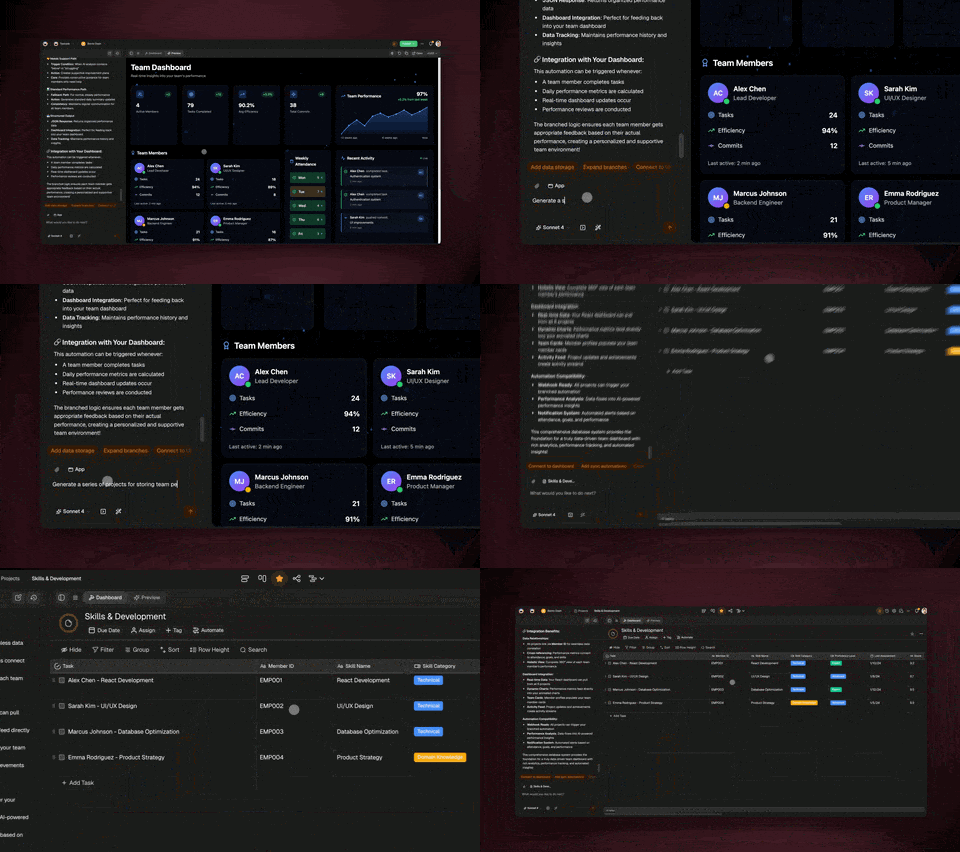
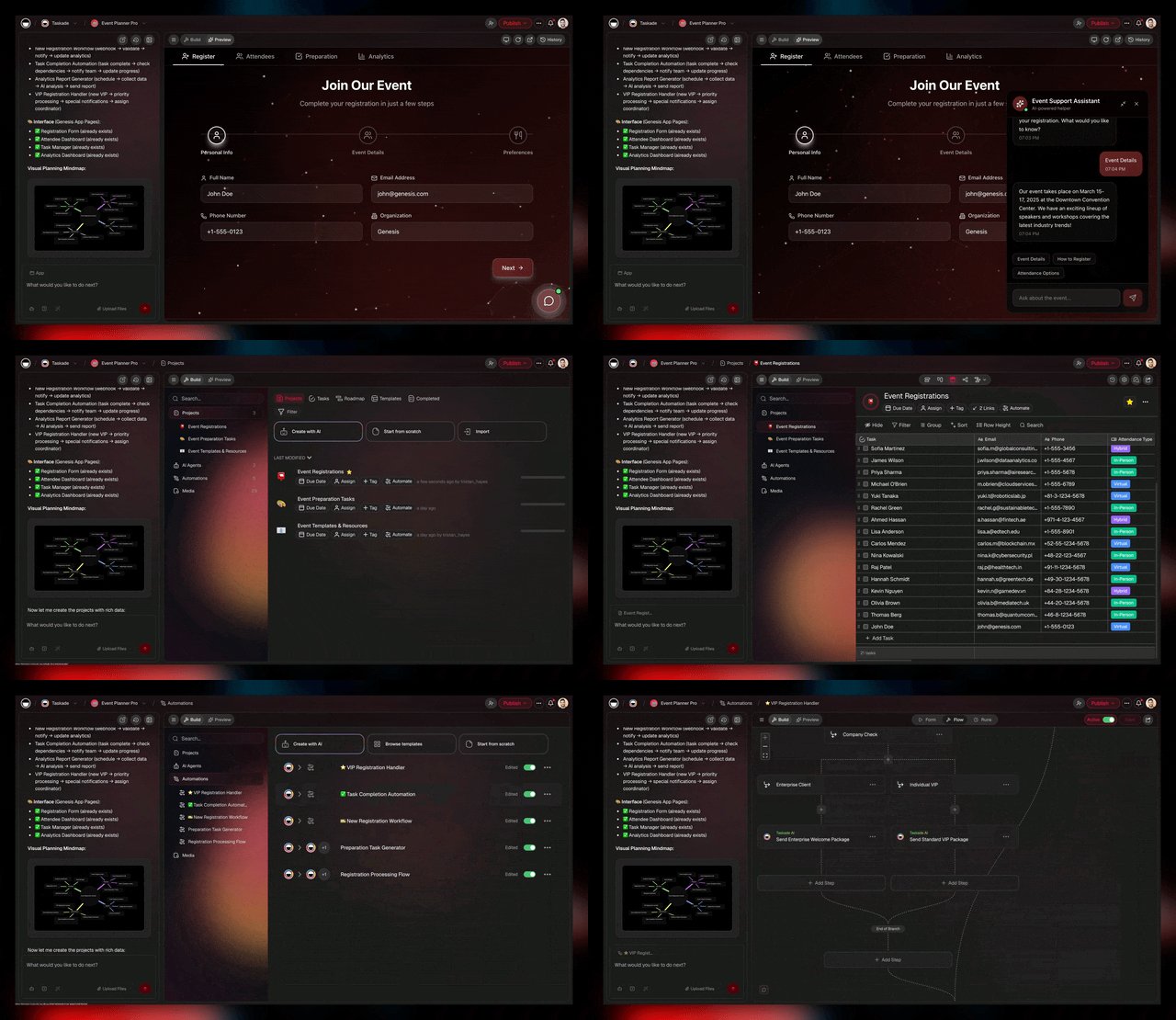
With V0, you get beautiful code that you (or your developer) must assemble into a working application. With Genesis, you describe what you want and get a live app running on your workspace — with data, AI agents, and automations already connected.
Who Should Use V0? Strategic Decision Framework
Choose V0 When...
1. You're a React Developer Who Wants Beautiful UI Components Fast
V0 accelerates frontend development for developers who know React:
- Scenario: Building a SaaS dashboard and need polished admin components quickly
- Why V0: Get production-quality components in minutes instead of hours of manual coding
- Value: 50-70% faster frontend development for experienced React developers
- Example: Senior developer needs user settings page, pricing table, data visualization components
- Best practice: Use V0 for UI scaffolding, then customize the code for your specific logic
2. You Have an Existing Backend and Just Need Frontend
Perfect if backend infrastructure already exists:
- Scenario: Your API is built, you just need a modern React frontend
- Why V0: Generate components that connect to your existing endpoints
- Value: Skip frontend boilerplate, focus on integrating with your API
- Example: Company has Ruby on Rails API, wants modern React frontend
- Integration: V0 components call your existing /api/users, /api/products endpoints
3. You're a Designer Prototyping Before Handoff to Engineers
Design-to-code workflow for design teams:
- Scenario: Product designer wants interactive prototype for user testing
- Why V0: Create realistic prototypes that look and feel like final product
- Value: Test UX with functional prototypes, get feedback before engineering sprint
- Example: Designer creates checkout flow prototype, tests with users, hands code to engineers
- Handoff: Engineers receive clean React code to integrate, not static mockups
4. You're Building a Component Library for Your Design System
Accelerate design system development:
- Scenario: Building internal component library (buttons, forms, cards, modals)
- Why V0: Generate shadcn/ui-based components that follow modern patterns
- Value: Faster component library development, consistent styling
- Example: Design system team creates 50+ components for company-wide usage
- Customization: Take V0 output as starting point, refine to match brand guidelines
5. You're Learning React and Want to Study Modern Patterns
Educational value for developers improving skills:
- Scenario: Junior developer learning React, TypeScript, Tailwind CSS
- Why V0: See how modern components are structured, learn best practices
- Value: Study V0-generated code to understand patterns, composition, typing
- Example: Junior dev generates various components, studies code structure, learns modern React
- Career development: Exposure to professional-grade component patterns
Choose Taskade Genesis When...
1. You Want a Complete Working App, Not Just Components
Non-developers or teams needing full applications:
- Scenario: Marketing team needs campaign tracker, sales needs CRM, operations needs inventory system
- Why Genesis: Get working app with database, AI, automation — not just UI components
- Value: Launch working apps without backend development, database setup, deployment configuration
- Example: Marketing manager builds lead capture system with AI scoring + Slack notifications in 10 minutes
- No developer required: Business users build complete operational apps themselves
2. You Don't Have Developers (Or Don't Want to Wait for Them)
Self-service for non-technical teams:
- Scenario: Small business needs client portal but can't afford developer
- Why Genesis: Natural language prompts create deployed apps instantly
- Value: Get working software without hiring, onboarding, managing developers
- Example: Consultant builds client onboarding portal with document uploads + progress tracking
- Empowerment: Business owners become their own app builders
3. You Need AI Agents Working Autonomously on Your Data
Apps with intelligent behavior, not just UI:
- Scenario: Support system that auto-triages tickets, CRM that auto-scores leads
- Why Genesis: AI agents trained on YOUR workspace data work 24/7 autonomously
- Value: Intelligence without coding OpenAI integrations, prompt engineering, token management
- Example: Customer support app where AI analyzes urgency, routes tickets, suggests responses automatically
- Workspace DNA advantage: AI understands your specific business context, not generic knowledge
4. You're Building 5-10+ Internal Business Tools
Companies need many operational apps:
- Scenario: Need project tracker, feedback system, booking platform, inventory manager, employee onboarding, etc.
- Why Genesis: From $6/month (Starter) unlimited apps vs $135-520/month per V0-built app
- Value: Build unlimited operational tools for cost of one hosted app
- Example: Operations team builds 10 different systems in one afternoon: client portal, inventory tracker, booking system, feedback collector, team directory, document library, meeting scheduler, expense tracker, onboarding portal, knowledge base
- Cost savings: $12,000-50,000/year in infrastructure + developer costs
5. You Want Apps That Live in Your Workspace
Integration with daily workflow:
- Scenario: Team already collaborates in Taskade (projects, meetings, documents)
- Why Genesis: Apps built on workspace data, seamless integration with daily work
- Value: Context carries over (workspace knowledge, team members, existing data)
- Example: Project tracker becomes client dashboard, meeting notes become searchable knowledge base
- Network effect: More you use Taskade, smarter your apps become
6. You Need Working App Today, Not After 2-Week Sprint
Speed to value matters:
- Scenario: Client presentation tomorrow, need demo of proposed portal
- Why Genesis: Functional app in 10 minutes vs 50 hours of development
- Value: Show working software, not mockups or slides
- Example: Sales team demos custom client portal during pitch (built that morning)
- Competitive advantage: Move faster than competitors still building
The Hybrid Approach: When to Use Both
Some scenarios benefit from combining both tools:
V0 for (Frontend-only needs):
- Marketing landing pages with custom designs
- Design system component libraries
- Public-facing marketing sites
- Custom UI for existing backend
Taskade Genesis for (Complete apps):
- Internal operational tools
- Client portals and dashboards
- Workflow automation systems
- Apps with AI intelligence built-in
Example Development Shop:
- Frontend team uses V0 for client marketing sites (beautiful custom UI)
- Operations team uses Genesis for internal tools (CRM, project tracking, client management)
- Result: Beautiful client work + efficient internal operations
- Cost: $20 V0 + $6 Taskade Starter (or $16 Pro) = $26-36/month total
The 7 Best v0 Alternatives in 2026
If v0 does not fit your stack, team, or output needs, these seven tools cover every other serious option in the AI app builder category. Each recommendation below is based on hands-on testing, user reports, and the feature matrix above. For the full 12-way breakdown, see best v0 alternatives.
1. Taskade Genesis — Best for Complete Apps (Featured)
Taskade Genesis is the only v0 alternative that ships a deployed, intelligent application from a single prompt — not a codebase to assemble. Where v0 stops at React files, Genesis orchestrates Workspace DNA: a proven Memory layer (Projects database with 7 views — List, Board, Calendar, Table, Mind Map, Gantt, Org Chart), Intelligence layer (15+ frontier models from OpenAI, Anthropic, and Google with 33 built-in agent tools and custom tool support), and Execution layer (100+ integrations powering reliable automation workflows).
What makes it different from v0:
- Output is a live app, not code. You get a working URL in 2-15 minutes, not 60-85 hours of integration.
- Database is built-in. No Supabase, Neon, or PlanetScale setup. The workspace is the backend.
- AI agents included. Deploy specialized agents with custom tools, slash commands, and persistent memory. Over 500K+ agents deployed, 150K+ Genesis apps built, and 130K+ apps in the Community Gallery.
- Real-time collaboration. 7-tier role-based access (Owner, Maintainer, Editor, Commenter, Collaborator, Participant, Viewer) with chat, video, and comments.
- Non-coder friendly. Marketing, ops, and support teams build their own operational apps without a developer.
- Pricing: Free plan includes 3,000 credits. Starter $6/mo, Pro $16/mo (10 users), Business $40/mo, Enterprise custom. Unlimited apps on every paid plan.
Best for: Teams that want working software, not a codebase. Non-technical founders. Ops teams with 5-10 internal tools to build. Anyone who has ever bounced off the v0-to-production gap.
Try Taskade Genesis free | Genesis vs Bolt.new comparison
2. Bolt.new — Best for In-Browser Full-Stack Prototypes
Bolt.new uses StackBlitz WebContainers to run a full Node.js environment in the browser, so you can edit and preview your app without leaving the tab. It generates full-stack code (frontend + backend + package.json + config) and supports one-click deployment to Netlify.
Strengths: Instant preview, edits live code in-browser, good for full-stack prototypes. Weaknesses: Aggressive token consumption, no built-in database, no agents, no real collaboration. Credits run out fast on mid-complexity apps. Pricing: Free tier limited daily, $20/mo Pro, $50/mo Teams.
Full review: best Bolt.new alternatives 2026.
3. Lovable — Best for Supabase-Native Full-Stack
Lovable (formerly GPT Engineer) generates full-stack TypeScript apps with native Supabase integration, so auth, database, and storage come wired by default. You own the code and can export to GitHub.
Strengths: Full-stack out of the box, real Supabase wiring, you own the code, clean UI. Weaknesses: Locked to Supabase, no agents, no automations, no true collaboration, costs escalate on complex apps. Pricing: Free tier limited daily, $20/mo Pro, $50/mo Teams.
Context: what is Lovable.
4. Cursor — Best AI-Native Code Editor for Developers
Cursor is a VS Code fork with deeply integrated AI chat, inline edits, and an agent mode that can modify multiple files at once. It is the default tool for developers who want AI assistance inside their existing repo rather than a generator that scaffolds new projects.
Strengths: Works on any existing codebase, multi-file edits, great model selection. Weaknesses: Not for non-coders, no backend generation, no deployment, no collaboration features. Pricing: Free tier with limited requests, $20/mo Pro, $40/user Business.
Full review: best Cursor alternatives 2026.
5. Claude Code / Claude Agent SDK — Best for Terminal-Native Agents
Claude Code is Anthropic's terminal-native coding agent, and the Claude Agent SDK lets you script custom agents that run shell commands, edit files, and call tools. It is the most programmable option in this list — closer to a framework than a product.
Strengths: Runs in any environment, composes with any toolchain, strong reasoning, works on huge codebases. Weaknesses: Pay-per-token billing, no UI, no deployment, requires developer comfort with CLIs. Pricing: Pay-per-token via API, team SSO available.
6. Windsurf — Best for Cascade Agent Flow
Windsurf is Codeium's AI-native editor, built around a persistent "Cascade" agent that maintains context across long coding sessions. The UI is polished, the agent feels more cohesive than Cursor's, and the free tier is generous.
Strengths: Strong free tier, Cascade agent keeps context, good for mid-size refactors. Weaknesses: Editor only, no deployment, no backend generation, smaller plugin ecosystem than Cursor. Pricing: Free tier, $15/mo Pro, $35/user Teams.
7. Replit Agent — Best for All-in-One Build + Host
Replit Agent combines code generation, in-browser editing, and hosting in a single workspace — you go from prompt to hosted app without leaving Replit. Bundled hosting is the biggest differentiator vs v0.
Strengths: Hosting included, collaborative editor, good for beginners and students, supports many languages. Weaknesses: Performance can lag on large projects, automations limited, not as polished as Bolt or Lovable, no real AI agent layer. Pricing: Free tier limited, $20/mo Core, $35/user Teams.
Use-Case Recommendation Table
Match your use case to the right tool. This table compresses the 7 alternatives above into a single recommendation per scenario.
| Use Case | Recommended Tool | Why |
|---|---|---|
| Non-coder building a CRM or portal | Taskade Genesis | Only option that ships a live app |
| React dev scaffolding UI for existing backend | v0 | Cleanest shadcn/ui output |
| Full-stack prototype in browser | Bolt.new | WebContainers give instant preview |
| Supabase-based SaaS MVP | Lovable | Native Supabase wiring |
| Working inside an existing repo | Cursor | Best multi-file AI edits |
| Terminal-native power users | Claude Code | Agent SDK + any toolchain |
| Long-running agent sessions | Windsurf | Cascade context persistence |
| All-in-one build + host for beginners | Replit Agent | Hosting bundled |
| 5-10 internal business tools | Taskade Genesis | Unlimited apps, from $6/mo |
| Apps with AI agents + automations | Taskade Genesis | Workspace DNA bundles all three layers |
Strengths and Weaknesses Summary
Every tool in this category has real trade-offs. Here is the honest one-line summary for each.
| Tool | Biggest Strength | Biggest Weakness |
|---|---|---|
| v0 | Beautiful shadcn/ui components | Code only, no backend, token costs unpredictable |
| Taskade Genesis | Deployed apps + agents + 100+ integrations in one prompt | Less low-level UI customization than v0 |
| Bolt.new | In-browser full-stack preview | Credit burn, no database |
| Lovable | Supabase baked in | Locked to Supabase |
| Cursor | Best AI editor for existing repos | Not for non-coders |
| Claude Code | Most programmable agent | No UI, pay-per-token |
| Windsurf | Cascade agent context | Editor only |
| Replit Agent | Hosting included | Laggy on large projects |
The Verdict: Component Libraries vs Complete Systems
V0 is one of the best AI-powered UI component generators available. For React developers who need beautiful, modern components quickly, V0 delivers real value.
What V0 Excels At
For Frontend Developers: V0 provides measurable productivity gains:
- 50-70% faster UI scaffolding compared to manual component writing
- Production-ready components using modern patterns (shadcn/ui, Tailwind, TypeScript)
- Clean, maintainable code that developers can understand and extend
- Rapid iteration through conversational refinement
Design Quality: V0's component designs are genuinely polished:
- Professional typography, spacing, and color schemes
- Mobile-responsive layouts that work across devices
- Accessibility best practices built-in (ARIA labels, keyboard navigation)
- Dark mode support included
Developer Experience: V0 understands React developer workflows:
- No proprietary runtime or vendor lock-in
- Standard dependencies (React, Tailwind, shadcn/ui)
- Copy/paste into existing codebases
- Works with modern tools (Next.js, Vite, etc.)
The 80% Problem: What V0 Doesn't Solve
Here's the critical limitation most people discover after using V0:
V0 delivers 20% of a business application (the frontend UI).
The other 80% (backend, database, AI, automation, deployment) requires traditional development.
The Reality of Building Business Apps with V0:
- Component generation: 10-30 minutes with V0 ✅
- Database setup: 4-8 hours (schema design, migrations, configuration)
- Backend API development: 8-16 hours (endpoints, validation, authentication)
- AI integration: 12-20 hours (OpenAI API, prompts, token management)
- Automation workflows: 10-15 hours (webhooks, email, third-party integrations)
- Deployment & DevOps: 8-12 hours (hosting, monitoring, security)
- Ongoing maintenance: 8-12 hours/month (updates, scaling, support)
Total work required: 60-90 hours after V0 generates beautiful components
Developer cost: $6,000-18,000 (at $100-200/hour)
Monthly infrastructure: $140-520/month per app
The component-to-app gap is real. V0 gives you beautiful ingredients, but you still need to cook the meal.
Where Taskade Genesis Takes a Different Approach
Taskade Genesis asks a fundamentally different question: What if we didn't generate components at all, but instead orchestrated complete systems?
The Architectural Difference:
V0 Philosophy: Generate beautiful UI code → Developer integrates → Deployed app
Genesis Philosophy: Orchestrate proven systems → Instant deployed app
Why This Matters:
When V0 generates a CRM interface component:
- You get clean React code for a contact list, deal pipeline, task views
- You still need to build database, API, authentication, automation, deployment
- Result: 60-80 hours to working CRM
When Taskade Genesis builds a CRM:
- It orchestrates Taskade Workspace DNA (battle-tested for 3+ years)
- Memory (database) + Intelligence (AI agents) + Execution (automations) + Interface (UI)
- All layers connected, deployed, and working autonomously
- Result: 10-minute setup to working CRM that processes leads 24/7
The Proof: Taskade Workspace DNA has powered thousands of teams for years:
- Database layer: Millions of real-world operations refined performance
- AI agents: Trained on actual business contexts, not generic examples
- Automations: 100+ integrations tested by thousands of teams
- Reliability: Proven systems vs code that might work
Strategic Recommendations by Scenario
For React Developers Building Custom Products:
- Use V0: When building customer-facing products with unique UX requirements
- Why V0: Beautiful custom components that match your brand precisely
- Trade-off: Accept 60-80 hours of integration work for complete control
- Best use case: SaaS platforms, consumer apps, unique user experiences
For Designers Prototyping User Experiences:
- Use V0: For realistic, interactive prototypes before engineering builds
- Why V0: Test UX with functional prototypes, get feedback before committing to engineering
- Workflow: Design → V0 prototype → User testing → Engineering build
- Value: Validate UX before expensive engineering investment
For Teams With Existing Backend Infrastructure:
- Use V0: When you have APIs but need modern frontend refresh
- Why V0: Generate React frontend for existing backend systems
- Example: Company has established Django/Rails API, wants modern React UI
- Integration: V0 components call existing endpoints
For Non-Technical Teams Needing Operational Tools:
- Use Genesis: When you need working apps without developer resources
- Why Genesis: Natural language to deployed app in minutes
- Example: Marketing team builds campaign tracker, sales builds CRM, ops builds inventory system
- Empowerment: Teams build their own tools, don't wait for developers
For Companies Building 5-10+ Internal Apps:
- Use Genesis: When you need many operational tools
- Why Genesis: From $6/month unlimited apps vs $1,680-6,240/month with V0 approach
- Cost analysis: 10 V0-built apps = $140-520/month each = $16,800-62,400/year in infrastructure alone
- Genesis cost: $72/year (Starter, billed annually) or $192/year (Pro, billed annually) for unlimited apps
- Savings: $16,608-62,328/year
For Startups Pre-Product-Market Fit:
- Use Genesis: Validate ideas rapidly before engineering investment
- Why Genesis: Build functional prototypes in 10 minutes vs 2-week sprints
- Risk reduction: Test 10 ideas in time it takes to build 1 with V0 approach
- Pivot faster: Discover what customers want without wasting engineering time
The Honest Comparison
| What You Need | V0 | Taskade Genesis | Winner |
|---|---|---|---|
| Beautiful custom UI components | Yes ✅ | Standard UI | V0 ✅ |
| Complete working app | No (requires integration) | Yes ✅ | Genesis ✅ |
| Database included | No | Yes ✅ | Genesis ✅ |
| AI agents built-in | No | Yes ✅ | Genesis ✅ |
| Automation workflows | No | Yes ✅ | Genesis ✅ |
| Deployment included | Partial (Vercel integration) | Yes ✅ | Genesis ✅ |
| Time to working app | 60-80 hours | 10 minutes | Genesis ✅ |
| Cost for 1 app (annual) | $1,680-6,240 + dev time | From $72 (Starter) | Genesis ✅ |
| Customization control | Full code access ✅ | Limited | V0 ✅ |
| Learning React patterns | Yes ✅ | N/A | V0 ✅ |
| Design system components | Yes ✅ | N/A | V0 ✅ |
| Non-technical users | No | Yes ✅ | Genesis ✅ |
Final Recommendation
Use V0 when:
- You're a React developer who wants beautiful UI components fast
- You have backend infrastructure and just need frontend
- You're building a design system or component library
- Custom, branded UX is critical to your product
- You want full code control and customization
- You're learning React and want to study modern patterns
Use Taskade Genesis when:
- You want complete working apps, not components to integrate
- You're non-technical or don't have developer bandwidth
- You need database + AI + automation, not just UI
- You're building multiple operational/internal apps
- Time to value is measured in minutes, not weeks — with self-healing deploys and built-in analytics
- Cost predictability matters (from $6/month vs $140-520/month per app)
- You want custom domains (6 TLDs including .app and .dev) without external hosting
Use both strategically when:
- V0 for customer-facing products with custom UX requirements
- Genesis for internal operations, client portals, automation apps
- Result: Best of both worlds — beautiful custom products + efficient operations
💡 V0 generates beautiful React components for 20% of the work. Taskade Genesis orchestrates complete systems for 100% of the solution. Both are valuable — for different problems.
The Future: Component Generation vs System Orchestration
The future of AI-powered development is splitting into two paths:
Path 1 — Component/Code Generators (V0, Bolt, Lovable):
- Better models → Better code → Better components
- Designers and developers get faster at frontend work
- Still requires: Backend, database, deployment, maintenance
- Target: The 20% of apps needing unique, custom frontend UX
Path 2 — System Orchestrators (Taskade Genesis):
- Orchestrate proven infrastructure → Complete working systems
- Anyone can build apps with natural language
- Includes: All layers (frontend + backend + database + AI + automation)
- Target: The 80% of apps using established patterns
Both paths lead to faster application development. The key is choosing the right path for your specific situation.
The strategic question: Do you need custom UI components or complete working systems?
- If beautiful custom components → V0
- If complete business applications → Taskade Genesis
- If both → Use both strategically
🐑 Before you go... Looking for an AI platform that goes beyond component generation? Taskade Genesis complements V0 by delivering complete business applications—not just beautiful UI code.
- 💬 AI Chat: Collaborate with AI that understands your Workspace DNA—brainstorm features, plan architecture, or discuss technical decisions in natural language.
- 🤖 AI Agents: Unlike V0's component generation, Taskade AI Agents build entire functional apps from prompts—database, backend, AI features, and automation included. No integration work required through vibe coding.
- ✏️ AI Assistant: Generate project plans, technical specs, and workflow documentation with AI-powered templates that integrate seamlessly with your development process.
- 🔄 Workflow Generator: Build intelligent automations connecting your apps, tools, and data—powered by workspace memory and 100+ integrations.
Sign up today and experience complete application development—where living software delivers working apps, not components to assemble.
🔗 Resources
- v0.app - Official Website
- Vercel Platform Documentation
- V0 Pricing & Plans
- shadcn/ui Component Library
- Next.js Framework Documentation
- Vercel Templates & Examples
- V0 Community Showcase
- Guillermo Rauch (Vercel CEO) on Twitter
💬 Frequently Asked Questions About V0
What is V0 and how does it work?
V0 is Vercel's AI-powered code generator that creates React and Next.js components from natural language prompts. It uses large language models to generate production-ready UI code using Tailwind CSS and shadcn/ui components. For teams seeking complete applications beyond UI components, Taskade Genesis offers instant deployed apps through Workspace DNA.
Who created V0 and when was it launched?
V0 was created by Vercel, the company founded by Guillermo Rauch (creator of Next.js). V0 launched in beta in October 2023 as an experimental AI tool for generating UI components. In January 2026, it rebranded from v0.dev to v0.app. Vercel is now valued at $9.3 billion, with investors including Accel, GV (Google Ventures), and Greenoaks Capital. As of March 2026, v0 has over 6 million developers on the platform.
How much does V0 cost?
As of 2026, V0 uses token-based pricing: Free ($0, $5/month in credits), Premium ($20/month, $20/month in credits with Figma imports and API access), Team ($30/user/month with shared credits), and Enterprise (custom pricing). Each generation costs a variable number of tokens depending on complexity, making costs less predictable than the previous credit system. Compare this to Taskade's pricing which starts at $6/month (Starter, billed annually) for unlimited apps.
Is V0 better than Bolt or Lovable for building apps?
It depends on your needs. V0 excels at generating beautiful React components for developers who want clean, customizable code. Bolt generates faster with WebContainers but also outputs code requiring deployment. Lovable generates full-stack code you own. All three still require deployment and backend integration. For instant deployed apps without code, Taskade Genesis provides working applications with AI agents and automations built-in.
Can V0 generate complete applications or just components?
V0 generates UI components and frontend code—not complete business applications. After V0 generates components, you still need to: configure database, build backend API endpoints, implement authentication, integrate AI features, set up automation workflows, configure deployment, and handle ongoing maintenance (60-85 hours of integration work). For complete working apps, Taskade Genesis orchestrates full-stack systems instantly.
Does V0 include backend, database, or authentication?
No. V0 generates frontend UI components only. You need to separately build or integrate: database (PostgreSQL, MongoDB, etc.), backend API (REST, GraphQL, tRPC), authentication (Auth0, Clerk, NextAuth), file storage (AWS S3, Cloudinary), email system (SendGrid, Resend), and AI integration (OpenAI, Anthropic). This is 40-60 hours of additional work. Taskade Genesis includes all these layers by default through Workspace DNA.
Can non-developers use V0 to build apps?
Not effectively. While V0's natural language interface is accessible, the generated output is React/TypeScript code requiring developer knowledge to integrate, customize, and deploy. Non-developers can generate components but can't meaningfully build production apps without understanding code, databases, deployment, and DevOps. For non-technical teams, Taskade Genesis enables app building through vibe coding—natural language to deployed apps.
What's the difference between V0 and traditional code editors like Cursor?
V0 generates complete UI components from prompts, while Cursor is an AI-enhanced code editor where developers write code with AI assistance. V0 is better for scaffolding UI quickly; Cursor is better for writing custom application logic. Both require developer skills. V0 outputs components to integrate; Cursor helps write all code. For teams seeking alternatives to both, Taskade Genesis eliminates coding entirely through workspace-powered apps.
How does V0 compare to Webflow or no-code builders?
V0 generates code (React/Next.js), while Webflow is a visual website builder. Webflow is better for marketers building marketing sites without code. V0 is better for developers wanting component code they can customize. V0 provides more flexibility but requires technical knowledge. Both require separate backend/database work for business apps. Taskade combines visual app building with intelligent automation and AI agents.
Does V0 work with existing Next.js projects?
Yes! V0 generates standard React/Next.js components using Tailwind CSS and shadcn/ui, which can be copied directly into existing Next.js projects. The components have no proprietary runtime or vendor lock-in—they're just clean React code. However, you're responsible for integrating these components with your app's routing, state management, API calls, and business logic. V0 accelerates frontend development but doesn't eliminate integration work.
Try Both
- V0: Great for developers wanting UI components → v0.dev
- Genesis: Great for teams wanting live apps → Try Genesis Free
More Comparisons
AI App Builders:
- Taskade vs V0 — Full feature comparison
- Taskade vs Cursor — Full Review
- Taskade vs Lovable — Full Review
- Taskade vs Bolt — Full Review
- Taskade vs Replit — Full Review
- Taskade vs Windsurf — Full Review
Workspace Tools:
- Taskade vs Notion — Full Review
- Taskade vs Webflow — Full Review
- All Taskade Reviews — What users say
Explore Taskade Genesis
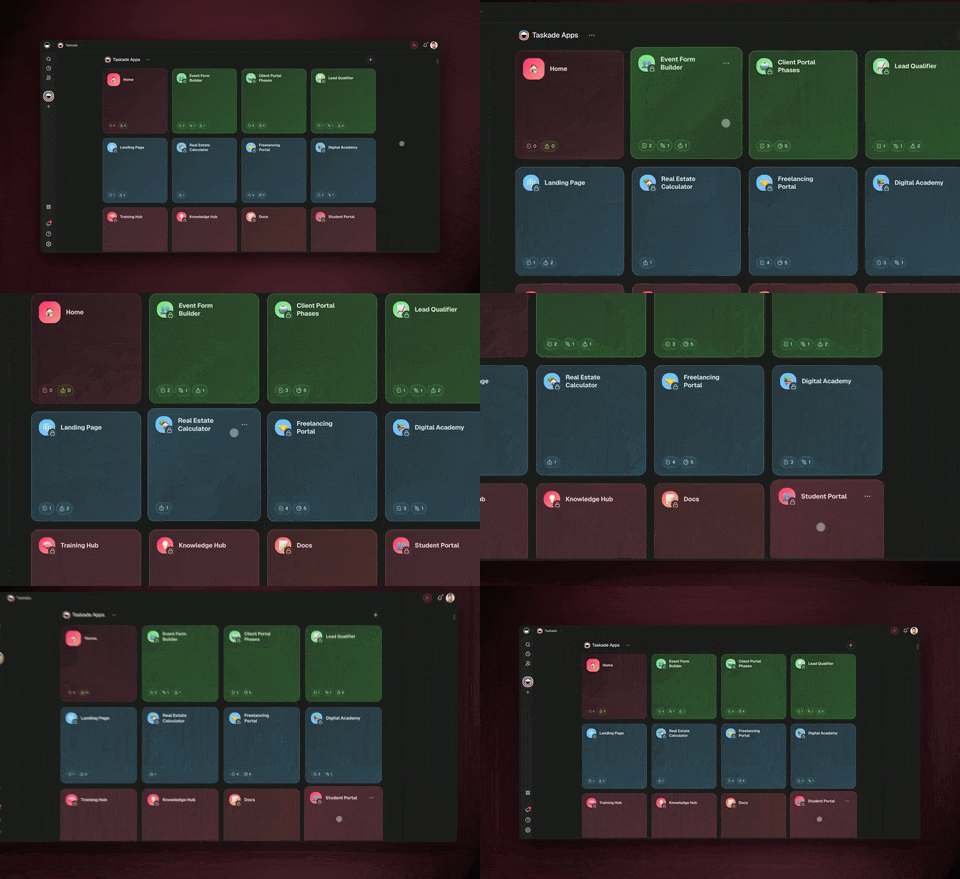
- AI App Builder — One prompt, one app
- Vibe Coding — Natural language app creation
- AI Agent Platform — Digital teammates that work 24/7
- Workflow Automation — 100+ integrations
- Community Apps — Clone and customize