







Genspark doubled its revenue run rate in early 2026 — crossing $200 million in annual recurring revenue in under 12 months from launch. The platform raised $545 million total funding at a ~$1.6 billion valuation, making it one of the most heavily funded AI startups in history.
On March 12, 2026, Genspark launched Claw — its first "AI Employee" product — alongside AI Workspace 3.0, which adds support for frontier models from Anthropic, OpenAI, and NVIDIA.
But the growth numbers tell only one side of the story. On Trustpilot, Genspark holds a 1.7 out of 5 stars with 82% one-star reviews as of March 2026. Users report credits consumed in 2 hours, charges for failed outputs, and no customer support.
TL;DR: Taskade Genesis is the best Genspark alternative for teams — unlimited AI agents, 7 project views, 100+ integrations, and automation workflows at $16/month for 10 users. Genspark Pro costs $249.99/month per user with no project management. 150,000+ Genesis apps built. Try it free →
At $249.99/month per user for the Pro plan, Genspark targets enterprise budgets. It has no native project management, no team collaboration workspace, and no automation workflows connecting to external tools. For teams that need AI agents and project management and team collaboration — at a price that doesn't require CFO approval — there are better options.
This guide compares the 7 best Genspark alternatives across AI capabilities, project management, team collaboration, pricing, and real-world user satisfaction.
Quick Comparison Table
| Platform | AI Agents | Project Management | Real-Time Collab | Automation | Price (10 Users/mo) |
|---|---|---|---|---|---|
| Taskade Genesis | Unlimited (34 tools) | 7 views | Yes (multiplayer) | 100+ integrations | $16/mo |
| ClickUp | Super Agents (credits) | Full PM suite | Yes | Native | $120+/mo |
| Notion | 3.2 Agents (20-min) | Databases | Yes | Via Zapier | $200/mo |
| Monday.com | Agent Factory (separate) | Full PM suite | Yes | Native | $149+/mo |
| Asana | AI Teammates (beta) | Full PM suite | Limited | Basic | $150+/mo |
| Lindy.ai | Custom AI agents | None | No | Multi-step | $49+/mo |
| Genspark | 80+ tools (credits) | None | No | None | $250+/mo per user |
Why Teams Look for Genspark Alternatives
Genspark's growth is impressive, but its positioning creates specific gaps that drive teams to look elsewhere.
1. No Project Management
Genspark has no task boards, Gantt charts, sprint planning, calendar views, or team workload management. It generates content and manages emails — it doesn't manage projects. If your team needs to track tasks, plan sprints, or visualize timelines, you need a separate tool entirely.
Compare that to Taskade's 7 project views (List, Board, Calendar, Table, Mind Map, Gantt, Org Chart) — all fed by the same data, switching instantly.
2. Credit-Based Pricing at Scale
Genspark's credit system means costs are unpredictable for active teams:
| Genspark Plan | Monthly Price | Credits | Cost per 10K Credits |
|---|---|---|---|
| Free | $0 | 100/day | — |
| Plus | $24.99/mo | 10,000/mo | $24.99 |
| Pro | $249.99/mo | 125,000/mo | $20.00 |
| Credit Pack | $20 one-time | 10,000 | $20.00 |
A 10-person team using Pro-level AI would pay $2,500/month ($249.99 x 10) — or $30,000/year. The same team on Taskade Pro pays $192/year (annual billing) with unlimited AI usage.
3. No Team Collaboration Workspace
Genspark launched Team and Enterprise plans in November 2025, but the platform is fundamentally designed for individual autonomous workflows, not real-time team collaboration on shared projects. There is no multiplayer editing, no role-based permissions on project views, and no shared workspace context that AI agents can learn from.
Taskade provides 7-tier role-based access (Owner, Maintainer, Editor, Commenter, Collaborator, Participant, Viewer) and real-time multiplayer editing across all project views.
4. No Automation Workflows
Genspark agents work autonomously within the platform but cannot trigger external workflows — no Slack notifications, no CRM updates, no email sequences connected to project milestones. For teams that need AI execution connected to their existing tool stack, this is a significant limitation.
Taskade automations support branching, looping, filtering, and 100+ integrations across communication, email, CRM, payments, development, and productivity tools.
5. Customer Support and Trust Issues
Trustpilot tells a story that funding announcements do not. We cover this in detail below, but the 1.7/5 rating with 82% one-star reviews signals systemic issues with billing practices, credit consumption rates, and support responsiveness.
How AI Workspace Tools Work: Architecture Comparison
Not all AI workspace tools are built the same way. The underlying architecture determines what the tool can and cannot do for your team — and more importantly, what it can learn over time.
There are two dominant architectures in the AI workspace category as of 2026: linear pipelines and feedback loops. Understanding the difference is critical for choosing the right tool.
Linear Pipeline (Genspark, Lindy.ai)
Genspark uses a linear pipeline — you give the AI a prompt, it runs through specialized models, and it outputs a finished asset (a slide deck, an email, a media file). The output is a static deliverable. There is no feedback loop, no project context, and no connection to your ongoing work. Each interaction starts from zero. The AI does not know what you asked yesterday, what tasks your team is working on, or what decisions have been made.
This architecture is fast for one-off tasks. It breaks down for ongoing team workflows where context accumulates over weeks and months.
Feedback Loop (Taskade Genesis)
Taskade Genesis uses a feedback loop architecture called Workspace DNA — Memory (your projects, tasks, files) feeds Intelligence (AI agents that understand context), Intelligence triggers Execution (automations that act on your behalf), and Execution creates new Memory. The cycle is continuous and self-reinforcing.
The practical effect: the longer your team uses Taskade, the smarter your AI agents become. They learn from completed tasks, project patterns, team preferences, and historical decisions. This is fundamentally different from a tool that treats every prompt as a blank slate.
This architectural difference is why Genspark excels at one-off content generation but struggles with ongoing team workflows. Taskade Genesis excels at continuous team execution because every AI action feeds back into the workspace context.
What this means in practice:
- Genspark: You prompt the AI to create a slide deck. It creates the deck. Done. The next time you prompt, the AI has no memory of the deck or your project. You start over every time.
- Taskade Genesis: Your AI agents see every task, deadline, and team member assignment. They suggest actions, trigger automations, and update project state — creating a continuous workflow loop that gets smarter with every cycle.
Why Architecture Matters for Teams
For a solo user doing one-off content tasks, the linear pipeline is fine. For teams managing ongoing projects with multiple stakeholders, deadlines, and dependencies, the feedback loop is essential. Here is why:
- Context accumulation — After a month of use, Taskade agents understand your team's naming conventions, workflow patterns, and priority signals. Genspark agents start fresh every session.
- Cross-project intelligence — Taskade agents can reference data from any project in your workspace. Genspark operates in isolated sessions with no cross-task awareness.
- Automation chains — Taskade automations trigger based on project state changes (task moved to "Done", deadline approaching, new team member added). Genspark has no event-driven automation.
- Team learning — When one team member teaches an agent a preference, all team members benefit. Genspark has no shared agent memory.
For a deeper look at how this works, see What is Agentic Engineering and How Workspace DNA Works.
Trustpilot Reality Check: 1.7/5 Stars
Before evaluating alternatives, it is worth looking at what real users say about Genspark. Funding rounds and ARR figures measure investor confidence. Trustpilot measures user satisfaction.
Star Distribution (March 2026, 70+ Reviews)
| Stars | Percentage | Count (approx.) |
|---|---|---|
| 5 stars | 10% | ~7 |
| 4 stars | 3% | ~2 |
| 3 stars | 1% | ~1 |
| 2 stars | 4% | ~3 |
| 1 star | 82% | ~57 |
Common User Complaints
Credits consumed too fast. Multiple users report that paid credits are consumed within 2 hours of purchase. One reviewer wrote: "Bought the Plus plan and my 10,000 credits were gone before lunch. Each action costs way more credits than advertised."
Charged for failed outputs. Users report being billed credits even when the AI produces errors, blank outputs, or unusable results. There is no refund mechanism for failed generations.
No customer support. The most consistent complaint across Trustpilot reviews is the absence of responsive customer support. Users report no email responses, no chat support, and no way to escalate billing disputes.
Difficulty canceling. Several reviewers describe a difficult cancellation process, with subscriptions continuing to charge after cancellation requests.
Bait-and-switch perception. A recurring theme: the free tier works well enough to convince users to subscribe, but the paid experience is dramatically worse in terms of credit value and output quality.
The Credit Consumption Problem
The most actionable complaint is about credit consumption rates. Genspark's Plus plan includes 10,000 credits/month for $24.99. Users report that AI Workspace 3.0 features — especially media generation, Claw browser automation, and multi-step research tasks — consume credits at rates that deplete the monthly allotment in hours rather than weeks.
This creates a frustrating experience: the free tier is generous enough (100 credits/day) to demonstrate the platform's capabilities, but the paid tiers do not scale proportionally. Users who upgrade expecting 30 days of access report running out within the first week.
How This Compares to Taskade's Model
Taskade uses flat-rate pricing with no credit system:
| Aspect | Taskade | Genspark |
|---|---|---|
| Pricing model | Flat monthly rate | Credits per action |
| Predictability | Fixed cost, unlimited AI | Variable cost, usage-dependent |
| Failed outputs | No charge (unlimited retries) | Credits consumed regardless of quality |
| Team scaling | $16/mo for 10 users (Pro) | $249.99/mo per user (Pro) |
| Cancellation | Instant, self-service | User-reported difficulties |
| Support | Help center + email support | Users report no response |
For individual experimentation, Genspark's free tier (100 credits/day) is worth trying. For teams committing $250+/month per user, the Trustpilot pattern is a serious consideration. Teams with budget accountability should trial extensively before committing to annual contracts.
By contrast, Taskade's free plan includes 3,000 one-time AI credits with no per-action deductions on core workspace features, and the paid plans start at $6/month (Starter) with transparent flat-rate pricing and no surprise charges.
What Is Genspark Claw?
On March 12, 2026, Genspark launched Claw — marketed as its first "AI Employee." Claw is designed to autonomously browse the web, complete multi-step tasks, fill forms, navigate websites, and execute complex workflows without human intervention.
How Claw Works
Claw operates as a browser-based autonomous agent. You give it a task description — "Book the cheapest round-trip flight from SFO to JFK for April 15-18" — and it opens a browser session, navigates websites, fills forms, compares options, and completes the task. It runs inside Genspark's AI Workspace 3.0 environment powered by frontier models from Anthropic, OpenAI, and NVIDIA.
Claw vs. Taskade AI Agents
| Capability | Genspark Claw | Taskade AI Agents v2 |
|---|---|---|
| Autonomous execution | Web browsing, form filling | Task management, content, workflows |
| Memory | Session-based | Persistent (learns from workspace) |
| Team context | Individual tasks | Shared project context |
| Tools | Browser automation | 34 built-in tools, custom tools |
| Integrations | Web-only | 100+ via automation |
| Multi-agent | Single agent | Multi-agent collaboration |
| Embedding | No | Public embedding, custom domains |
| Project management | None | 7 views |
| Price | Included in Genspark plans (credit-based) | Included in all Taskade plans |
The Key Difference
Claw is an individual productivity tool — it does things for you on the web. Taskade AI Agents are team productivity tools — they do things with your team inside a shared workspace. Claw cannot see your project tasks, team assignments, or historical decisions. Taskade agents can.
When Claw Makes Sense
Claw is useful for repetitive web-based tasks that a human would otherwise do manually: filling out forms, comparing prices across multiple websites, gathering data from public sources, and completing multi-step web workflows. If your primary need is browser automation for individual tasks, Claw is a capable tool.
However, Claw consumes Genspark credits. Given the user-reported credit consumption rates (see the Trustpilot section above), teams should calculate expected usage carefully before relying on Claw for high-volume tasks.
When Taskade Agents Make More Sense
Taskade AI Agents are designed for team workflows that involve project management, collaboration, and integration with external tools. If your team needs agents that:
- Understand project deadlines and team assignments
- Trigger automations when project state changes
- Collaborate with multiple team members in real time
- Connect to 100+ external tools (Slack, CRM, email, development tools)
- Build functional applications from natural language descriptions
- Share persistent memory across sessions and team members
Then Taskade agents offer capabilities that Claw does not. The choice depends on whether you need a personal web automation tool (Claw) or a team AI workspace (Taskade).
For teams comparing these approaches, see Best AI App Builders 2026 and Claude Code Alternatives for a broader view of autonomous AI tools.
#1. Taskade Genesis — Best Overall Genspark Alternative
Why It Is Number One
Taskade Genesis is the only platform that combines Genspark-level AI agents with full project management, real-time team collaboration, and automation workflows — at a fraction of the price.
Over 150,000 Genesis apps have been built since launch, ranging from CRM dashboards and intake portals to knowledge bases and client-facing tools. You can browse real examples in the Community Gallery.
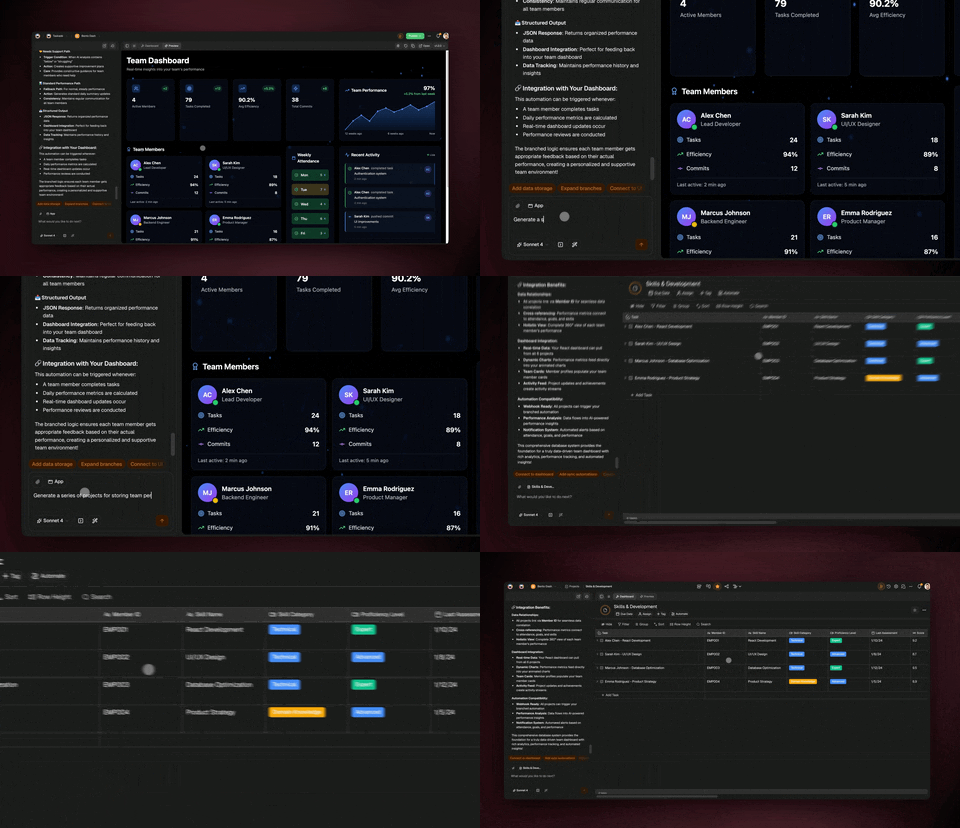
With Taskade Genesis you describe an app in plain English and it ships live — one-prompt apps backed by AI agents with 34 built-in tools, reliable automation workflows (branch, loop, filter, wait, resume from failure), 100+ bidirectional integrations, and 7 project views. David, an IT program manager with no engineering team, used it to ship a production project dashboard tracking Customers, Jobs, Invoices, and Team — the kind of functional app Genspark's content tools cannot produce.
How It Compares to Genspark
| Feature | Taskade Genesis | Genspark |
|---|---|---|
| AI agents | Unlimited, 34 tools, persistent memory | 80+ tools, credit-based |
| AI models | 15+ (OpenAI, Anthropic, Google) | 9+ LLMs + frontier models (Anthropic, OpenAI, NVIDIA) |
| Project management | 7 views (List, Board, Calendar, Table, Mind Map, Gantt, Org Chart) | None |
| Team collaboration | Real-time multiplayer, video calls, 7-tier RBAC | Basic sharing |
| Automation | Reliable workflows, 100+ integrations | None |
| App building | Vibe coding — text to live app | No |
| Public embedding | Yes (custom domains, embed agents) | No |
| Trustpilot | N/A (workspace tool category) | 1.7/5 stars (82% one-star) |
| Price (10 users, annual billing) | $16/mo | $2,500/mo (Pro) |
What Taskade Does Better
AI Agents that understand project context — agents see tasks, timelines, team assignments, and historical data. They don't just generate content; they manage workflows across your entire workspace.
7 Project Views — the same data visualized as lists, boards, calendars, tables, mind maps, Gantt charts, org charts, and timelines. Genspark has zero project views.
Automation Workflows with branching, looping, filtering, and 100+ integrations across communication, CRM, development, and productivity categories. Genspark has no workflow engine.
Vibe Coding — describe an app in natural language and Genesis builds it live. CRM dashboards, intake portals, knowledge bases, client-facing tools. Genspark generates content; Genesis generates functional applications.
Prompts and Templates — thousands of pre-built starting points for every use case, from project management templates to AI agent prompts.
Cost transparency — $16/month for 10 users with unlimited AI. No credit system, no surprise charges, no failed-output billing. Genspark Pro at team scale costs $30,000/year.
What Genspark Does Better
Specialized media generation — Genspark's AI Slides Creative Mode, AI Media Agents (images, video, audio, music), and Speakly voice-to-text are more specialized than Taskade's general-purpose agents.
Deep email automation — Genspark's AI Inbox 2.0 with bulk email cleanup and custom workflows is purpose-built for email management.
Autonomous web browsing — Genspark Claw can autonomously navigate websites, fill forms, and complete web-based tasks. Taskade agents operate within the workspace environment.
Pricing (V8, Annual Billing)
| Plan | Monthly Cost | Users | AI |
|---|---|---|---|
| Free | $0 | Limited | 3,000 one-time credits |
| Starter | $6/mo | 1 | Full AI |
| Pro (Popular) | $16/mo | 10 included | Unlimited |
| Business | $40/mo | 10+ | Unlimited + advanced controls |
| Max | $200/mo | 10+ | Unlimited + power features |
| Enterprise | $400/mo | Custom | Full suite + SSO |
Best For: Teams that need AI agents AND project management AND collaboration at an affordable, predictable price.
#2. ClickUp — Best for Feature-Rich Project Management + AI
Overview
ClickUp 4.0 with Super Agents (powered by the December 2025 Codegen acquisition) offers the most feature-rich project management + AI combination after Taskade.
Key Differentiators vs. Genspark
- 500+ work skills through Super Agents — from code generation to customer support triage
- Full project management — tasks, docs, chat, goals, dashboards, whiteboards
- Native automation — complex workflow automation without third-party tools
- Credit-based AI — 1,500 AI credits/user/month on Brain AI
Pricing
| Plan | Monthly (Annual) |
|---|---|
| Free | $0 |
| Unlimited | $7/user/mo |
| Business | $12/user/mo |
| Enterprise | Custom |
Plus AI credits allocated per user per month.
Limitations vs. Taskade
- Per-user pricing scales linearly (10 users x $12 = $120/month vs. Taskade's flat $16)
- AI credits limited per user — heavy AI users may need additional credits
- Learning curve steeper than Taskade for new teams
- No public agent embedding or vibe coding app generation
ClickUp vs. Genspark: Head-to-Head
| Dimension | ClickUp | Genspark |
|---|---|---|
| Core strength | Project management + AI | AI content generation |
| AI approach | Credits per user per month | Credits per account |
| PM features | Tasks, docs, goals, dashboards | None |
| Collaboration | Real-time, comments, chat | Basic sharing |
| Integrations | 1,000+ native + Zapier | Internal tools only |
| Learning curve | Steep (feature-dense) | Moderate (specialized) |
| 10-user annual cost | $1,440+ | $30,000 |
ClickUp is the right choice if you need deep project management with AI sprinkled on top. It is not the right choice if you want AI-first workflows at a low price point — that is where Taskade Genesis wins.
Best For: Teams already using ClickUp who want to add AI agents to their existing project management workflow.
#3. Notion — Best for Document-First AI Workflows
Overview
Notion 3.2 (January 2026) brought AI agents to the document workspace — agents that work autonomously for up to 20 minutes across hundreds of pages simultaneously.
Key Differentiators vs. Genspark
- Document-native AI — agents operate within Notion's page and database paradigm
- Enterprise Search — connected search across Slack, GitHub, Microsoft Teams, Jira, Asana
- Multi-model support — choose between models from OpenAI, Anthropic, and Google
- Extensive template ecosystem — thousands of community-built templates
Pricing
| Plan | Monthly (Annual) | AI Included? |
|---|---|---|
| Free | $0 | No |
| Plus | $10/user/mo | No |
| Business | $20/user/mo | Yes |
| Enterprise | Custom | Yes |
Limitations vs. Taskade
- AI requires Business plan ($20/user/month — 10 users = $200/month vs. Taskade's $16/month for 10)
- No automation engine (delegates to Zapier for workflow automation)
- No video calls (requires Zoom/Google Meet integration)
- No public agent embedding or app generation
- Agents limited to document operations (no task management automation)
Notion vs. Genspark: Head-to-Head
| Dimension | Notion 3.2 | Genspark |
|---|---|---|
| Core strength | Documents + databases | AI content generation |
| AI approach | 20-min autonomous sessions | Credit-based per action |
| PM features | Database views, relations | None |
| Collaboration | Real-time, comments | Basic sharing |
| External search | Slack, GitHub, Jira, Teams | None |
| API/Integrations | API + Zapier/Make | Internal tools only |
| 10-user annual cost | $2,400 | $30,000 |
Notion is the right choice if your team's workflow centers on documents and knowledge management. It is not the right choice if you need task management views (Gantt, Board, Timeline) or automation workflows — Taskade Genesis provides both alongside AI agents.
Best For: Teams that live in documents and need AI for content creation, analysis, and knowledge management.
#4. Monday.com — Best for Visual Project Management + Standalone AI
Overview
Monday.com launched Agent Factory in September 2025 as a separate standalone product — it does not even require a Monday.com account. This makes it architecturally similar to Genspark (standalone AI) rather than integrated like Taskade.
Key Differentiators vs. Genspark
- Template-based agent creation — build agents from templates or custom prompts
- Voice calls — agents can take calls (up to 300 on Squad plan)
- Visual project management — Monday.com's core product is a strong visual PM tool
- Separate products — Agent Factory for AI, Monday.com for PM (can be used together or independently)
Pricing
| Product | Plan | Monthly Price |
|---|---|---|
| Monday.com PM | Pro | $10/user/mo |
| Agent Factory | Squad | $49/mo |
| Agent Factory | Force | $299/mo |
Limitations vs. Taskade
- Agent Factory and PM are separate products — agents do not natively read/write Monday.com boards
- Agent Factory pricing ($49-299/month) plus PM pricing adds up quickly
- AI credits limited (500-30,000/month depending on plan)
- No unified workspace where AI agents and project management share context
- No vibe coding or app generation
Best For: Teams that want visual project management (Monday.com) alongside standalone AI agents (Agent Factory) as separate tools.
#5. Asana — Best for Enterprise Teams (When AI Ships)
Overview
Asana's AI Teammates are still in beta as of March 2026, with general availability expected mid-2026. The approach emphasizes "checkpoint governance" where humans approve agent actions before execution.
Key Differentiators vs. Genspark
- Enterprise project management — portfolios, goals, workload management, resource planning
- Checkpoint governance — human-in-the-loop approval at each step (addresses Asana's cited research that "autonomous agents fail at 70% of basic tasks")
- AWS Marketplace — available on AWS AI Agents storefront
- Security certifications — SOC 2, ISO 27001, GDPR compliance for regulated industries
Pricing
| Plan | Monthly (Annual) |
|---|---|
| Personal | $0 (10 users) |
| Starter | $10.99/user/mo |
| Advanced | $24.99/user/mo |
| Enterprise | Custom |
Plus AI Studio Pro add-on required for AI Teammates.
Limitations vs. Taskade
- AI Teammates still in beta — not production-ready for critical workflows
- Checkpoint governance means agents cannot run autonomously (every action requires approval)
- AI Studio add-on pricing adds to already high per-user costs
- Moving toward usage-based AI pricing (unpredictable costs at scale)
- No vibe coding, no app generation, no public agent embedding
Best For: Enterprise teams with complex project portfolios who can wait for Asana's AI to reach GA and are willing to pay premium pricing for governance features.
#6. Lindy.ai — Best for Custom AI Agent Workflows
Overview
Lindy.ai is a dedicated AI agent platform focused on building custom agents for specific business workflows — sales, support, recruiting, and operations. It sits closer to Genspark's philosophy (AI-first, no PM) but with more flexibility in agent creation.
Key Differentiators vs. Genspark
- Purpose-built agent builder — create agents for specific use cases with custom triggers and actions
- Multi-step workflows — chain agents together for complex automation sequences
- Integration-heavy — connects to CRMs, email, calendars, and communication tools
- More affordable — starts at $49/month vs. Genspark's $249.99/month Pro
Pricing
| Plan | Monthly Price | Agents |
|---|---|---|
| Starter | $49/mo | Limited |
| Pro | $149/mo | More agents + integrations |
| Enterprise | Custom | Unlimited |
Limitations vs. Taskade
- No project management (agents only, no task views or team collaboration)
- No real-time team workspace or multiplayer editing
- No vibe coding or app generation
- Specialized for agent workflows, not general team productivity
- No templates or prompt library for getting started quickly
Best For: Solo operators and small teams that need custom AI agents for specific business processes without needing a full project management workspace.
#7. Genspark — For Reference
What Genspark Does Well
- $200M ARR in under 12 months — demonstrating genuine product-market fit at the enterprise level
- AI Workspace 3.0 — upgraded to frontier models from Anthropic, OpenAI, and NVIDIA (March 2026)
- Genspark Claw — first AI Employee for autonomous web browsing and multi-step task completion
- Speakly — macOS/Windows voice-to-text with agent triggering, zero data retention
- AI Inbox 2.0 — email triage and bulk cleanup at scale
- AI Slides Creative Mode — prompt-to-presentation generation
- AI Media Agents — finished images, videos, audio, and music assets
- AI Sheets 2.0 — spreadsheet automation with natural language queries
Pricing
| Plan | Monthly Price | Credits/Month |
|---|---|---|
| Free | $0 | 100/day |
| Plus | $24.99/mo | 10,000 |
| Pro | $249.99/mo | 125,000 |
| Enterprise | Custom | Custom |
Funding and Valuation
| Metric | Value |
|---|---|
| Total funding | $545M |
| Valuation | ~$1.6B |
| ARR | $200M (March 2026) |
| Time to $100M ARR | 9 months |
| Trustpilot rating | 1.7/5 (82% one-star) |
When to Choose Genspark
- You need specialized media generation (slides, video, audio, images) at enterprise scale
- Email management is your primary AI use case
- You have enterprise budget ($250+/user/month) and can absorb credit-based pricing uncertainty
- You do not need project management, team collaboration, or automation workflow features
- You have evaluated the Trustpilot feedback and are comfortable with the reported support experience
Use Case Comparison: Who Wins Where?
Different teams have different primary workflows. Here is which tool wins for each common use case:
| Use Case | Best Tool | Why |
|---|---|---|
| Team project management + AI | Taskade Genesis | Only tool with unlimited AI agents + 7 project views + real-time collab at $16/mo |
| Solo content generation | Genspark | Specialized media, slides, email tools (but watch credit consumption) |
| Document-heavy knowledge work | Notion 3.2 | Best document + database AI integration with Enterprise Search |
| Enterprise PM with governance | Asana | Portfolio-level planning, checkpoint governance, compliance certifications |
| Feature-dense PM + AI | ClickUp | Most PM features in one tool with Super Agents |
| Visual PM + standalone AI | Monday.com | Strong visual boards + separate Agent Factory |
| Custom agent workflows | Lindy.ai | Purpose-built agent chaining for sales, support, recruiting |
| App building from prompts | Taskade Genesis | Only tool that builds live apps from natural language (vibe coding) |
| Automation with 100+ tools | Taskade | Reliable workflows with branching, looping, 100+ integrations |
| Budget-conscious teams | Taskade | $16/mo for 10 users (annual) vs. $120-$30,000/year for alternatives |
The key takeaway: if you need both AI and project management, Taskade Genesis is the clear winner. If you need specialized media generation and have enterprise budget, Genspark has specialized tools that no other alternative matches. Everything else falls somewhere in between.
Annual Pricing Comparison: 10-Person Team
The cost difference between these platforms is dramatic at team scale. Here is what a 10-person team pays annually:
| Platform | Annual Cost (10 users) | AI Limits | Project Management | Automation |
|---|---|---|---|---|
| Taskade Pro | $192 | Unlimited | 7 views | 100+ integrations |
| Lindy.ai | $588+ | Plan-based | None | Agent workflows |
| ClickUp Business | $1,440+ | Credit-limited | Full suite | Native |
| Monday.com + Agent Factory | $1,788+ | 500-30K credits | Full suite | Native |
| Notion Business | $2,400 | 20-min sessions | Databases | Via Zapier |
| Asana Advanced | $3,000+ | Beta + add-on | Full suite | Basic |
| Genspark Pro | $30,000 | 125K credits/user | None | None |
Taskade Pro at $192/year delivers unlimited AI agents with full project management. Genspark Pro at $30,000/year delivers specialized content generation without project management — a 156x price difference.
Decision Framework: Which Tool Should You Choose?
Use this decision tree to find the right Genspark alternative for your team:
Choose Taskade Genesis If
- You need AI agents + project management + team collaboration in one platform
- Budget matters ($16/month for 10 users on annual billing)
- You want unlimited AI without credit limits or surprise charges
- You need automation workflows connecting to 100+ external tools
- You want to build apps with vibe coding and publish to the Community Gallery
- You value transparent pricing over credit-based billing
Choose Genspark If
- Specialized media generation (slides, video, audio) is your primary need
- You have enterprise budget ($250+/user/month) and have evaluated Trustpilot feedback
- Email management automation is critical to your workflow
- You do not need project management, team collaboration, or automation features
- You want to try the new Claw AI Employee for autonomous web browsing
Choose ClickUp If
- You need the most feature-rich PM tool with AI capabilities
- Per-user pricing fits your budget ($12/user/month)
- You are already in the ClickUp ecosystem and want to add AI agents
Choose Notion If
- Documents and databases are your primary workflow
- You need Enterprise Search across connected apps (Slack, GitHub, Jira)
- You can afford $20/user/month for AI access
Choose Monday.com If
- You need strong visual project management with a separate AI agent tool
- Voice-capable AI agents are important for your workflow
- You are already using Monday.com for project management
Choose Asana If
- Enterprise governance and compliance are top priorities
- You can wait for AI Teammates to exit beta (mid-2026)
- You need portfolios, goals, and resource planning at scale
Choose Lindy.ai If
- You need custom AI agents for specific business processes (sales, support, recruiting)
- You do not need project management or team collaboration
- Multi-step agent chaining is your primary use case
Summary: The Two Questions That Matter
Choosing the right Genspark alternative comes down to two questions:
Do you need project management alongside AI? If yes, your realistic options are Taskade Genesis ($16/month for 10 users), ClickUp ($120+/month), Monday.com ($149+/month), Notion ($200/month), or Asana ($150+/month). Genspark and Lindy.ai are AI-only tools with no project management.
Is predictable pricing important to your team? If yes, Taskade's flat-rate pricing eliminates the credit anxiety that Genspark users report on Trustpilot. ClickUp and Monday.com also use credits for AI features, which can create unexpected costs for active teams.
Getting Started in 5 Minutes: Build Your First Genesis App
If you are coming from Genspark and want to experience the difference, here is how to get started with Taskade Genesis in 5 minutes:
Step 1: Create a Free Account
Go to taskade.com/create and sign up. No credit card required. The free plan includes 3,000 one-time AI credits to explore the platform.
Step 2: Build Your First App
In the Genesis builder, describe what you want in natural language. Here is a prompt that creates a team dashboard — something Genspark cannot do:
Build a project management dashboard for a 5-person marketing team.
Include:
- A task board with columns: Backlog, In Progress, Review, Done
- A content calendar for blog posts and social media
- A team workload view showing who is assigned to what
- An AI agent that summarizes daily progress and flags overdue tasks
- Automation: when a task moves to "Done", notify the team in Slack
Genesis will build this as a live, functional app — not a static document or slide deck. You can switch between 7 project views, assign team members, and the AI agent will start learning your project context immediately.
Here is another example for a sales team migrating from Genspark's email automation:
Create a sales pipeline tracker with:
- A Kanban board: Lead, Qualified, Proposal, Negotiation, Closed Won, Closed Lost
- An AI agent that drafts follow-up emails based on deal stage
- Automation: move deals to "Qualified" when the prospect replies
- Automation: send a Slack alert when any deal hits "Negotiation"
- A dashboard showing pipeline value, win rate, and average deal cycle time
This replaces Genspark's email-focused AI with a full sales workflow — pipeline management, AI-drafted emails, automated stage transitions, and team notifications — all in one workspace.
Step 3: Add Your Team
Invite team members and assign roles using the 7-tier permission system (Owner, Maintainer, Editor, Commenter, Collaborator, Participant, Viewer). Each member gets real-time multiplayer access to all project views.
Step 4: Connect Your Tools
Go to Integrations and connect the tools your team already uses — Slack, Gmail, GitHub, Jira, Salesforce, Stripe, and 100+ more. Set up automation workflows that trigger actions across connected tools.
Step 5: Explore the Community
Browse the Community Gallery to see what other teams have built. Clone any app as a starting point and customize it for your team. Over 150,000 Genesis apps have been built across every use case imaginable.
For more guidance on building with Genesis, see:
- Vibe Coding for Non-Developers — step-by-step guide
- What is Vibe Coding? — the concept explained
- Best AI App Builders 2026 — how Genesis compares
Migrating from Genspark: What to Expect
If your team is currently using Genspark and considering a switch, here is what the migration looks like:
What Transfers Easily
- Content generation workflows — Taskade AI agents handle content creation, summarization, research, and writing tasks. You describe what you need in natural language, just like Genspark.
- Email drafting — While Taskade does not have Genspark's dedicated AI Inbox, AI agents can draft emails, create email templates, and integrate with email tools through automation workflows.
- Research tasks — Taskade agents with persistent memory can handle multi-step research, maintaining context across sessions (unlike Genspark's session-based approach).
What You Gain
- Project management — 7 views (List, Board, Calendar, Table, Mind Map, Gantt, Org Chart) that Genspark does not offer at all
- Team collaboration — Real-time multiplayer editing, video calls, 7-tier role-based access
- Automation — Reliable workflows with branching, looping, and 100+ integrations
- App building — Vibe coding creates live applications from natural language prompts
- Predictable pricing — Flat $16/month for 10 users with no credit anxiety
- Community resources — Browse and clone from 150,000+ apps in the Community Gallery
What You May Miss
- Specialized media tools — Genspark's AI Slides, AI Media Agents, and Speakly are purpose-built for media production. Taskade agents are general-purpose and handle text, tasks, and workflows rather than specialized media formats.
- AI Inbox — Genspark's email automation is deeply integrated. Taskade connects to email through integrations rather than a native inbox tool.
- Claw browser automation — If you rely on Claw for web-based tasks, Taskade agents operate within the workspace rather than browsing external websites.
For most teams, the trade-off is clear: you gain project management, team collaboration, automation, and predictable pricing. You may lose specialized media tools that can be replaced with dedicated media generation services if needed.
The deeper reason Taskade Genesis pulls ahead is its self-reinforcing Workspace DNA loop — ▲ ■ ● Memory feeds Intelligence, Intelligence triggers Execution, and Execution creates new Memory. Every task, automation, and agent action makes the next one smarter, which is exactly what a one-prompt content pipeline cannot do. Build your first Genesis app free → and see how unlimited AI agents, reliable automation workflows, and 7 project views compound over time.
Further Reading
Vibe Coding and App Building
- What is Vibe Coding? — the new way to build apps without code
- Vibe Coding for Non-Developers — practical guide for non-technical users
- Best Vibe Coding Tools 2026 — 7 tools compared
- Best AI App Builders 2026 — Genesis vs. the competition
AI Agents and Automation
- What is Agentic Engineering? — the framework behind AI agents
- How Workspace DNA Works — Memory + Intelligence + Execution explained
- Taskade AI Agent Tools — 34 built-in tools explained
- Claude Code Alternatives — AI coding agent comparison
- Best OpenClaw Alternatives 2026 — AI agent platform comparison
Workspace Alternatives
- Best Notion Alternatives 2026 — workspace comparison
- Best AI Agent Platforms 2026 — autonomous agent platforms ranked
- Best Devin AI Alternatives — AI coding agent comparison
- Best AI Project Management Tools — PM tools ranked
Compare Taskade Directly
Explore Taskade
- Taskade Genesis — Build Apps
- AI Agents — browse and deploy agents
- Automation Workflows — connect 100+ tools
- Prompt Library — thousands of starting points
- Template Gallery — pre-built project templates
- Content Converter — transform content formats
- Community Gallery — browse 150,000+ real apps
Frequently Asked Questions
What is Genspark and what does it do?
Genspark is an AI workspace platform that crossed $200M ARR in under 12 months (March 2026). It uses 9+ specialized large language models with 80+ professional tools to automate content generation, email management, slide creation, and media production. It raised $545M total funding at a ~$1.6B valuation. In March 2026 it launched Genspark Claw, its first AI Employee product, and AI Workspace 3.0. Founded by Eric Jing (ex-Microsoft/Bing) and Kay Zhu.
Why look for Genspark alternatives?
Common reasons include pricing (Genspark Pro is $249.99/month per user), Trustpilot rating of 1.7 out of 5 stars with 82% one-star reviews, credits consumed within hours, charges for failed outputs, no customer support, lack of native project management features (no task boards, Gantt charts, or sprint planning), no real-time team collaboration on projects, and no automation workflow engine for connecting to external tools. Taskade Genesis offers unlimited AI agents with project management for $16/month for 10 users.
What is the cheapest Genspark alternative?
Taskade Genesis at $16/month for 10 users (annual billing) is the most cost-effective alternative with unlimited AI agents, 7 project views, and automation workflows. Genspark Plus is $24.99/month for 1 user with 10,000 credits. For a 10-person team, Taskade costs $16/month total vs. Genspark Pro at $249.99+/month per user.
Can Taskade replace Genspark for AI workspace needs?
Yes, for most team use cases. Taskade offers AI agents with 34 built-in tools, persistent memory, and automation workflows -- similar to Genspark's autonomous execution. Taskade adds native project management (7 views including List, Board, Calendar, Table, Mind Map, Gantt, and Org Chart), real-time team collaboration, video calls, and custom agent embedding. The main area where Genspark excels is specialized media generation (AI slides, images, video, audio).
How does Genspark pricing compare to alternatives?
Genspark Plus is $24.99/month (1 user, 10K credits). Genspark Pro is $249.99/month (1 user, 125K credits). For a 10-person team, Taskade Pro costs $16/month total (annual billing). ClickUp Business is $120/month. Notion Business is $200/month. Monday.com Pro + Agent Factory is $149+/month. Genspark is the most expensive option at potentially $2,500/month for 10 Pro users.
Does Genspark have project management features?
No. Genspark focuses on AI content generation, email management, and media production. It has no native task management, Kanban boards, Gantt charts, sprint planning, or team project views. For teams that need both AI agents and project management, Taskade Genesis combines both in one platform with 7 project views (List, Board, Calendar, Table, Mind Map, Gantt, Org Chart).
What AI models does Genspark use?
Genspark AI Workspace 3.0 (March 2026) uses frontier models from Anthropic, OpenAI, and NVIDIA alongside its 9 specialized LLMs and 80+ professional tools. Taskade supports 15+ frontier models from OpenAI, Anthropic, and Google, with the ability to switch models per agent. Both platforms offer multi-model AI, but Taskade gives users explicit model choice at the agent level.
Is Genspark better than Taskade for solo users?
For solo content generation and research, Genspark's specialized AI tools (slides, media, email automation) are strong -- but Trustpilot reviews warn that credits can be consumed in as few as 2 hours. For solo productivity that includes task management, AI agents, and workflow automation, Taskade offers more at a lower price ($6/month Starter vs. $24.99/month Genspark Plus). Choose based on whether you primarily need content generation (Genspark) or project execution (Taskade).
What is Genspark Claw and how does it compare to Taskade agents?
Genspark Claw, launched March 12, 2026, is marketed as an AI Employee that can autonomously browse the web, complete multi-step tasks, and run complex workflows. It targets individual power users. Taskade AI Agents v2 offer similar autonomous capabilities with 34 built-in tools, persistent memory, slash commands, and multi-agent collaboration -- but integrated into a team workspace with project management, 100+ integrations, and automation workflows at $16/month for 10 users.
Why does Genspark have a 1.7 out of 5 star Trustpilot rating?
As of March 2026, Genspark has a 1.7 out of 5 star rating on Trustpilot with 82% one-star reviews across 70+ reviews. Common complaints include credits being consumed within 2 hours of purchase, being charged for failed or low-quality outputs, difficulty canceling subscriptions, and no responsive customer support. Multiple reviewers describe the experience as a bait-and-switch where the free tier works well but paid plans deliver poor value.
How does Taskade compare to Genspark for team collaboration?
Taskade is built for teams with real-time multiplayer editing, video calls, 7-tier role-based access (Owner through Viewer), shared workspace context that AI agents learn from, and 7 project views for visualizing team work. Genspark is designed for individual autonomous workflows with basic sharing added later. Genspark has no multiplayer editing, no role-based permissions on project views, and no shared workspace context for AI agents.
Can I build apps with Genspark alternatives?
Yes. Taskade Genesis lets you build live apps from natural language prompts -- CRM dashboards, intake portals, knowledge bases, client-facing tools -- with custom domains, password protection, and the ability to publish to the Community Gallery. Over 150,000 Genesis apps have been built. Genspark generates content and media but cannot generate functional applications. Other alternatives like ClickUp and Notion also cannot build apps from prompts.