TL;DR: MCP (Model Context Protocol) is the USB-C of AI agents — one open standard that lets any agent reach any tool, data source, or service without custom glue. Taskade runs a hosted MCP server: Claude Desktop, Cursor, and VS Code connect into your workspace and read projects, AI agents, and automations over one standard protocol, on every paid plan; Taskade agents reach Notion, Linear, and the rest of your stack through 100+ integrations. 2026 operators build on MCP because the plumbing travels with the stack. Companion reads: Workflow-First Playbook, BYOA, The 2026 Productivity Playbook.
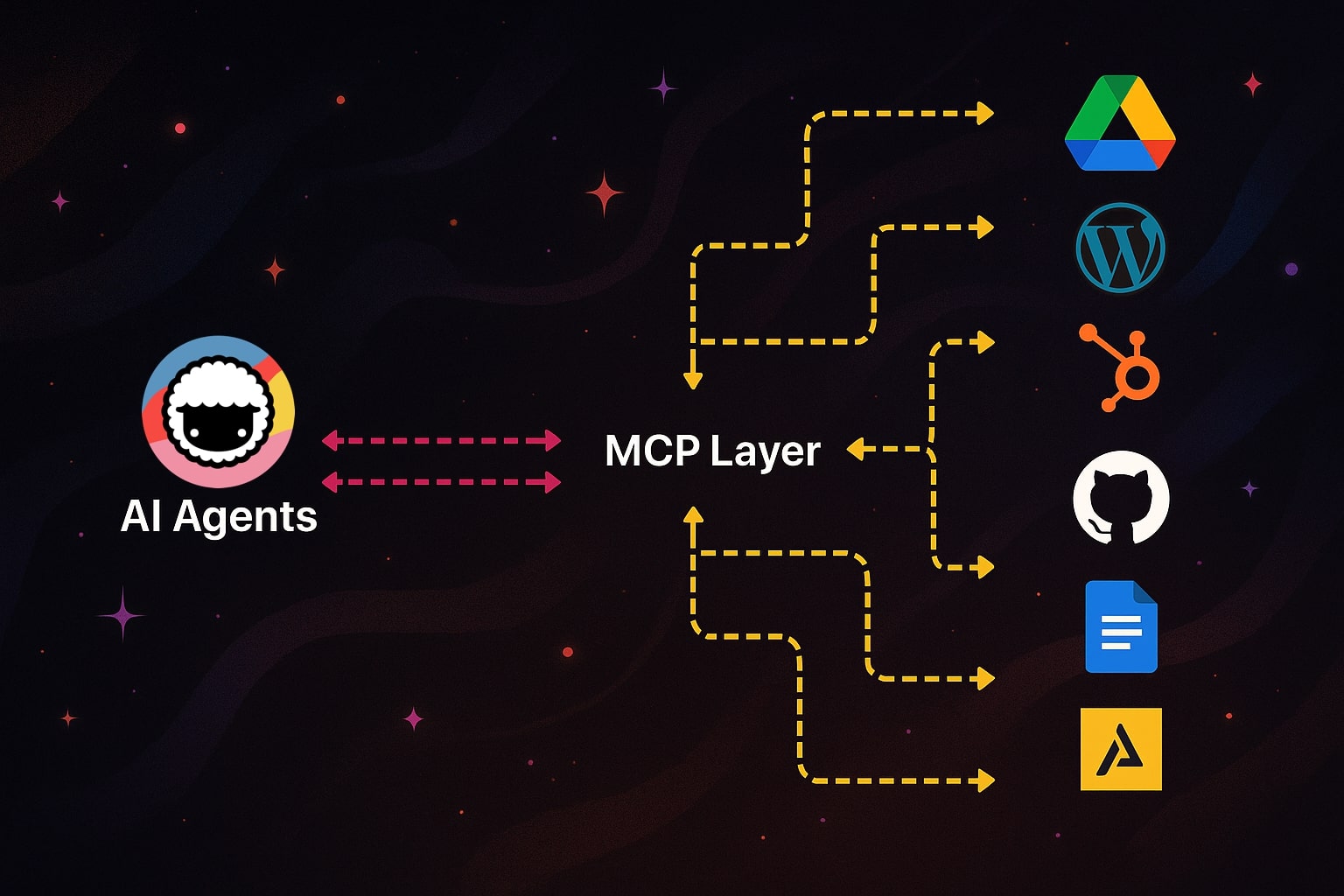
▲ ■ ● One protocol. Every tool. Any agent.
The stepping stones of the unfolding AI revolution don't always come with a press release. They don't blow up on Twitter or get turned into TED Talks. Some just quietly fix the plumbing. And MCP (Model Context Protocol) is one of them. Here's why this one's worth knowing.
Connect Your AI Agents Today: Get started with Taskade's official MCP server — convert any OpenAPI spec into tools that Claude, Cursor, and other MCP clients can use instantly.
MCP is an open protocol that gives AI agents a standard way to access tools, data, and context they have never had natively. Instead of being locked inside chat prompts, large language models can now reach out into the world to trigger actions and sync with the apps you already use.
In this article, we break down everything you need to know about the Model Context Protocol. You'll learn:
What MCP actually is, without technical jargon
How the three MCP primitives (Resources, Tools, Prompts) work under the hood
The full timeline from Anthropic's launch to Linux Foundation governance
How MCP compares to traditional APIs and Google's A2A protocol
How Taskade's hosted MCP server exposes your workspace to Claude Desktop, Cursor, and other autonomous AI agent clients
What this means for your current workflow

What Is MCP (Model Context Protocol)?
The Model Context Protocol (MCP) is an open standard that defines how AI systems connect to external tools, data, and workflows in a consistent, secure way. It was created by David Soria Parra and Justin Spahr-Summers at Anthropic and open-sourced on November 25, 2024.(1)
Depending on who you ask, MCP can be defined as a connector, a bridge, a protocol layer, a runtime interface, and even the USB-C of the AI world. And all those terms are perfectly valid.
However, in this case, what you call MCP matters less than what it actually makes possible.
Before MCP, AI developers faced a peculiar challenge. While AI kept getting more capable and connected, it still struggled to "talk" to the tools, files, and data people actually use.
Integrating AI models with real-world tools like a calendar or a database meant writing custom code, manual wiring, and constant upkeep. Nothing just worked out of the box. If you wanted your agentic AI system to connect to ten services, you needed ten separate integrations — each with its own authentication flow, data format, and error handling. MCP removes that friction, giving practitioners of agentic engineering a universal wiring layer for their agent systems.
MCP fixes that by offering a unified wiring system for AI, hence the USB-C analogy.
One protocol. Many tools. No more duct tape.
How MCP Works: Architecture and Components
To make it work, MCP uses a client-server architecture built on JSON-RPC 2.0 messaging. Here are the core components:
Hosts: These are the apps where the AI actually runs — Claude Desktop, Cursor, Windsurf, VS Code. If you point one of them at your Taskade workspace, the desktop client is the host and Taskade sits on the server side of that connection.
Clients: The client is the go-between. It sits inside the host and handles the connection to outside tools. It knows how to speak the protocol and how to reach servers. Each client maintains a 1:1 connection with a single server.
Servers: These are the things the AI wants to talk to: your calendar, your files, your GitHub repo, you get the idea. A server wraps those and makes them accessible to AI through standardized MCP interfaces.
Transports: MCP supports two standard transport layers: stdio for local processes and Streamable HTTP for remote servers. Streamable HTTP replaced the older Server-Sent Events (SSE) transport in the March 2025 spec revision. This flexibility means MCP works for everything from local dev tools to cloud-hosted enterprise services.
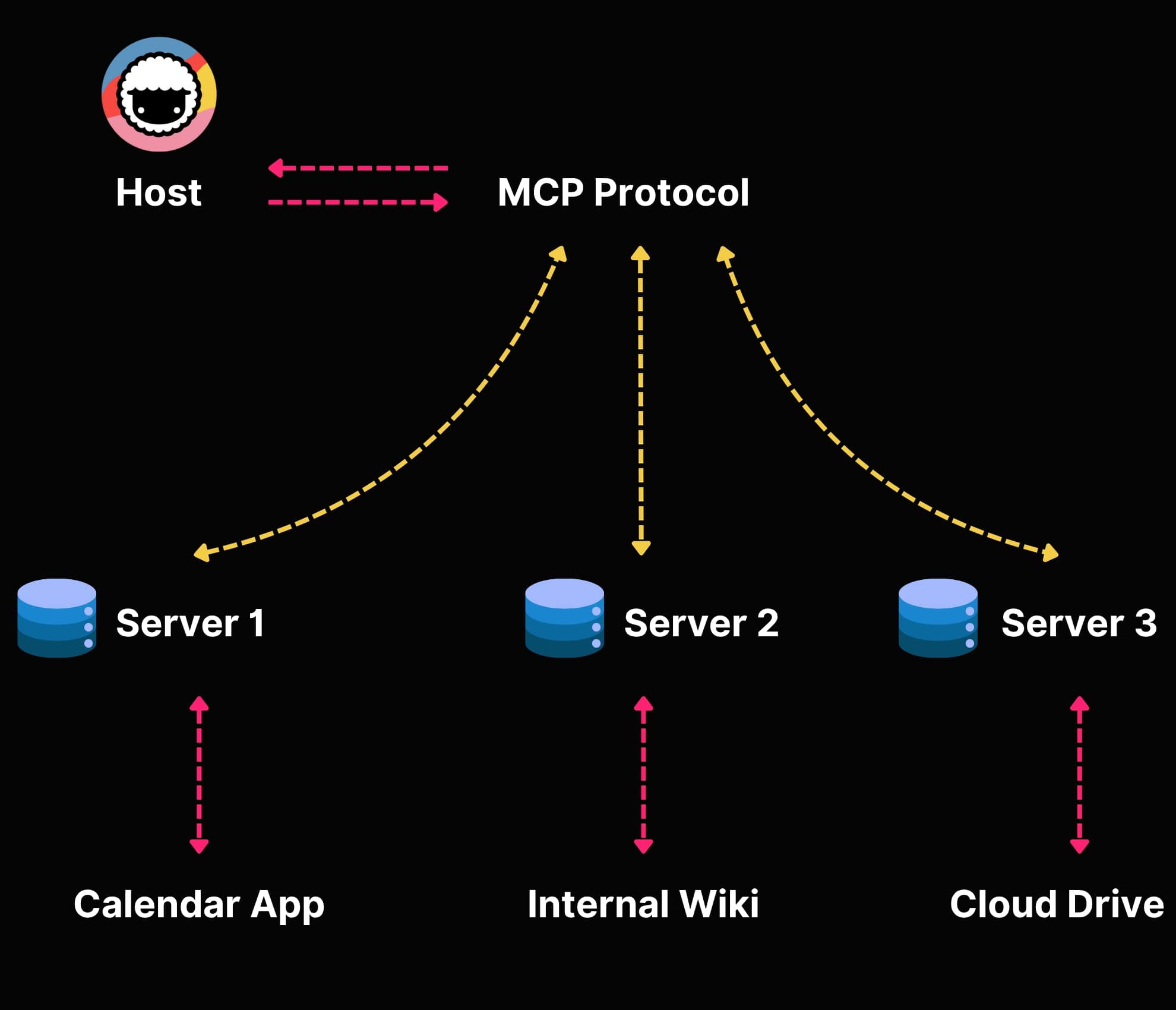
Once connected, servers expose functionality through MCP's three core primitives. Let's dig into those.
The Three MCP Primitives: Resources, Tools, and Prompts
Every MCP server exposes capabilities through three standardized primitives. Understanding these is key to understanding what makes MCP different from traditional API integrations.
1. Resources (Read Data)
Resources are read-only data sources that provide context to the AI model. Think of them as files, database records, API responses, or live system data that the agent can read but not modify directly.
Examples:
- A file from your Google Drive
- A list of tasks from your Taskade workspace
- Customer records from your CRM
- Real-time metrics from your analytics dashboard
Resources use URI-based addressing (like file:///path/to/doc.md or taskade://workspace/project/tasks) so agents can reference specific data consistently.
2. Tools (Execute Actions)
Tools are executable functions the agent can invoke to perform actions in the real world. This is where autonomous agents get their power — they don't just read data, they act on it.
Examples:
- Creating a new task or project in Taskade
- Sending an email through Gmail
- Pushing code to a GitHub repository
- Querying a database and returning results
- Scheduling a meeting on Google Calendar
Each tool includes a JSON Schema that describes its inputs, outputs, and behavior. This means agents can discover tools at runtime — they don't need to be pre-programmed to use each one.
However, not all tools are created equal. Jeremiah Lowin, creator of FastMCP and CEO of Prefect, argues that most MCP servers make a fundamental design mistake: they mirror CRUD operations instead of representing outcomes. "If your MCP server is just a REST API with extra steps, you've missed the point," Lowin explains. Instead of exposing get_order, get_order_items, and get_shipping_status as separate tools, a well-designed MCP server offers a single check_order_status tool that returns everything the agent needs. This outcome-oriented approach reduces tool count, cuts token usage, and makes agents significantly more reliable — especially as agent performance degrades noticeably above approximately 50 tools.
3. Prompts (Reusable Templates)
Prompts are pre-built interaction templates that structure how the model interacts with specific tools or workflows. They're like recipes that combine resources and tools into reusable patterns.
Examples:
- A "summarize project status" prompt that reads tasks, analyzes completion rates, and generates a report
- A "triage support tickets" prompt that reads incoming tickets, categorizes them, and assigns agents
- A "code review" prompt that reads a pull request, analyzes changes, and provides feedback
Together, these three primitives give AI agents everything they need: data to read, actions to perform, and patterns to follow. It's a complete toolkit for agentic AI systems.
MCP vs. Traditional API Integrations
To understand why MCP is such a big deal, it helps to compare it directly with how AI integrations worked before.
| Feature | Traditional API Integration | MCP |
|---|---|---|
| Discovery | Manual — developers read docs, write code | Automatic — agents discover available tools at runtime |
| Protocol | Varies (REST, GraphQL, SOAP, gRPC) | Standardized JSON-RPC 2.0 |
| Authentication | Custom per service (OAuth, API keys, tokens) | Built-in capability negotiation, OAuth 2.1 support |
| Schema | Varies (OpenAPI, custom) | Standardized JSON Schema for all tools |
| Integration effort | Days to weeks per service | Minutes — plug in any MCP server |
| Maintenance | High — each connector needs updates | Low — protocol handles versioning |
| Multi-tool chaining | Custom orchestration code required | Native — agents chain tools automatically |
| Context sharing | Manual data passing between services | Built-in resource sharing across tools |
| Error handling | Custom per integration | Standardized error responses |
| Bidirectional | Usually request-response only | Full bidirectional with server-initiated notifications |
The bottom line: traditional integrations scale multiplicatively (M agents × N services = M×N custom connectors). MCP scales additively — each server implements MCP once, each client implements MCP once.
MCP Adoption Timeline: From Anthropic to the Linux Foundation
MCP's journey from an internal Anthropic project to an industry standard happened remarkably fast:
November 25, 2024 — Anthropic open-sources MCP, created by David Soria Parra and Justin Spahr-Summers. Claude Desktop ships as the first major MCP client.(1)
December 2024 - February 2025 — Early adopters build the first community MCP servers. Cursor IDE integrates MCP for AI-powered coding workflows. Windsurf and Cline follow.
March 2025 — OpenAI announces MCP support in their Agents SDK and ChatGPT desktop app, signaling industry-wide endorsement.
April 2025 — Google announces the Agent-to-Agent (A2A) protocol as a complementary standard for inter-agent communication. Security researchers publish the first MCP vulnerability analysis, identifying prompt injection and tool permission risks.
Mid 2025 — Microsoft announces MCP support across Windows, Copilot, Visual Studio Code, and Azure. Google DeepMind integrates MCP with Gemini.
November 2025 — MCP spec revision adds streamable HTTP transport and OAuth 2.1 authorization, addressing enterprise deployment requirements.
December 9, 2025 — Anthropic donates MCP to the Agentic AI Foundation (AAIF), a directed fund under the Linux Foundation co-founded by Anthropic, Block, and OpenAI.(5)
2026 (current) — MCP reaches 97 million monthly SDK downloads and 10,000+ active servers. Every major AI platform supports it natively. The protocol is governed as a vendor-neutral open standard.
This speed of adoption is nearly unprecedented in the AI space. For context, it took REST APIs over a decade to achieve similar ubiquity.
MCP vs. A2A: Two Protocols, Two Problems
When Google announced the Agent-to-Agent (A2A) protocol in April 2025, many people asked: is A2A replacing MCP? The short answer is no — they solve different problems and work together.
MCP is vertical: it connects a single agent to tools and data sources. Think of it as giving your agent hands and eyes.
A2A is horizontal: it enables multi-agent systems to communicate, delegate tasks, and coordinate work. Think of it as giving agents the ability to talk to each other.
Here's how they compare:
| Aspect | MCP | A2A |
|---|---|---|
| Purpose | Agent-to-tool connectivity | Agent-to-agent communication |
| Direction | Vertical (agent connects down to tools) | Horizontal (agents communicate peer-to-peer) |
| Created by | Anthropic (Nov 2024) | Google (Apr 2025) |
| Core use case | Read files, call APIs, execute functions | Delegate tasks, share results, coordinate workflows |
| Discovery | Tool and resource discovery | Agent capability discovery via Agent Cards |
| Protocol | JSON-RPC 2.0 | HTTP + JSON-RPC |
| Current status | Industry standard, Linux Foundation | Early adoption, development slowed in late 2025 |
In a mature multi-agent system, you'd use MCP to give each agent access to tools (databases, calendars, code repos) and A2A to let those agents coordinate on complex tasks that require multiple specializations.
Smart teams use both. MCP handles the "what can this agent do?" question. A2A handles the "how do agents work together?" question. For more on how autonomous task management works in practice, see our deep dive.
Why MCP, Why Now?
Until recently, combining AI-first tools with existing tool stacks required some serious elbow grease. For example, building AI tools that could read a Google Docs draft or Google Calendar events required building custom integrations, one tool at a time.
But that was only part of the problem.
The bigger issue? Access to organic information. Real data. Real workflows. Real-time data from the tools you actually use. Without it, even the smartest LLM is flying blind.
When Anthropic open-sourced Model Context Protocol, it dropped a missing puzzle piece into place, combining modular integrations and real-time access to the tools and data that matter.
The timing makes a lot of sense too.
AI adoption is exploding (to the surprise of no one). In 2024, 78% of companies were using AI in at least one part of their business. That's up from just 55% the year before (McKinsey).(2)
AI agents are becoming a core part of that shift. According to Deloitte, 25% of companies using gen AI launched agent pilots or proofs of concept in 2025. That number is expected to hit 50% by 2027.(3) And the market is following. Analysts expect the AI agent space to grow to over $47 billion by 2030.(4)
MCP shortens development time and makes it easier to integrate AI. For development teams, it means getting smarter AI solutions into production faster. For users, it means AI tools that understand the broader context of work and can act with more autonomy.
MCP Security: What You Need to Know
No protocol discussion is complete without addressing security. In April 2025, security researchers published an analysis identifying several MCP-specific risks:
- Prompt injection: Malicious data in MCP resources could manipulate agent behavior
- Tool permission escalation: Combining multiple tools could enable unintended data exfiltration
- Lookalike tools: Malicious servers could impersonate trusted tools with similar names
- Data leakage: Without proper scoping, agents might expose sensitive data across tool boundaries
The MCP specification addresses these through capability negotiation (servers declare what they can do, clients declare what they'll allow), scoped permissions, and transport-layer security. The November 2025 spec revision added OAuth 2.1 authorization for production deployments.
For enterprise teams, best practices include:
- Human-in-the-loop approval for sensitive operations (deleting data, sending emails, financial transactions)
- Tool allowlisting — only connect agents to pre-approved MCP servers
- Audit logging — track every tool invocation for compliance
- Network isolation — run MCP servers in sandboxed environments
The Agentic AI Foundation under the Linux Foundation is actively working on enhanced security specifications as part of the protocol's evolution.
Why MCP Matters for Taskade
If you've used Taskade for a while, you know that Taskade's AI Agents can do a lot. They can help you coordinate tasks, schedule events, generate content, or automate workflows.
Think: extra hands, minus the hand-holding.
Even today, Taskade Agents can already connect with a wide range of services, from GitHub and Google Calendar to Google Drive, LinkedIn, X (Twitter), Facebook, HubSpot, and more. They can read project data, retrieve documents, and keep your work rolling on autopilot.
But making that happen hasn't always been smooth.
Every time we built agents that needed to interact with something outside its bubble — a calendar, a task board, a database — we had to "teach" them how to do the talking.
MCP is the other half of that story, pointed the other way. Instead of teaching one more agent to speak one more API, Taskade publishes the workspace itself over MCP — so any MCP client you already use can read your projects, agents, and automations without a line of glue code.
Rolling out MCP has been a collaborative effort across our engineering team, including early contributions from Prev Wong, who worked on core client-side tooling.
Our internal teams use Taskade MCP to fast-track that work and eliminate boilerplate. If there's an OpenAPI spec, it can become a fully functional MCP tool in minutes — ready for Claude, Cursor, or any other MCP client to call.
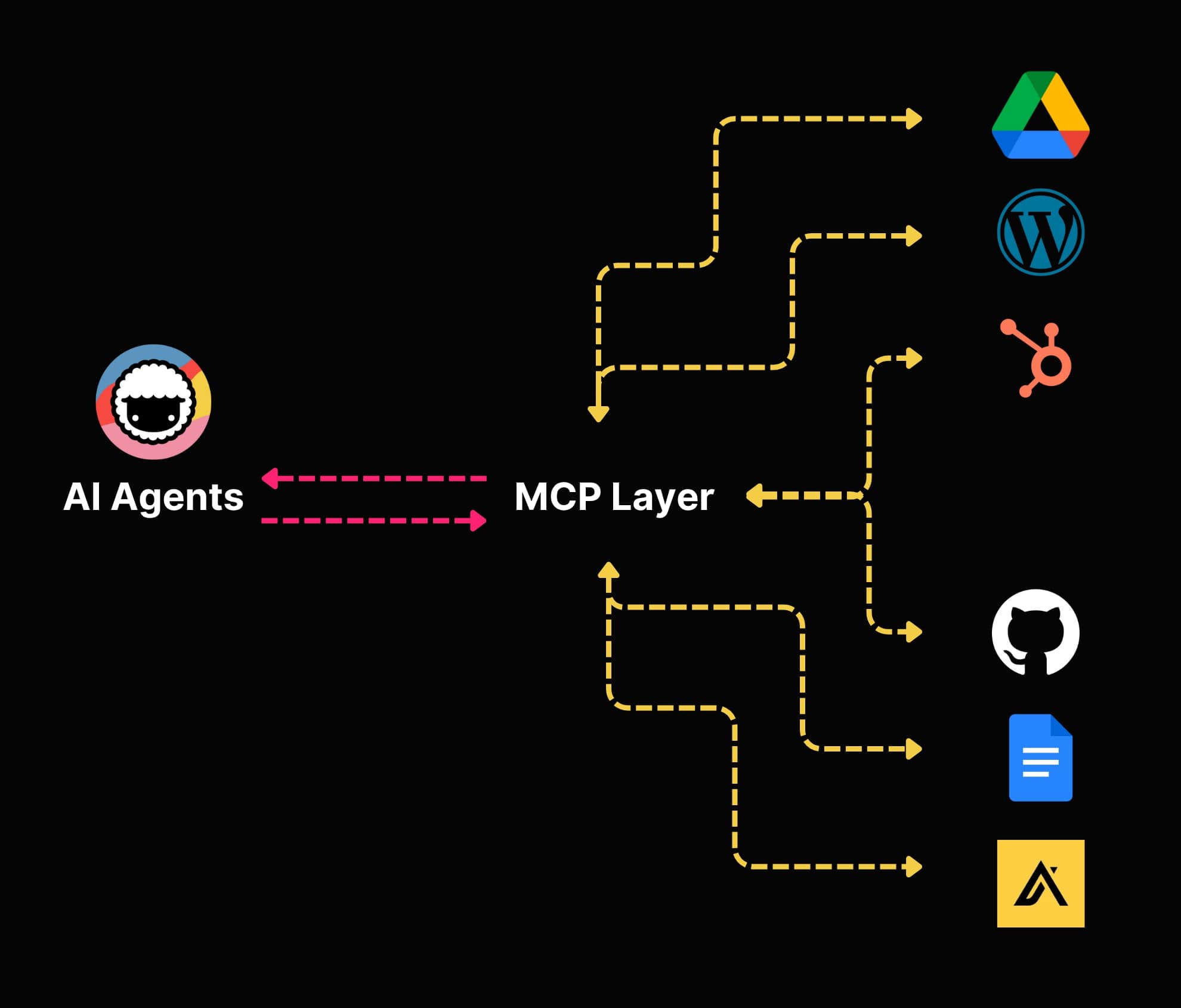
This opens the door to a number of exciting use cases that were not possible before.
You can point any MCP client at your workspace — Claude Desktop for research, Cursor or VS Code for editing a live Genesis app — and it instantly understands how to read your projects, agents, and automations. No custom connector per client. For reaching out to databases, CRMs, and analytics dashboards, Taskade agents use 100+ bidirectional integrations and custom tool schemas, the same machinery behind multi-agent systems.
What We're Building at Taskade
MCP is how the workspace itself becomes addressable.
We're building something bigger than automation. We're creating the foundation for truly autonomous, context-aware agents that can operate inside and outside your workspace.
The hosted Taskade MCP server is live on every paid plan. Point an MCP client at it and your workspace shows up as browsable structure — projects, AI agents, and automations — with live Taskade Genesis app source you can edit in place.
Taskade MCP also automatically converts OpenAPI 3.x specs into MCP tools that Claude, Cursor, and other MCP-compatible clients can use instantly. Structured schemas instead of hand-written glue — and we use it ourselves inside Taskade to ship integrations faster.
What that actually means in practice:
A workspace your AI client can actually read, instead of screenshots pasted into a prompt
The ability to coordinate tasks across team members & AI with easy handoff
Live Taskade Genesis app source you can edit from Cursor or VS Code without leaving the editor
A plug-and-play client ecosystem, where any new MCP-compatible tool works on day one
Human-in-the-loop workflows that give you control when it matters
Read and write access over one protocol, scoped by your plan and the OAuth grant you approve
Developers can use our Developer Portal and Official MCP Server on GitHub to turn Taskade's API — or any OpenAPI spec — into MCP tools that Claude, Cursor, and other external clients can call — all without writing the glue code by hand.
Get Started with Taskade MCP:
Bash
git clone https://github.com/taskade/mcp
cd mcp && yarn install
The Taskade MCP repository includes everything you need: OpenAPI conversion tools, example integrations, and documentation for building your own MCP servers.
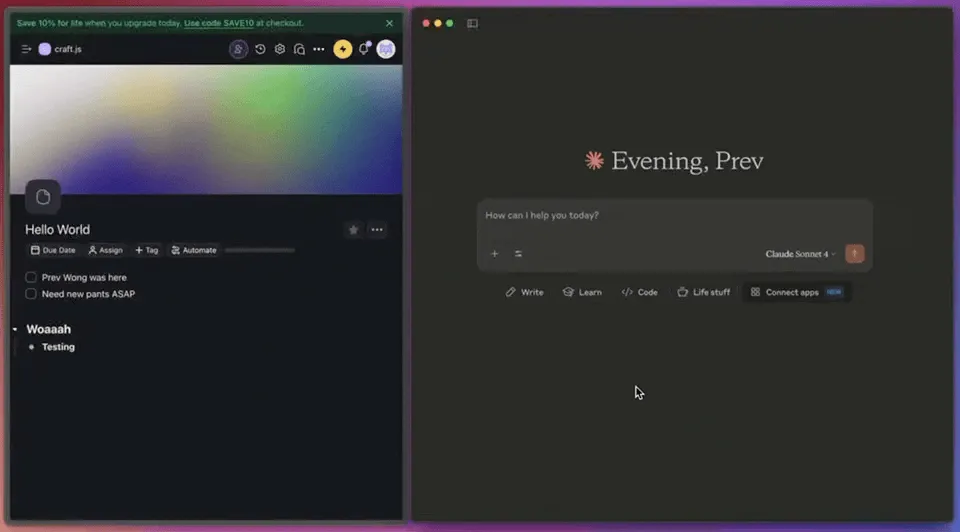
MCP-powered Taskade agent running inside Claude Desktop by Anthropic
We're already running production integrations and rolling out new capabilities throughout 2026. The vision? AI agents that move into real work across every layer of your stack.
Connect Taskade to Claude, Cursor, and Any MCP Client
The Taskade MCP server is live. Once connected, Claude Desktop, Cursor, Windsurf, VS Code, or any MCP-compatible client can browse your Taskade workspace like a set of files — reading projects, AI agents, and automations, and editing live Taskade Genesis app source directly. There are two ways to connect:
| Option | How it works | Best for | Plan |
|---|---|---|---|
| Hosted MCP server | OAuth 2.0 with PKCE: browser sign-in, no API key | Claude Desktop, Cursor, Windsurf, any OAuth-MCP client | Paid plans |
Open-source server (@taskade/mcp-server) |
Runs locally via npx with a Personal Access Token |
n8n, custom clients, local stdio setups | Any plan |
Connect the hosted server — add this to your Claude Desktop config (claude_desktop_config.json) or Cursor settings (.cursor/mcp.json):
Json
{
  "mcpServers": {
    "taskade": {
      "type": "url",
      "url": "https://www.taskade.com/mcp"
    }
  }
}
Restart the client, authorize Taskade in the browser window that opens, and your workspace tools appear instantly — no manual key setup. Prefer a local, self-hosted bridge? Run the open-source server on any plan:
Bash
npx -y @taskade/mcp-server
Full step-by-step setup for every client lives in the Taskade MCP setup guide.
How to Get Started with MCP
Whether you're a developer or a non-technical user, here's how to start using MCP today:
For Developers
- Clone an MCP server: Start with Taskade's MCP server or browse the official MCP servers list for your tools
- Install the SDK: The official TypeScript and Python SDKs are available via npm and pip
- Connect a client: Use Claude Desktop, Cursor, VS Code, or any MCP-compatible client
- Build your own server: Expose your internal tools as MCP resources and tools using the official specification
For Non-Technical Users
- Use Taskade: Connect the hosted Taskade MCP server once and your workspace shows up inside Claude Desktop or Cursor — no code, no API key, on every paid plan
- Try Claude Desktop: Install Claude Desktop and connect it to community MCP servers for files, search, and productivity tools
- Explore the community: Browse Taskade's community gallery for pre-built AI agents and Taskade Genesis apps you can clone in a click
For Teams
- Connect the workspace first: Point Claude Desktop or Cursor at the hosted Taskade MCP server so the whole team's projects are readable from the clients they already use
- Set up automations: Wire your most-used tools (Slack, GitHub, Google Calendar) through 100+ bidirectional integrations — triggers pull events in, actions push data out
- Scale gradually: Add more MCP clients and more automation triggers as your team identifies high-value integration points
Real-World MCP: How Karpathy's Dobby Claw Controls an Entire Home
The best way to understand MCP's potential is to watch it work outside a demo environment. Andrej Karpathy — former Tesla AI lead and OpenAI co-founder — built exactly that: a persistent agent he calls "Dobby the Elf" (internally "Dobby Claw") that controls his entire home through API integrations.
The discovery flow is worth studying. Karpathy typed a simple prompt: "I think I have Sonos at home. Can you try to find it?" The agent responded by performing an IP scan on the local network, found the Sonos speakers, reverse-engineered the control API, and played music — all within roughly three prompts. No manual configuration. No pre-built integration. The agent discovered, connected, and acted.
From there, Karpathy extended Dobby to control lights, HVAC, shades, pool, spa, and security cameras. The security camera pipeline is particularly striking: the agent monitors feeds and surfaces alerts like "a FedEx truck just pulled up. You might want to check it." All of this funnels through what Karpathy describes as "the single WhatsApp portal to all of the automation" — one conversational interface orchestrating dozens of real-world systems.
The key insight behind the whole setup is deceptively simple: "shouldn't it just be APIs and agents are the glue." That is MCP in practice. Agents don't need hardcoded integrations for every device. They need a protocol that lets them discover APIs, understand their schemas, and act — dynamically, at runtime.
Taskade applies the same pattern at the workspace level, from the other end of the wire. 100+ bidirectional integrations let AI agents orchestrate actions across your entire stack — from project boards and CRMs to communication tools and databases — while the hosted MCP server makes that same workspace readable from Claude Desktop, Cursor, or any other MCP client. Explore what teams are building in the Community Gallery, or start connecting your tools with Taskade Automations.
MCP Architecture: From Protocol to Action
The diagram below shows how a single AI agent connects to any external system through the MCP protocol layer — the same pattern Karpathy's Dobby uses for smart home control, and the same pattern an MCP client uses to reach a Taskade workspace:
MCP Integrations Landscape
| Integration Type | Examples | MCP Capability | Taskade Support |
|---|---|---|---|
| Smart Home | Sonos, Hue, HVAC | Device discovery + control | Not supported |
| Productivity | Slack, Discord, Email | Message send/receive | 100+ native integrations |
| Development | GitHub, Jira, Linear | Code + issue management | Built-in developer tools |
| Data | Google Sheets, Airtable | Read/write structured data | CSV/spreadsheet processing |
| Communication | WhatsApp, Telegram | Unified messaging portal | Multi-channel automation |
The key insight: MCP turns every API into a tool that any agent can discover and use at runtime. Taskade extends this with Workspace DNA — Memory (your projects and knowledge bases) feeds Intelligence (AI agents with built-in tools across frontier models), which triggers Execution (automations across 100+ integrations). The result is a workspace where agents don't just connect to tools — they orchestrate entire workflows across your stack. Connect your MCP client to Taskade →
Frequently Asked Questions
What does MCP stand for?
MCP stands for Model Context Protocol. It's an open standard introduced by Anthropic in November 2024 that standardizes how AI agents and large language models connect to external tools, data sources, and workflows.
How is MCP different from function calling?
Function calling (used by OpenAI, Anthropic, and others) lets you define functions that an LLM can invoke within a single API call. MCP goes further — it standardizes how those functions are discovered, described, and connected across different tools and services. Function calling is like teaching one model one trick. MCP is like giving every model access to every trick through a universal interface.
Can I use MCP with any AI model?
Yes. MCP is model-agnostic. While Anthropic created it for Claude, OpenAI, Google, and Microsoft have all adopted it. Any LLM that supports tool use can work with MCP servers through an MCP client. The protocol doesn't care which model is behind the client.
Is MCP only for developers?
No. While developers build MCP servers and clients, end users benefit automatically. Connect Claude Desktop or Cursor to the hosted Taskade MCP server and the protocol works behind the scenes — those clients get structured access to your workspace, and your Taskade AI agents keep working on the same projects. You don't need to write code to benefit from MCP.
What programming languages support MCP?
The official MCP SDKs are available in TypeScript/JavaScript and Python. Community SDKs exist for Go, Rust, Java, C#, and other languages. The protocol itself is language-agnostic — any language that can handle JSON-RPC 2.0 messaging can implement an MCP server or client.
How many MCP servers exist?
As of early 2026, there are over 10,000 active MCP servers with 97 million monthly SDK downloads. Servers exist for virtually every popular tool and service — from GitHub, Slack, and Google Workspace to databases like PostgreSQL and MongoDB, and developer tools like Docker and Kubernetes.
Will MCP replace REST APIs?
No. MCP is not a replacement for REST APIs — it's a layer that sits on top of them. Most MCP servers wrap existing REST APIs, GraphQL endpoints, or database connections and expose them through the standardized MCP interface. REST APIs remain the backbone of web services; MCP makes them accessible to AI agents in a consistent way. That said, Jeremiah Lowin (creator of FastMCP) warns against converting REST APIs directly to MCP by auto-generating one tool per endpoint — REST APIs are designed for programmatic clients with state management, while agents are stateless conversational clients that need a different interaction model. The best MCP servers build an agent-friendly abstraction layer on top of the API.
What is the Agentic AI Foundation?
The Agentic AI Foundation (AAIF) is a directed fund under the Linux Foundation, announced in December 2025. Co-founded by Anthropic, Block, and OpenAI, it governs three founding projects: MCP, Block's goose, and OpenAI's AGENTS.md. The foundation ensures MCP evolves as a vendor-neutral, community-governed standard.
How does MCP relate to multi-agent systems?
MCP handles the agent-to-tool connection — giving each agent access to external resources and actions. For agent-to-agent communication, protocols like Google's A2A handle coordination and task delegation. In a mature multi-agent system, MCP provides the tools while A2A (or similar protocols) provides the communication layer between agents.
Is MCP free to use?
Yes, completely. MCP is open-source under the MIT license. The specification, SDKs, reference implementations, and documentation are all freely available. Since its donation to the Linux Foundation in December 2025, MCP is governed as a vendor-neutral open standard with no licensing fees or usage restrictions.
Parting Words
Our expectations for AI tools are changing. We expect more hands-free experiences with less prompting and more doing. We want AI agents to act on their own.
MCP is the infrastructure that makes that possible. It gives us the missing piece: a way for agents to stop working in isolation and start operating with real context.
If you're a developer building new tools or a power user who wants full control over your tech stack, MCP means you don't have to write one-off integrations for every tool.
And if you're a regular Taskade user who just wants your AI agents to be more helpful without more hassle? Things will only get easier. You won't have to do anything special. Just use Taskade like you always do, and your agents will get smarter and more connected.
Here's what to remember:
MCP is a protocol, not a product. It's an open standard that gives AI tools a consistent way to connect to external platforms and data sources.
Context is now structured, not stitched together. Instead of injecting raw text or static files into prompts, MCP lets AI access live, structured context through Resources, Tools, and Prompts.
You don't need to be technical to benefit. Connecting the hosted server takes one config block, and after that your workspace is readable from whichever MCP client you already use, while your Taskade AI agents keep working in the browser.
The future of AI is connected. We don't want one big model doing everything. We want an ecosystem of tools that talk to each other, with autonomous agents acting as go-betweens.
MCP is now an industry standard. With backing from Anthropic, OpenAI, Google, Microsoft, and the Linux Foundation, this isn't a proprietary experiment — it's the foundation of how AI will interact with the world.
With the hosted MCP server live, your workspace travels to whatever client you work in.
Ready to Build?
MCP powers the connections. Taskade Genesis powers the intelligence. Build complete AI applications that understand your tools, automate your workflows, and evolve as living software.
- Developers: Clone our MCP server and start building
- Everyone else: Create your first Taskade Genesis app — no code required
- Explore: Browse AI apps in our community
- Learn more: Read our guides on multi-agent systems, autonomous task management, and AI automation
Build your AI workforce of the future!
Resources
https://www.mckinsey.com/capabilities/quantumblack/our-insights/the-state-of-ai
https://developers.googleblog.com/en/a2a-a-new-era-of-agent-interoperability/