

Custom Domains for Genesis Apps
Custom domains turn a Taskade Genesis app into a real product. Buy a .com, .app, or .dev directly from Taskade — or bring your own — and we handle SSL, DNS, SPA routing, password protection, and auto-renewal for you. No other AI app builder ships this natively. Bolt, Lovable, V0, Cursor, and Base44 all expect you to wire up Netlify/Vercel + DNS + SSL + analytics yourself.
TL;DR: Ship your Taskade Genesis app on
app.yourbrand.comin 2 minutes. Auto-SSL, SPA routing, password protection, analytics, custom 404s — all included from $6/mo. The traditional stack to replicate this costs $145–$1,450/mo. Publish your domain →
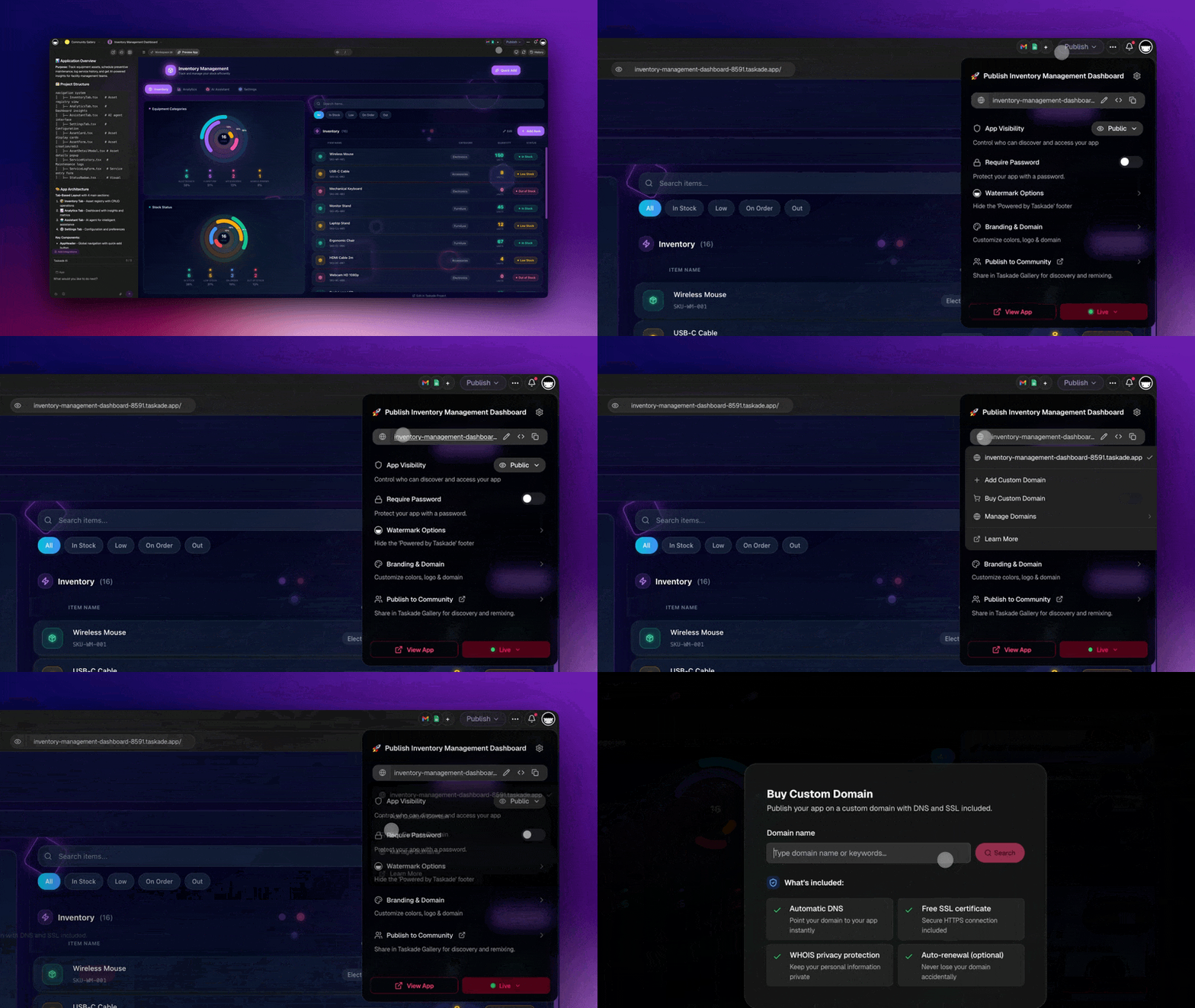
Supported Domain Extensions
You can purchase domains with these extensions directly from Taskade:
| Extension | Best For | Example |
|---|---|---|
| .com | Business apps, client portals | myapp.com |
| .org | Non-profits, community projects | ourproject.org |
| .net | Network services, utilities | dashboard.net |
| .app | Web applications, tools | tracker.app |
| .dev | Developer tools, APIs | api.dev |
| .fyi | Information portals, dashboards | status.fyi |
You can also bring a domain you already own from any registrar — just point a CNAME record at Taskade and add a one-time TXT record for verification.
The Domain Lifecycle
Every custom domain flows through four stages. Taskade handles everything after you hit Create:
You'll spend ~2 minutes in PendingVerification (adding the TXT record). Once Active, the domain serves your app over HTTPS indefinitely — Taskade silently renews the certificate every 60–90 days.
Set Up a Custom Domain
- Open your published Genesis app
- Go to App Settings → Domain
- Search for your desired domain name (or click Connect existing domain to bring your own)
- Purchase or connect — for connected domains, create the TXT verification record on your DNS
- SSL is provisioned automatically — your app is secured with HTTPS within minutes
💡 Note: DNS propagation typically takes a few minutes. Your custom domain will be live shortly after verification.
What's Included (verified against the platform codebase)
| Capability | What it does |
|---|---|
| Automatic SSL | Certificates are issued, renewed, and hot-reloaded automatically — nothing to manage |
| SPA routing | Deep links like app.yourbrand.com/dashboard or /settings/billing resolve correctly — no 404 on page refresh |
| Domain normalization | Automatic lowercase, www. stripping, trailing-dot cleanup so App.YourBrand.com and yourbrand.com/ all resolve the same |
| Password protection | Optional access gate on top of the domain — great for client reviews and invite-only betas |
| Custom 404 pages | Branded not-found pages instead of a generic error |
| OIDC/SSO compatible (beta) | Sign-in flows work correctly when the app is served under your own domain |
| Per-domain CORS + CSP | Security headers scoped to your domain out of the box |
| Subdomain routing | Architecture supports multiple apps on subdomains of a single root (e.g., crm.yourbrand.com, portal.yourbrand.com) |
| Analytics integration | Built-in app analytics track visits and engagement on your custom domain |
| Auto-renewal | Certs nearing expiry are renewed automatically — no manual intervention |
What You'd Pay Without Taskade
A single custom-domain Genesis app replaces a traditional stack that would typically cost $145–$1,450/month:
| Traditional stack | Monthly cost | With Taskade Genesis |
|---|---|---|
| Hosting (Vercel, Netlify, Render) | $20–100 | ✅ Included |
| Database (Supabase, PlanetScale) | $25–100 | ✅ Projects (included) |
| Auth (Auth0, Clerk, WorkOS) | $25–300 | ✅ Password protection + 7-tier RBAC (OIDC beta) |
| Automation (Zapier, Make) | $20–200 | ✅ Automations (included) |
| AI (OpenAI, Anthropic APIs) | $20–500 | ✅ 11+ frontier models (included) |
| Analytics (Mixpanel, Amplitude) | $25–200 | ✅ App Analytics (included) |
| Custom domain + SSL + DNS | $10–50 | ✅ CNAME + auto-SSL (included) |
| Total | $145–$1,450/mo | Single Taskade plan from $6/mo |
Password Protection
Custom domains pair naturally with password protection for private tools and client reviews:
- Go to App Settings → Access
- Enable password protection
- Set your password
- Visitors must enter the password to access your app
The password gate runs on top of the domain, so app.yourbrand.com can stay branded and public-facing while the content behind it stays private.
Tips
- Check availability first — Use the domain search in App Settings to see pricing before committing. Popular
.comnames may already be taken, but.app,.dev, and.fyioften have more availability. - Combine with publishing — After setting up your custom domain, publish your app to make it live. Your domain, SSL, and hosting are all managed by Taskade.
- Brand consistency — Use a domain that matches your brand or project name so visitors recognize your app instantly.
- Multiple apps, multiple domains — Each Genesis app can have its own custom domain, so you can run several branded apps from a single Taskade workspace.
- Subdomains for product lines — Use
crm.yourbrand.com,portal.yourbrand.com,status.yourbrand.comon a single root to group related apps. - See it in action — Browse real custom-domain Genesis apps in the Community Gallery.
Related guides
- Publishing Genesis Apps — Make your app live on the web
- App Analytics — Track visits and engagement on your custom domain
- Version History & Rollback — Track and restore previous versions
- Community Gallery — See real apps shipping on custom domains
- Taskade Genesis FAQ — Common questions about Genesis apps, pricing, and features
- Genesis Analytics, Domains & Security → — Blog deep-dive on the full production layer
- Build your own → — Start a Genesis app and publish it under your domain